

Anatova ransomware is a crypto locker that does not append any extension to the encrypted files
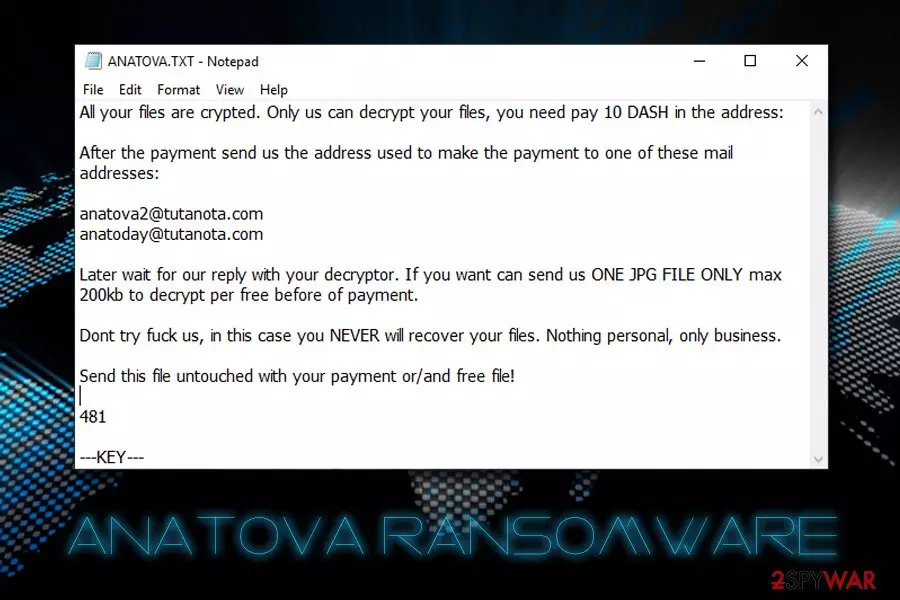
Anatova is a ransomware-type virus that was discovered on January 16th by security researcher Valthek. While most malware of such type adds an extension at the end of the file, this one does not but does make all data inaccessible to its owners. After the encryption is complete, Anatova virus contacts a remote server to retrieve ransom note ANATOVA.TXT which explains what happened to the victims' computers. Users are prompted to pay 10 DASH cryptocurrency to the provided address and then email hackers via anatova2@tutanota.com or anatoday@tutanota.com. The associated executables of the virus are CallOfCthulhu.exe, 170fb7438316.exe, and anatova.exe.
| Name | Anatova |
| Type | Ransomware |
| Distribution | Spam emails, malicious files, hacked websites, drive-by downloads, fake updates, brute-force attacks, etc. |
| Discovery date | January 16th 2019 |
| Extension | None |
| Ransom note | ANATOVA.TXT |
| Contact | anatova2@tutanota.com or anatoday@tutanota.com |
| Decryptable? | No |
| Elimination | Scan your with with FortectIntego or other software that is capable of detecting the payload |
Anatova ransomware is a fairly new infection and does not seem to have connections to any known ransomware samples. Nevertheless, at the time of the writing, 35 AV engines on Virus Total detect the threat and FortectIntego, which is based on the Avira scan engine, is one of them.[1] Therefore, Anatova ransomware removal attempts might be unsuccessful if the anti-virus software does not identify it.
Anatova ransomware spreads with the help of multiple distribution techniques, including:
- Spam emails;
- Brute-force attacks
- Hacked websites;
- Repacked installers;
- Drive-by downloads;
- Cracks or keygens;
- Fake updates, etc.
Soon after the installation, Anatova virus modifies Windows operating system to gain persistence and starts a system scan that seeks for files with pre-determined extensions, for example, .jpg, .doc, .mp3, .avi, .xtml, .html, .dat, .pdf, and many others. The data is then encrypted with a strong encryption algorithm which makes it unusable.
The ransom note states the following:
All your files are crypted. Only us can decrypt your files, you need pay 10 DASH in the address:
After the payment send us the address used to make the payment to one of these mail addresses:
anatova2@tutanota.com
anatoday@tutanota.comLater wait for our reply with your decryptor. If you want can send us ONE JPG FILE ONLY max 200kb to decrypt per free before of payment.
Dont try fuck us, in this case you NEVER will recover your files. Nothing personal, only business.
Send this file untouched with your payment or/and free file!
As evident, crooks are willing to decrypt one picture file for free in order to prove that decryptor does work. Nevertheless, even it does work, and the test decryption is successful, it does not mean that Anatova ransomware authors will send the required unique key. They can simply ignore victims and keep the 10 DASH, which is approximately $700 at the time of the writing.
Additionally, paying criminals will prove them that ransomware works and is a lucrative business, encouraging them to create new, improved viruses that blackmail people. Therefore, do not contact hackers and remove Anatova ransomware instead.
While there is no decryption tool created for this particular virus yet, there are other methods that could work to recover the encoded data. If you had backups on a virtual or physical drive, you would be able to restore all your files without a problem, as long as you get rid of Anatova ransomware first.
If you did not prepare any backups, try data recovery software from third parties. We included all the instructions below, so make use of them.

Avoid ransomware infections while browsing the web
The reason why ransomware is so devastating is that people are not ready for it. They do not expect to get infected, neither do they use adequate protection measures. However, file locking malware is much more devastating than, let's say, adware, as it can lead to permanent personal data loss. Additionally, those who decide to pay crooks for the valuable data might lose the money as well.
Therefore, be prepared for ransomware, as digital data, like photos, videos are priceless memories (accordingly, lost information might result in millions of dollars in damages for businesses). Simply follow these tips prepared by industry experts:[2]
- Download and install comprehensive security software and keep it up to date;
- Install system and software patches on time;
- Do not casually open attachments or click on links inside spam emails;
- Avoid visiting high-risk websites, such as porn, gambling, or file-sharing;
- Do not use cracks/keygens as these tools will most likely be flagged as malicious regardless if they actually are or not, so there is no way to check. Cybercriminals love injecting malicious scripts into cracks;
- Be careful with torrents, as something like name.torrent.exe is malicious;
- Disable Adobe Flash – it is an obsolete and unsafe technology that will soon be terminated;[3]
- Backup your files regularly.
Get rid of Anatova ransomware with the help of anti-malware tool
Anatova ransomware removal should not cause any difficulties to most of the people, as long as reputable anti-virus software is used. We recommend choosing FortectIntego, although other security software can be useful as well.
Anatova virus might interfere with the normal operation of the security program. In such a case, we suggest you enter Safe Mode with Networking and perform a scan from there. This mode is a safe environment in which most or malware's functions are disabled.
Once you remove Anatova ransomware from your device, proceed with file recovery. Connect to your backup device and copy all the files to the desired folder. Alternatively, check our guide for data recovery software below.
Did this guide help?
Be the first to comment