

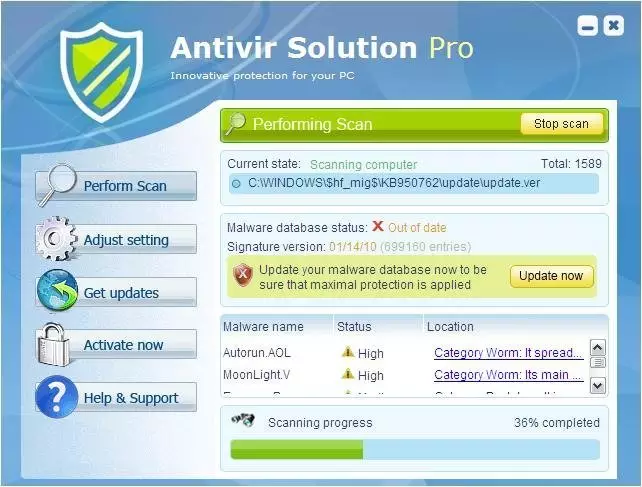
Antivir Solution Pro is a rogue anti-spyware application that claims to keep the machine secure
Antivir Solution Pro is a program that could be considered to be a potentially unwanted application because it is distributed with other programs. This is the rogue tool from the same family as AV Security Suite and Antispyware Soft. This fake program is typically promoted via fake online scanners and misleading web pop-ups that appear when browsing bogus websites.
Those pop-ups will state that your computer is infected with adware, spyware, and other malware. Then you will be prompted to download and run their malware removal tool which is Antivir Solution Pro of course. Please also note that the rogue program may come bundled with other malware or it can enter your computer through software vulnerabilities. However, most of the time it has to be manually installed. If you find that your computer is infected with this virus, please follow the removal instructions below.
| Name | Antivir Solution Pro |
|---|---|
| Type | Rogue anti-spyware, PUP |
| Issues | The program triggers false detection lists with threats that are not related to the PC in question |
| Distribution | Freeware distribution sites can spread the rogue applications |
| Removal | Running a trustworthy anti-malware tool can help get rid of the PUP and other issues |
| Repair | Do not forget that PUPs can alter various parts of the system, so run FortectIntego to repair the damage |
Once Antivir Solution Pro is active, it will be configured to start automatically when loading Windows. The rogue program will scan your computer and detect non-existent or system files as infections, but won't let you remove them until you purchase the program.
This is obviously a scam because it asks you to pay for a license of a program that removes non-existent infections. What is more, the rogue program will display fake security alerts on your computer screen every one or two minutes. These alerts will range from warnings about your computer be hacked to active malware processes being detected. Some of the fake security alerts read:
INFILTRATION ALERT Virus Attack
Your computer is being attacked by an internet virus. It could be a password-stealing attack, a trojan – dropper or similar.
DETAILS
Attack from:152.179.59.20, port 4703
Attacked port: 29484
Threat: BankerFox.A
Do you want block this attack?
Get rid of the unwanted program
Antivir Solution Pro will block anti-spyware programs, Task Manager, Registry Editor, and other useful system tools to protect itself from being removed. It will also block nearly all websites and especially security-related ones. It won't let you download malware removal tools that why you will have to end these suspicious processes first or reboot your computer in Safe Mode with Networking.
As you can see, the main purpose of AntivirSolutionPro is to trick you into purchasing the program. Don't purchase it. If you have already paid for it then contact your credit card company and dispute the charges. Then please use the removal instructions below to remove this app from your computer as soon as possible.
You can rely on the Safe Mode with Networking when the threat is difficult to remove:
- Restart your computer. As your computer restarts but before Windows launches, tap “F8” key constantly. Use the arrow keys to highlight the “Safe Mode with Networking” option as shown in the image below, and then press ENTER.
- Open Internet Explorer. Click on the Tools menu and then select Internet Options.
- In the Internet Options window click on the Connections tab. Then click on the LAN settings button.
- Now you will see the Local Area Network (LAN) settings window.
- Uncheck the checkbox labeled Use a proxy server for your LAN under the Proxy Server section and press OK.
Did this guide help?
Be the first to comment