

Artemis ransomware is a computer infection that tries to get your money in exchange for a data decryption tool
Artemis ransomware is a new version of PewPew ransomware[1] that locks personal data and demands money from those who want to get a decryption key. Moreover, this virus also deletes system restore points and shadow copies of files to prevent victims from restoring their files easily.
Artemis virus employs a powerful encryption algorithm[2] to lock all personal files: documents, videos, pictures, music, etc. All affected files get .artemis extension, accompanied by the victim's ID and a contact email of the attackers. Thus, the modified file names look longer than those of other ransomware. For example, if your picture was named “one.jpg,” it becomes “one.jpg.id-C279F237.khalate@tutanote.com.artemis” after encryption.
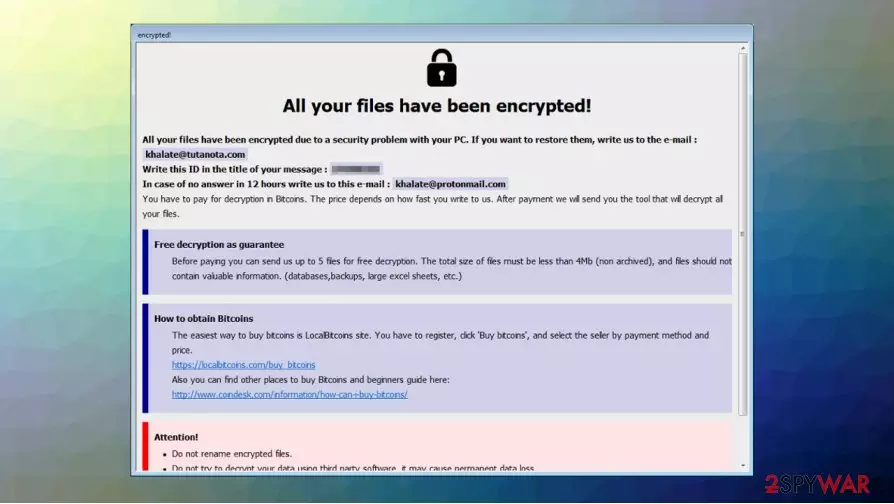
Besides that, malware delivers a ransom note in a pop-up window format, titled “encrypted.” It discloses what happened to personal files and claims that an email to khalate@tutanota.com should be sent to cooperate about the size of the ransom and other details.
| Name | Artemis ransomware |
| Type | Ransomware, crypto-virus, file locking virus |
| Ransomware family | This malware is a new version of PewPew ransomware |
| Cybercriminals' email | khalate@tutanota.com, khalate@protonmail.com |
| Extension | Files appended with victim's ID, cybercriminals' email address, and .artemis extension, for example, “one.jpg” is turned into a “one.jpg.id-C279F237.khalate@tutanote.com.artemis” |
| Ransom note | The “info-decrypt.hta” ransom demanding message is displayed on the desktop |
| Symptoms | The user can't open personal files on the computer and all personal files get .artemis extension. Moreover, the victim sees a ransom message on the desktop |
| File recovery | If the user doesn't have backups, recovering files is almost impossible. Nonetheless, you should try several methods listed below because they could help you in some cases |
| Malware removal | We recommend scanning the system with powerful anti-malware software |
| System fix | You should remember that malware can change the way Windows systems operate, causing errors, crashes, lag, and other stability issues. If you want to fix the system, we recommend scanning it with the FortectIntego repair tool |
First notices about Artemis ransomware began to appear in mid-October. This threat not only uses a text file to explain what happened to all personal data but also shows a pop-up note from cybercriminals. According to hackers, the victim can send up to 5 locked files (no valuable information should be included), and they will decrypt them to prove that the decryption key really exists.
Ransomware[3] message presented in “info-decrypt.hta” file reads the following:
All your files have been encrypted!
All your files have been encrypted due to a security problem with your PC. If you want to restore them, write us to the e-mail : khalate@tutanota.com
Write this ID in the title of your message : –
In case of no answer in 12 hours write us to this e-mail : khalate@protonmail.com
You have to pay for decryption in Bitcoins. The price depends on how fast you write to us. After payment we will send you the tool that will decrypt all your files.
Free decryption as guarantee
Before paying you can send us up to 5 files for free decryption. The total size of files must be less than 4Mb (non archived), and files should not contain valuable information. (databases,backups, large excel sheets, etc.)
How to obtain Bitcoins
The easiest way to buy bitcoins is LocalBitcoins site. You have to register, click 'Buy bitcoins', and select the seller by payment method and price.
hxxps://localbitcoins.com/buy_bitcoins
Also you can find other places to buy Bitcoins and beginners guide here:
http://www.coindesk.com/information/how-can-i-buy-bitcoins/
Attention!
Do not rename encrypted files.
Do not try to decrypt your data using third party software, it may cause permanent data loss.
Decryption of your files with the help of third parties may cause increased price (they add their fee to our) or you can become a victim of a scam.

But experts[4] say that you shouldn't obey cybercriminals. If your files are locked by this virus, you should remove Artemis ransomware from the system with reliable anti-malware software, such as SpyHunterCombo Cleaner or MalwarebytesMalwarebytes – these programs can delete the virus in just a few minutes.
Moreover, remember that after the Artemis ransomware removal you should fix all system errors with FortectIntego or any other powerful repair tool. If you are unsure how to do all removal steps try to rely on our explanations. You will find a detailed guide at the bottom of this text.
Methods how to recover .artemis files
In most cases, victims believe that they can unlock files and remove .artemis extension by deleting ransomware from their computers. But in reality, all affected data remains locked even after the malware is removed.
Unfortunately, there is no way to decrypt .artemis files without backups or paying cybercriminals. Not many users practice data backup procedures and end up thinking about paying ransom money. However, you should remember that paying ransomware developers is not advisable. They can deceive you and run away with your money without giving the decryption key.

If you want to recover .artemis files, there are few methods that might help to some users. We provided detailed instructions at the bottom of this article. Try them all and maybe you will be able to recover at least some of the encrypted data.
Remove Artemis ransomware and rely on backups to recover your files
As we explained before, paying for the criminals is not the best decision and experts say that it is risky because hackers can leave you without a decryption key. You should remove Artemis ransomware from your computer instead. Of course, this decision won't help you to unlock the files but you should get rid of this infection and then recover your data from backups. If you don't have copies of personal files, we recommend trying other solutions provided at the end of this article.
For Artemis ransomware removal, you should consider installing a powerful antivirus program. We recommend using SpyHunterCombo Cleaner or MalwarebytesMalwarebytes. If you experienced difficulties to begin scanning the system with a security tool, try to boot your computer into Safe Mode. You will find useful instructions below.
Did this guide help?
Be the first to comment