

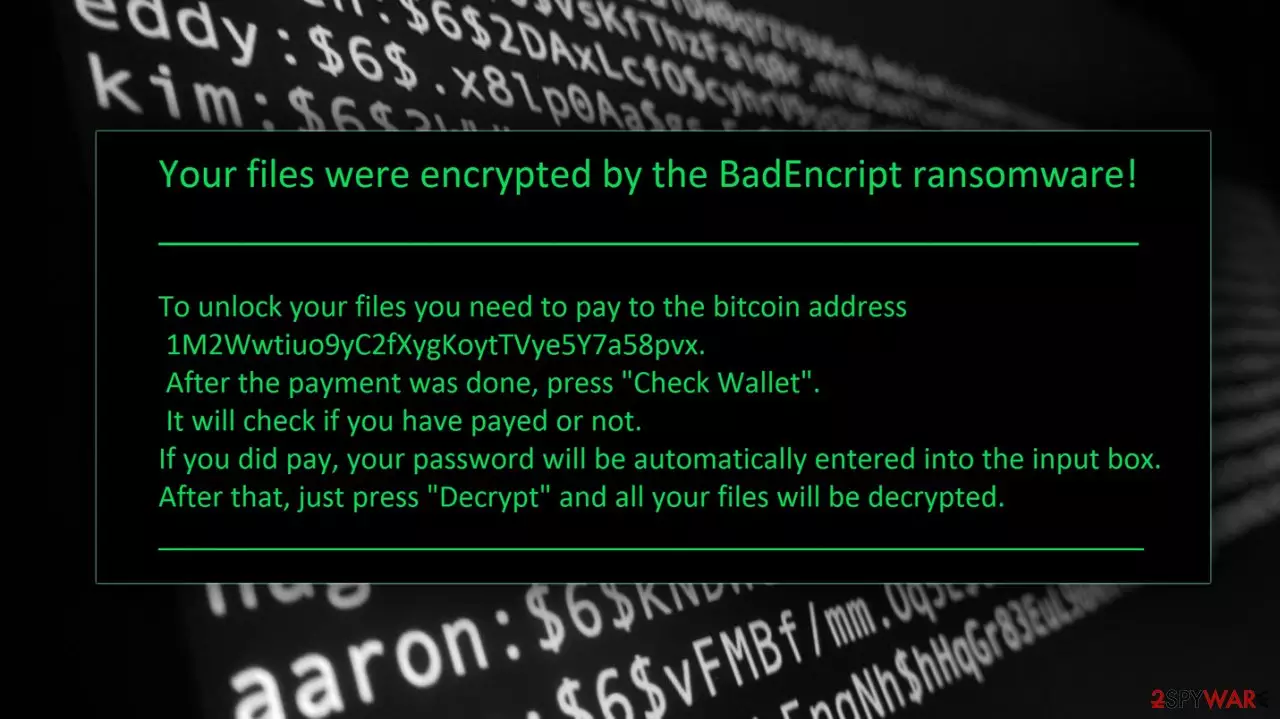
BadEncript ransomware is the file-encryption virus that drops the money demand on the desktop
BadEncript virus is a new file-encrypting virus that takes people's files hostage and demands paying the ransom. Malware spreads and infiltrates computers using various methods. After the attack, it silently works in the background and encrypts a wide range of personal files. It is still unknown which specific file types it targets, but the most popular picture, audio, video, and document formats are definitely in the ransomware’s target field. During data encryption, file-locking malware appends .bript file extension to each corrupted file. When users see this file extension, they should look for the ransom note that has been probably dropped on the desktop.
| Name | BadEncript ransomware |
|---|---|
| Type | Cryptovirus, ransomware, file-locking malware |
| Ransom note | The message gets delivered as a file on the system and changed as the desktop picture |
| Demanded cryptocurrency | Bitcoin |
| Distribution | File attachments from emails, malicious sites, other malware |
| Removal | The best option for virus elimination – anti-malware tools. Other tips can be found below |
| Repair | Your device gets more affected than only file encryption, so you should get the FortectIntego for virus damage fix |
The ransom note is called More.html, and it includes information about this unpleasant situation. The developers of the ransomware require to make the payment in bitcoins[1]. Surprisingly, the authors of the BadEncript ransomware did not reveal how much money they want. They might have forgotten to include this important fact in the ransom note, or this malware might be just a test version. We do not recommend figuring out how much money you should pay for the suspicious data recovery method.
One of the reasons why you should not consider paying the ransom[2] is that the decryption tool provided by the hackers might be not working properly. After transferring the money, the decryption software might not be active or with restored files, you might install other malware as well. Then, sooner or later you can expect the new ransomware attack and lose your files again.
Even though paying the ransom might seem like the only solution, you should not follow cyber criminals’ suggestions. If you have data backups[3], you can recover corrupted files as soon as you remove BadEncript from the computer. Indeed, data recovery might be complicated if you do not have backups; however, it’s still possible to retrieve at least some of your files.
Besides, there is always hope that malware researchers will manage to crack ransomware code and create a free decryption tool. For a proper virus removal we recommend installing SpyHunterCombo Cleaner or MalwarebytesMalwarebytes and running a full system scan as shown in the instructions provided at the end of the article.
Malware distribution strategies and how to avoid it
Malware researchers are still investigating the virus, so we cannot reveal one specific distribution technique. Ransomware users various ways to infiltrate the computers such as malicious email attachments, malvertising[4], exploit kits, bogus updates, or software installers.
Therefore, we recommend being extremely careful online because every careless click might cause a virus attack. Generally, infected email attachments[5] are the most popular ransomware distribution techniques, so we recommend double-checking the information before opening any attachment, especially if you decide to open a spam email.
Furthermore, you should not visit high-risk websites and click any suspicious ads there. However, new malvertising methods allow placing malicious ads even on legitimate websites, so you should know the consequences when you click on eye-catching advertisements that offer amazing products or shopping deals. Also, you should stay away from pop-ups that warn about outdated programs and suggest installing suspicious software. Keep in mind that the only safe source for software installation is official websites.
Guidelines for BadEncript virus elimination
Ransomware elimination requires employing professional malware removal programs such as SpyHunterCombo Cleaner or MalwarebytesMalwarebytes. We recommend these tools because they can remove the virus and all its related components. However, you can choose other programs, but don’t forget that cheap, free or illegal antivirus software will not do any good.
Using your chosen tool, you have to run a full system scan, but first, you have to update it to the newest version. If malware prevents from installing, updating, or running the problem, please, follow the instructions below. After BadEncript removal, you can recover your files from data backups. However, if you don’t have them, try our prepared additional data recovery methods explained at the end of this article. You should also consider a virus damage fix that FortectIntego can be helpful for.
Did this guide help?
Be the first to comment