

BlockDefense – rogue program that stops all protection from malware on your computer
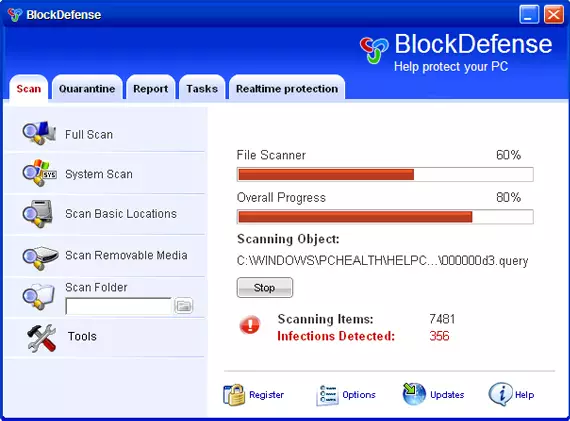
BlockDefense is another bogus security program from the same family as SaveDefense, Trust Ninja, SaveSoldier, SaveKeep, and other WiniFixer rogueware. This fake application uses false scan results, fake security alerts, and other misleading methods to make you think your computer is infected.
Once installed and active, it will ask you to buy a full version of the program to remove infections that do not even exist. Not only would you lose your money to a virus, but you might also leak your credit card information to cybercriminals, resulting in monetary loss. So make sure you do not purchase it – uninstall BlockDefense from your computer upon detection.
| Name | BlockDefense |
| Type | Malware, rogue antivirus, scareware |
| Distribution | Trojans, fake online scanners, deceptive ads, software bundles |
| Alleged functionality | It attempts to mimic real anti-malware software by showing fake scan results – users can often find hundreds of entries after each of the scans |
| Dangers | This program does not protect you from any type of malware. By having it installed on your system, you risk to leak your personal data, lose money, or install additional malware on your device |
| Removal | Perform a full system scan with powerful anti-malware software and reset your web browsers. If you can't, access Safe Mode as explained below |
| System fix | The rogue can damage Windows system functions. To repair the OS automatically after the infection is eliminated, we recommend using FortectIntego |
Basically, Block Defense is just a rename of the rogue applications mentioned above. As you can see, it uses the same template but this time with a very weird name, which doesn't make any sense. On the other hand, it does “Block” your “Defence,” so maybe it's not such a bad name after all.
Usually, the app is promoted by using Trojan viruses, fake online anti-spyware scanners, malicious websites, and other malware. While running, this parasite will perform a fake system scan and report various bogus computer security threats.
What is more, the rogue program will constantly display legitimately-looking security alerts. It will impersonate Windows Security Center and display notifications that your anti-virus protection is disabled and that you should buy Block Defense to ensure full system protection.
Here is a good example of the fake notification that uses scare tactics you might receive while infected:
Attention: DANGER!
BlockDefense detected that This PC is NOT PROTECTED. Currently installed malware applications will cause:
- Annoying advertisements wasting your traffic.
- Slow page downloading speed. Web browser is not working properly.
- Cyber thieves get access to credit card.
- Criminals will steal your personal data and photos.
- Hackers will get access to email box, personals, hosting and Internet services. They will use your computer and IP address for illegal purposes.
Of course, you should never oblige what is asked of you, as you will only waste your money, sending them directly to fake antivirus authors. Besides, your credit card details might be sold for cyber-thieves.
The rogue will also hijack your web browsers such as Google Chrome or Mozilla Firefox and block security software. If you find that your computer is infected, please use the removal guide below to remove BlockDefense from the system – either manually or automatically.
We recommend picking the automatic option. Security software such as SpyHunterCombo Cleaner and find and delete all malicious files at once. FortectIntego can remediate your Windows system and fixing crashes, errors, or other issues that could stem from this infection.
Avoid malware infections easily
While it is true that no security software can protect you fully from all infections, it plays a huge role in your computer security. Therefore, the first step to secure your device and your personal safety is ensuring that robust anti-malware is already installed.
The trick here is not to download shady programs, however, as rogue anti-spyware pretends to be useful programs that could defend you from all the nasties, while in reality, infect your machine and populate it with malicious ads and infect your web browsers. Thus, use these tips to avoid getting infected:
- Never download pirated versions of security apps;
- Install all the available security updates for Windows and other software;
- Do not believe prompts that tell you that something is missing from your device, you need to update something (Flash Player, for example), or that your computer is infected and you need to install a removal tool;
- Do not open attachments of suspicious emails – especially those that ask you to enable macro function.
Do not waste your time and remove BlockDefense immediately
As already mentioned, rogue antivirus programs often arrive on users' machines thanks to deception or are installed automatically by using software vulnerabilities/an already installed Trojan. Thus, many people want Block Defense removal, although not all of them know how to do it correctly.
That being said, we do not recommend you remove malware manually, as there are plenty of malicious files that could be left behind, resulting in threat reinfection. Therefore, rather automatic solutions for this difficult situation – SpyHunterCombo Cleaner or MalwarebytesMalwarebytes can do the job for you quickly instead. If you can't launch any security apps due to the virus, you should access Safe Mode with Networking, as explained below. After removal is complete, perform a scan with FortectIntego to reverse the damage done by the infection.
Did this guide help?
Be the first to comment