

BlueSky ransomware can infiltrate users' machines and lock their personal files
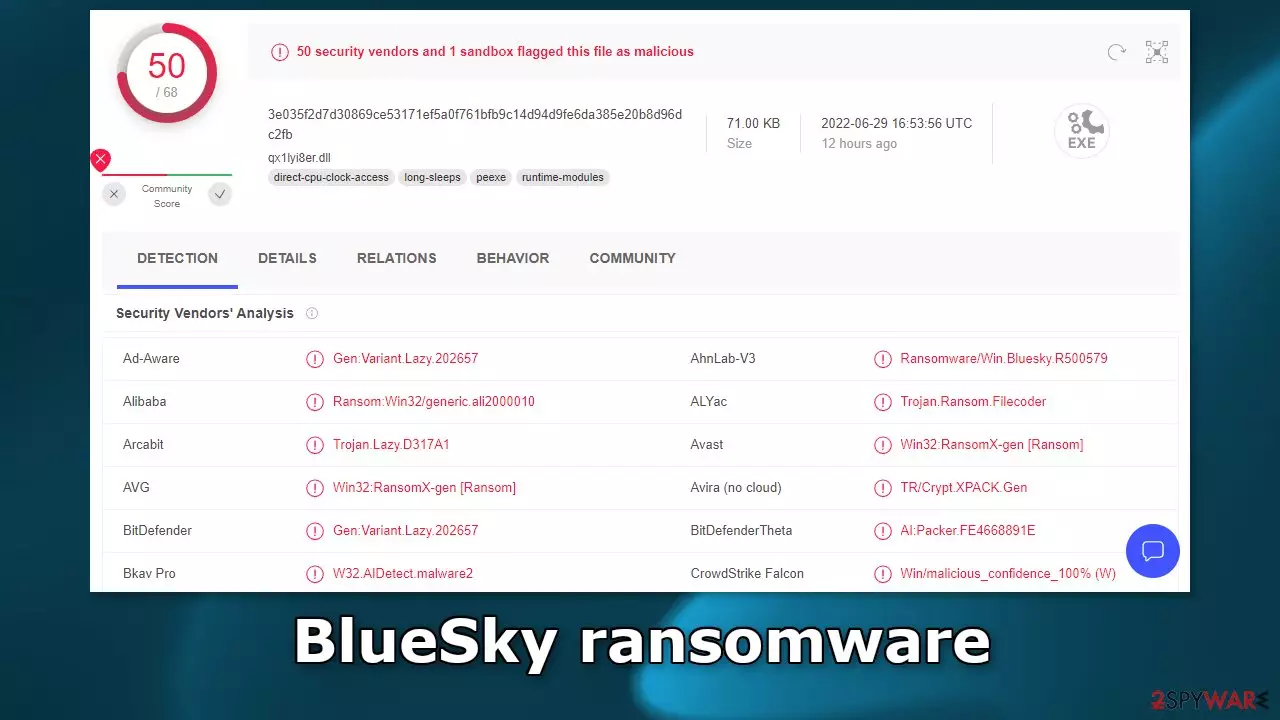
BlueSky ransomware was created to infiltrate users' devices and lock all of the personal files inside them. The icons get also changed to white pages, so users immediately notice that something is wrong. Affected files include photos, videos, documents, etc. They get appended with the .bluesky extension.
So if a file was previously named picture.jpg, after encryption is complete, it would look like this – picture.bluesky. Shortly after the encryption process is complete, two ransom notes are generated on the machine which inform users about their current situation. The files are named “# DECRYPT FILES BLUESKY #.html” and “# DECRYPT FILES BLUESKY #.txt.”
| NAME | BlueSky |
| TYPE | Ransomware, cryptovirus, data locking malware |
| DISTRIBUTION | Infected email attachments, peer-to-peer file sharing platforms, torrents, malicious ads |
| FILE EXTENSION | .bluesky |
| RANSOM NOTE | # DECRYPT FILES BLUESKY #.html; # DECRYPT FILES BLUESKY #.txt |
| RANSOM AMOUNT | 0.1 BTC or 0.2 BTC |
| FILE RECOVERY | It is almost impossible to recover the data if users do not have backups or the decryption keys were not leaked; we provide third-party solutions that work in some cases |
| ELIMINATION | Scan your machine with anti-malware software to eliminate the virus safely, keep in mind that this will not recover the locked files |
| SYSTEM FIX | You can avoid windows reinstallation with FortectIntego maintenance tool, which can fix damaged files and system errors |
The ransom note

The full # DECRYPT FILES BLUESKY #.html ransom note reads as follows:
BlueSky DECRYPTOR
SupportYour documents, photos, databases and other important files have been encrypted!
To decrypt your files you need to buy our special software BlueSky DECRYPTOR.
The payment should be made with Bitcoins.For 6 days, 23 hours, 59 minutes and 56 seconds BlueSky Decryptor will be available for the price of 0.1 BTC ≈ 2,075$.
In 6 days, 23 hours, 59 minutes and 56 seconds the price will increase to 0.2 BTC ≈ 4,150$.
In 13 days, 23 hours, 59 minutes and 56 seconds your private key will be permanently destroyed.
Trial decrypt
Upload 1 .bluesky file for free decryption (maximum size 256kb)How to buy BlueSky DECRYPTOR?
1. Register a Bitcoin wallet.
Our recommendations:
hxxps://blockchain.com/wallet
hxxps://coinbase.com/
2. Purchase Bitcoins.
Our recommendations:
hxxps://bitcoin.org/buy
hxxps://buybitcoinworldwide.com/
hxxps://localbitcoins.com/
hxxps://paxful.com/
3. Send 0.1 Bitcoins to the following address:
Send 0.1 BTC to the address above
Decrypter will be available after 3 confirmations.
The ransom note informs victims that their files have been encrypted and that they need to purchase a decryptor to recover them. Ransomware developers ask to be paid with cryptocurrencies[1] because they provide anonymity. For the first 6 days, the price of the decryption key is set to 0.01 Bitcoin which at the time of writing is about $2000. After 6 days, the price doubles, and if the victims do not pay, it is said that the key will be destroyed.
We do not recommend contacting cybercriminals or paying them because they cannot be trusted. Many previous ransomware attack victims say that they never heard back after sending the asked amount. Cryptocurrency transactions are non-refundable so you risk losing your money.
Even though only the criminals have the decryption tool that can recover the files, it is not worth taking that risk. Sometimes the decryption keys are released after crooks receive as many payments as possible. In this guide, you will also find a third-party recovery solution, that helps in some cases.
Distribution methods
Most people are unaware of ransomware attacks and how they work. There are a lot of methods that cybercriminals use to spread them. Probably the most common one – installations of “cracked” software. Many people do not have money to buy expensive software licenses so they resort to using third-party distributors that provide them for free.
The thing is, these websites are rarely regulated, so they are full of PUPs and malware. Of course, ransomware can also be disguised as a legitimate program also, that users download themselves intentionally. It is important to do your research before installing anything and make sure it is safe to do so. Find reviews and inspect the site, try to find the official source.
Another popular method threat actors use is email. Typically, the malicious code gets introduced by an executable file (.exe) that may have been in a zip folder, embedded within a Microsoft Office document’s macros,[2] or other viable attachments. You should only open attachments that you were expecting to receive.
If it was a surprise, double-check with the person through another platform. Threat actors also use social engineering to disguise their emails as urgent and important messages from well-known companies. That is why it is best to examine the email thoroughly if it asks you to click on a link or open an attachment.
BlueSky ransomware removal
There are plenty of ransomware-type infections which self-destroy after they are finished with data encryption. However, this is not the case for all malware, and it well might be that BlueSky ransomware will continue running in the background in order to lock the incoming data. Besides, it might drop several modules that could be designed for some other malicious activities, such as cryptojacking.[3]
Therefore, the first step you should do after being infected with ransomware is to remove it with powerful security software. You can perform a full system scan with an updated anti-virus application and it should delete all the related files and other items automatically. There are plenty of tools that recognize
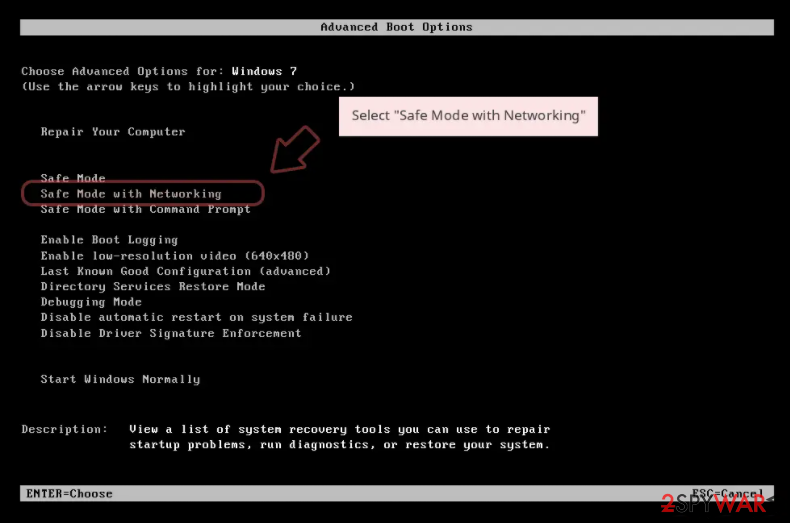
In some cases, ransomware might interfere with security software operations in one way or another (for example, it can immediately shut it down). Accessing Safe Mode with Networking can bypass this issue:
Windows 7 / Vista / XP
- Click Start > Shutdown > Restart > OK.
- When your computer becomes active, start pressing F8 button (if that does not work, try F2, F12, Del, etc. – it all depends on your motherboard model) multiple times until you see the Advanced Boot Options window.
- Select Safe Mode with Networking from the list.

Windows 10 / Windows 8
- Right-click on Start button and select Settings.
- Scroll down to pick Update & Security.
- On the left side of the window, pick Recovery.
- Now scroll down to find Advanced Startup section.
- Click Restart now.
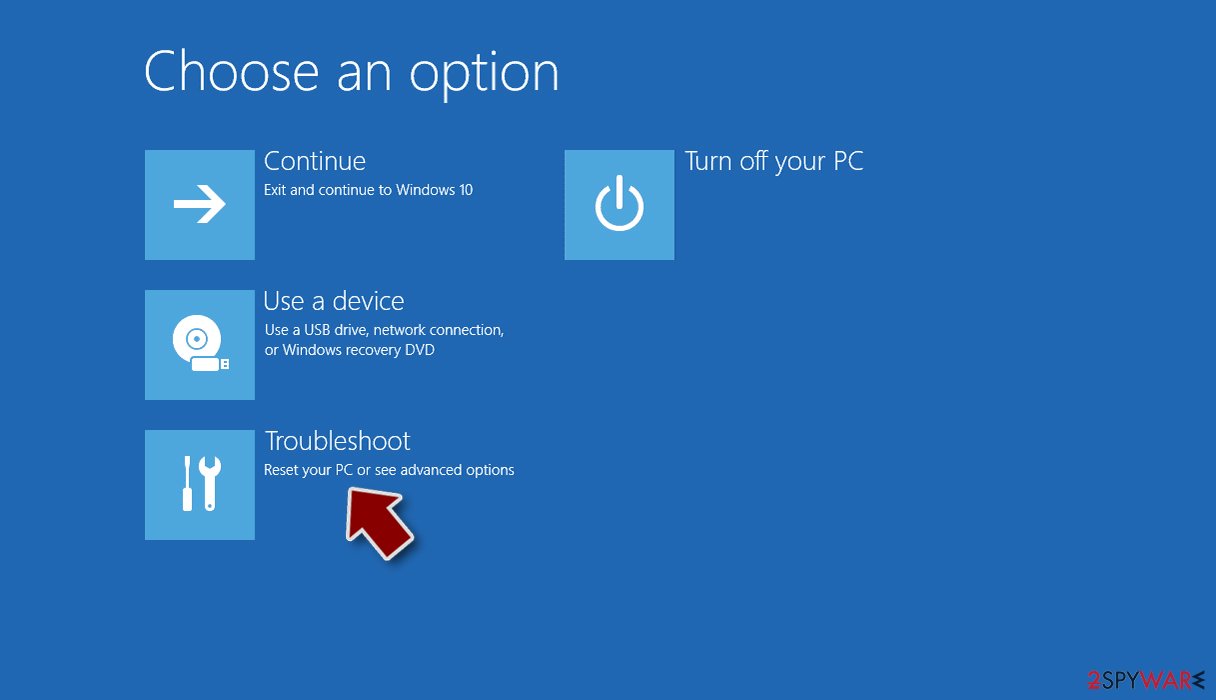
- Select Troubleshoot.
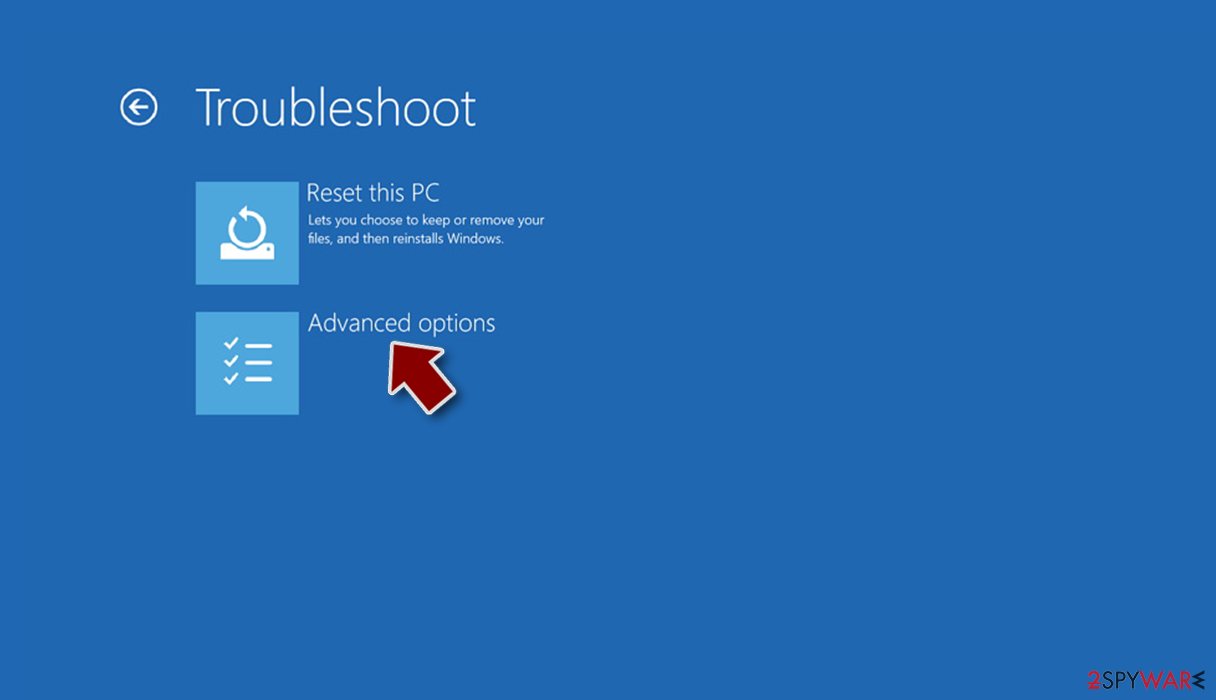
- Go to Advanced options.
- Select Startup Settings.
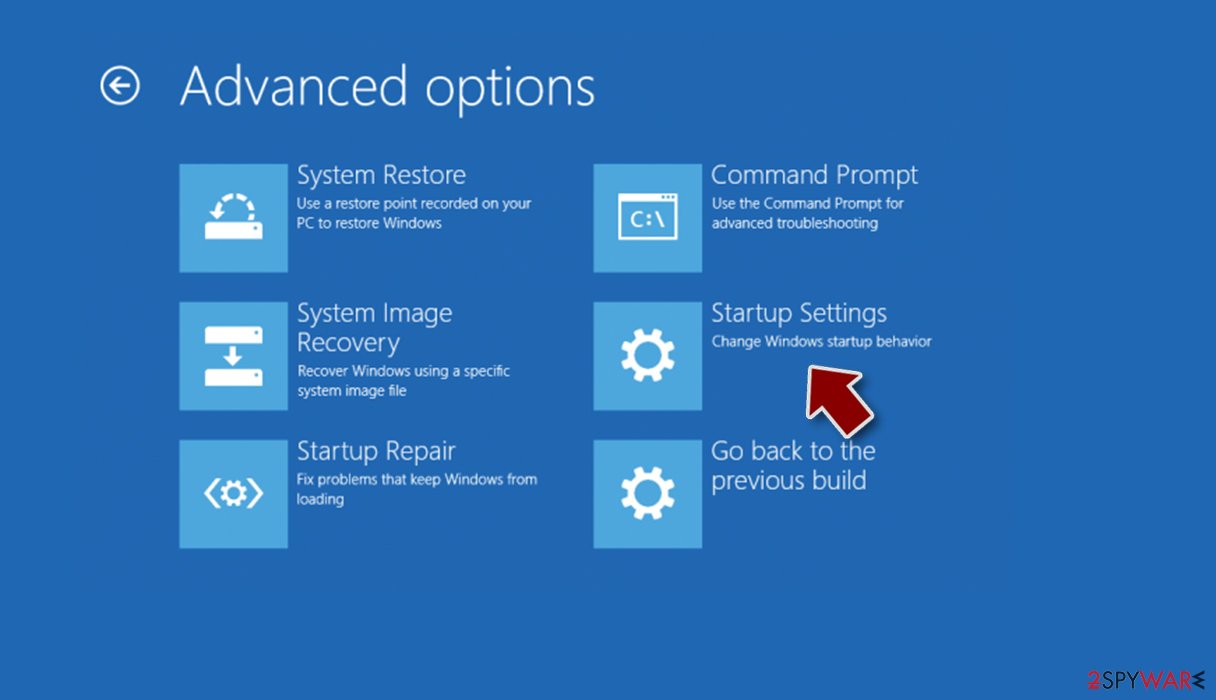
- Click Restart.
- Press 5 or click 5) Enable Safe Mode with Networking.


Once your computer reboots, your desktop background should be black, with “Safe Mode” markings in all four corners of the screen. Launch SpyHunterCombo Cleaner or MalwarebytesMalwarebytes and perform a full system scan. Your machine should be clean after that, and you can then restart it to go back to normal more to proceed with the next step.
Third-party solutions to recover .bluesky files
Having your files encrypted by ransomware can be particularly devastating, especially if data consists of important work documents or schoolwork. As already mentioned, paying criminals is not recommended – these people can simply not be trusted. They might never send you the required key, especially when there are no contact details provided (they might not know who you are – usually crooks provide a personal ID they can identify victims by).
Thus, you should instead rely on other methods. There is no guarantee they will work for you, but you should definitely try it.
- Download Data Recovery Pro.
- Double-click the installer to launch it.

- Follow on-screen instructions to install the software.

- As soon as you press Finish, you can use the app.
- Select Everything or pick individual folders where you want the files to be recovered from.
- Press Next.
- At the bottom, enable Deep scan and pick which Disks you want to be scanned.

- Press Scan and wait till it is complete.
- You can now pick which folders/files to recover – don't forget you also have the option to search by the file name!
- Press Recover to retrieve your files.



Repair the damaged operating system
Malware, such as ransomware, can negatively impact Windows system files, damaging them during the infection period. New ransomware strains are more prone to bugs due to malware creators' inexperience, so it can mess things up really quickly. Unfortunately, security software is not capable of fixing damaged system components, which might later result in system crashes, errors, and other issues. If you are experiencing similar problems after BlueSky ransomware removal, you should proceed with the following solution to repair damaged system files:
- Download FortectIntego
- Click on the ReimageRepair.exe

- If User Account Control (UAC) shows up, select Yes
- Press Install and wait till the program finishes the installation process

- The analysis of your machine will begin immediately

- Once complete, check the results – they will be listed in the Summary
- You can now click on each of the issues and fix them manually
- If you see many problems that you find difficult to fix, we recommend you purchase the license and fix them automatically.



Did this guide help?
Be the first to comment