

Brrr ransomware — another file-locking cryptovirus that offers to decrypt one file before paying the ransom
| Name | Brrr ransomware |
|---|---|
| Type | Cryptovirus |
| Family | Dharma |
| Active since | 2016 |
| Ransom note | Info.hta or FILES ENCRYPTED.txt |
| Contact email | paydecryption@qq.com |
| File extension | [paydecryption@qq.com].brrr |
| Distribution | Infected spam email attachments |
| Decryption | Other versions can be decrypted |
| Elimination | Use FortectIntego for Brrr ransomware removal |
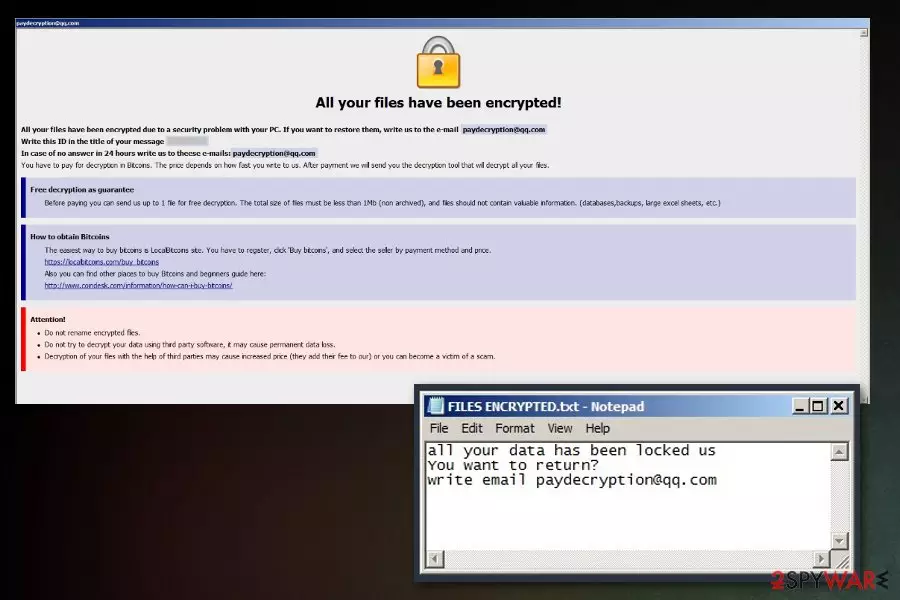
Brrr ransomware virus locks various data, such as photos, videos, documents or even archives. Since it a variant of Dharma, developers left the same patterns for the cyber threat. Ransom note placed in files with the same names as previous variants. Info.hta or FILES ENCRYPTED.txt contain similar to other versions message about the attack and encryption. In this ransom message, you can also see that developers suggest to test decrypt one file and contact them via paydecryption@qq.com email. While experts recommend not to contact cybercriminals, Brrr ransomware is not decryptable at the time of the writing.
Researchers noted that this variant of Dharma is mainly spread using unprotected RDP[2] connections in what is called brute-force attacks. Crooks scan computers using the internet and pick the ones that are vulnerable. Then, using a pre-determined list of passwords and login names, they break in and install Brrr malware on the machine.
At the time of the writing, Brrr ransomware is detected by 43 AVs[3] under the following names:
- Win32:Malware-gen
- TR/Dropper.Gen
- W32.RansomeDNZ.Trojan
- Ransom.Crysis.Generic
- Ransom.Crysis/Variant
- Trojan-Ransom.Win32.Crysis.a
- Trojan-Ransom.Win32.Crusis.to
To remove Brrr ransomware, you must use reputable security programs. We suggest using FortectIntego, SpyHunterCombo Cleaner or any other reputable anti-virus application that would be able to detect the cyber threat.
As soon as Brrr ransomware removal is performed, you can attempt to recover the locked data. As we already mentioned, it is still not decryptable. However, do not lose hope, as there are alternative methods that might be able to help you. Please check the list and guide below this article.
Remember that researchers[4] advise not to contact malicious hackers behind Brrr virus because they are not trustworthy. Crooks might send you malware executable instead, or ignore you entirely after they receive the money.

This variant is spread by breaking into the computer via the RDP
Remote Desktop Protocol is a useful feature that is used by both regular users and IT professionals. It allows one to connect to a remote PC and control it. Unfortunately, not many people put enough effort to protect these connections and end up infected with such a dangerous threat like ransomware.
Brute force attacks are widespread when it comes to ransomware distribution, and this fact should not be ignored. Since hackers are using a predetermined list of most common words used as usernames and passwords, it is never advisable making “qwerty” or similar as your password. Instead, use a complicated combination of numbers, letters, upper and lower case letters, etc. Alternatively, a trusted password management app can keep your them safe and away from crooks.
Additionally, the malware can also be spread using spam emails, exploit kits, malicious websites, and similar. Therefore, make sure to protect yourself by installing reputable anti-virus with a real-time protection feature.
Eliminate Brrr ransomware from your device right now
Ransomware attack can result in damage to your data and compromise the safety of your of your device in general. You need to remove Brrr ransomware as soon as possible. Scan your system with tools like FortectIntego, SpyHunterCombo Cleaner or MalwarebytesMalwarebytes and get rid of threats and restore registry entries back to normal.
As soon as Brrr ransomware removal using anti-malware tools is complete, the file recovery procedure can be started. This is important because any newly uploaded files will be encrypted immediately if malware is still present. Therefore, enter Safe Mode with Networking or use System Restore to stop the threat. Then, use your backed up files and copy them to your computer. If you do not have a backup, you can attempt to recover your data using third-party apps.
Did this guide help?
Be the first to comment