

You can now decrypt files locked by Bubble ransomware virus for free
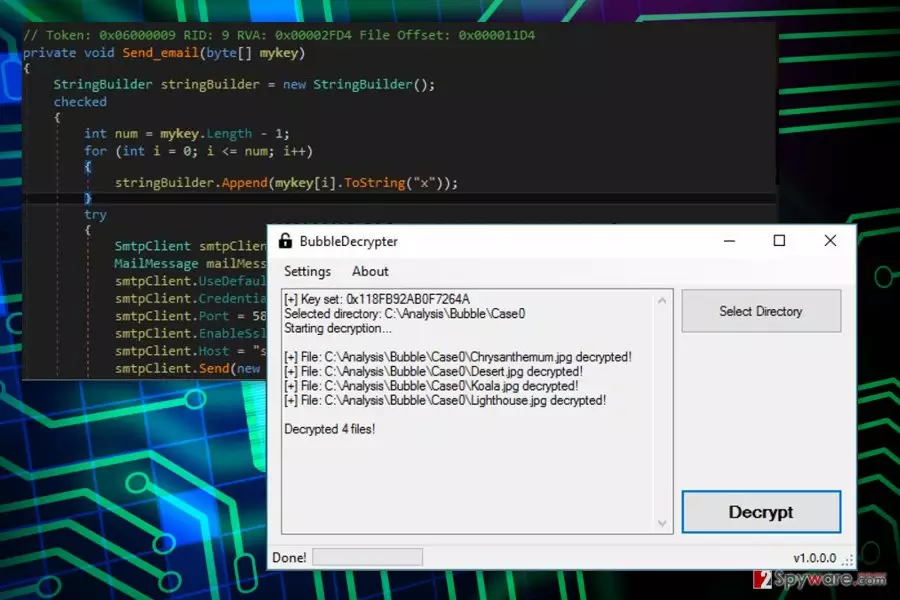
Bubble ransomware is malicious computer virus that aims to encrypt files on a target computer.[1] The virus adds .bubble file extensions to encrypted files.
Thanks to numerous mistakes in the ransomware code, malware analysts managed to create a free decryptor for this ransomware shortly after its debut. Before using the decrypter, you must remove Bubble virus using anti-malware software.
The virus targets computers running Windows operating system. On the affected device it makes changes to the system. For instance, it might modify the Registry in order to boot with computer’s startup. Undoubtedly, all these alterations make the system vulnerable. Thus, it’s recommended to get rid of the virus immediately.
The main task for the virus is to encrypt files on the affected computer. During data encryption, it appends .bubble file extension to various audio, video, image, documents and other popular files. However, there’s no worry about data recovery or follow hackers’ instruction and pay the ransom.
The analysis of the malware allows assuming that it was created by amateurs. First of all, in its code authors left email credential (bubble.lc@gmail.com). Secondly, it saves a corrupted key.
Thus, it didn’t take long to create the BubbleDecrypter. It’s a safe and effective tool that helps to decrypt all files for free. However, you should not rush to download it. There’s one more important task left.
After the cyber attack, you should focus on Bubble removal. Nevertheless, this ransomware-type virus does not seem dangerous; it’s still a serious cyber infection that has to be terminated correctly. Thus, you need to employ professional security program, such as FortectIntego and run a full system scan with an updated tool.
Malware might be resistant. File-encrypting viruses are usually designed to prevent users from installing or using security programs. However, if you encounter such problem, scroll down till the end of the article. There you will find the guide that will help to disable the virus and perform the automatic removal.
Only when you remove this ransomware from the computer, you can download a decryptor and recover the files. However, we want to encourage you to backup your data.[2] Not all ransomware viruses are decryptable, and you can never be sure when another cyber threat affect your PC. No matter where you live – in the United States, France[3] or Japan – you have to be prepared for a cyber attack.

Get to know the main ransomware distribution techniques
Authors of the Bubble malware use multiple methods to attack computers, hoping to collect ransoms from scared computer users. Knowledge about these methods can help you to prevent ransomware attack. The virus might enter the system using these strategies:
- Malicious email attachments;
- Bogus downloads;
- Fake updates;
- Malware-laden ads[4].
These are traditional ransomware distribution methods that allow tricking users into downloading a malicious program. Malware executable usually spread as an obfuscated email attachment. Social engineering tactics help to convince people that attached Word or PDF file is a safe document sent from a bank or other reputable organizations.
Bubble ransomware virus might also be presented as a useful program, for instance, security software or PC optimization tool. Usually, bogus programs are distributed via insecure file-sharing sites or P2P networks. Thus, it’s better to stay away from them.
Cyber criminals might also place misleading ads that inform about a necessity to download updates (usually, Java or Adobe Flash) or warn about detected viruses and suggest installing unknown security software. Keep in mind that only antivirus program installed on your PC can deliver alerts about infected computer and offer to fix the problem.
Bubble ransomware removal and data recovery options
Remove Bubble virus using antivirus or malware elimination software. We highly recommend dedicating this task to FortectIntego or MalwarebytesMalwarebytes. Scanning the system with these updated tools will assure that all malware-related entries will be deleted from the device.
Please, do not try to locate and delete virus-related files and processes manually. It may lead to irreparable system damage. Thus, invest in good security software that will clean the computer and protect from similar threats in the future.
Once you remove Bubble virus from the device, you can download decrypter or try other recovery methods presented at the end of the article.
Did this guide help?
Be the first to comment