

C0hen Locker ransomware is malware that encrypts data with AES and demands ransom of 0.15 BTC for their redemption
C0hen Locker ransomware is a new data locking malware that was spotted in the wild at the start of December 2019. Upon infiltration,the virus performs the necessary preparations inside the Windows PC and then scans it for files to encrypt – it targets the most common formats, such as .pdf, .doc, .jpg, .avi, etc. The encryption process is performed with a symmetric algorithm AES, and all the locked data is marked with .c0hen extension, making it inaccessible to its owners. Unfortunately, C0hen Locker ransomware will perform the exact same procedure on all the networked drives if any are found during the infection process.
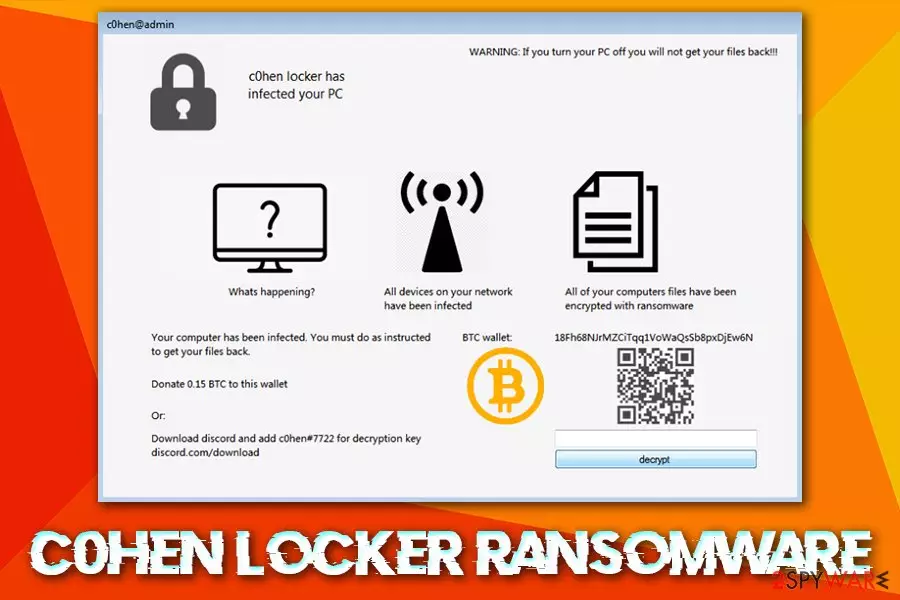
As soon as the C0hen Locker virus finishes encrypting files, it opens a custom program window titled c0hen@admin, which essentially serves as a ransom note. The cybercriminals ask victims to transfer 0.15 BTC to the provided Bitcoin wallet or contact a Discord user c0hen#7722 for negotiation. The ransomware is currently not decryptable, although the affected users could try using the unlock key 12309482354ab2308597u235fnq30045f, which was provided by a security researcher on Twitter.[1]
| Name | C0hen Locker ransomware |
| Type | Cryptomalware, file locking virus |
| Main executable | The samples found in the wild were named c0hen locker.exe, although it is also known that the malware can use a random name for its main executable |
| Encryption method | AES |
| File extension | As as soon as the virus infects the system, it encrypts all pictures, music, videos, MS Office documents and other most commonly used files by appending .c0hen marker to each of them |
| Ransom note | Instead of providing a text-based ransom note, C0hen Locker authors use a screen locker which is titled c0hen@admin |
| Contact | Users are not provided an email address as it is common, but instead are offered to use a chat application Discord to contact user c0hen#7722 |
| Ransom size | Victims are asked to pay 0.15 BTC for the C0hen Locker ransomware decryptor |
| File decryption | You can apply an unlock key 12309482354ab2308597u235fnq30045f. If not successful, you should use alternative data recovery methods provided below |
| Malware removal | Use reputable anti-malware software that can recognize the infection |
| System recovery | To remediate Windows OS after malware infection and fix damage done to it, we recommend using FortectIntego |
Security researchers have not yet found any connections between C0hen Locker ransomware and other families, so it seems like it is a new strain developed by unknown threat actors. However, seeing how ransomware has been extremely successful in the past few years, there are numerous criminals that want to succeed in this money-extortion business.
Before entering the machine, the C0hen Locker virus checks the system for the installed keyboard languages. It is possible that it might leave without infecting the system if the language is set to one of those that are excluded by ransomware authors – this behavior is typical and is often applied to ex-Soviet bloc countries.
After passing the initial check, C0hen Locker virus drops its main executable into the %TEMP% folder and performs a variety of changes to the system, including:[2]
- Removes Shadow Volume Copies with the command “vssadmin.exe delete shadows /all /quiet”
- Disables the Task Manager
- Installs system startup scripts (this might complicate C0hen Locker ransomware removal)
- Modifies the value of the HKCU\SOFTWARE\MICROSOFT\WINDOWS\CURRENTVERSION\RUN registry
- Drops over 500 files on the system, etc.
C0hen Locker ransomware then proceeds with the file encryption process, which also affects all the data on the connected networks. Finally, it drops a lock screen that states the following:
WARNING: If you turn your PC off you will not get your files back!!!
c0hen locker has infected your PC
Whats happening?
Your computer has been infected. You must do as instructed to get your files back.
Donate 0.15 BTC to this wallet
Or:
Download discord and add c0hen#7722 for decryption key
discord.com/downloadAll devices on your network have been infected. All of your computers files have been encrypted with ransomware.
Because C0hen Locker ransomware heavily modifies the host machine, files being corrupted permanently after shutting down the PC is possible. Therefore, before doing anything, experts suggest you back up all the data on the network and then remove C0hen Locker ransomware with powerful security software (you might have to access Safe Mode for that).

To recover the normal function of the PC and fix virus damage, we suggest using FortectIntego after C0hen Locker ransomware is eliminated.
You can avoid ransomware infections in most cases
Infecting your machine with ransomware can be either easy or not – it all depends on the applied security measures and the overall awareness. In most cases, those that get infected act carelessly online despite the risks or are simply unaware of how ransomware and other malware can infect computers.
As a general rule, ransomware is spread via the internet and often includes some type of social engineering. One of the most popular tactics used by cybercriminals is phishing emails. In some cases, crooks might send out thousands of emails using a botnet[3] or other automated tools, while other times, emails are targeted, and the recipient's name is already known by crooks (often acquired via previous phishing attempts or bought from the underground forums).
A spam email message can be crafted in various ways, but it often includes an attachment infused with malicious macros or a hyperlink that downloads the payload from a remote server. Thus, it is important not to open all the emails that come your way, even those that look legitimate (the “From” address can be forged by a technique called spoofing).[4]
Other methods often used by cybercriminals include:
- Exploits
- Software cracks
- Fake updates
- Unprotected RDP connections
To mitigate these techniques, you should ensure the comprehensive security software protects your system, all the accounts use secure passwords that are not repeated, and no suspicious files are downloaded from shady sites like torrents.
Backup your files and then remove C0hen Locker virus
In some cases, ransomware might self-delete after the file encryption process is complete. However, other malware might stay on the system in order to keep locking the incoming files. For that reason, C0hen Locker ransomware removal should be performed to attempt file recovery without paying threat actors the ransom. Nevertheless, you should also be aware that the action might render your files damaged – just as the system restart. Thus, make sure you back up all the files encrypted by the C0hen Locker virus.

After that, you should access Safe Mode with Networking and scan the machine with reputable anti-malware software to completely remove C0hen Locker ransomware and all its components from the system. After that, you could try recovering your data by using methods provided in the recovery section below. If none are successful, there is a chance that security researchers will find bugs within the malicious software and release a free C0hen Locker ransomware decryptor in the future.
Did this guide help?
Be the first to comment