

CapraRAT is Android-based malware that steals sensitive user data

CapraRAT is a Remote Access Trojan that has recently surfaced in the wild,[1] mainly targeting Indian users. It is believed that it is a modified version of previously known malware AndroRAT, as numerous similarities have been found between the two. Developers of the virus, known as APT36 from Pakistan, have been previously found distributing fake versions of the Aarogya Setu application, which is the official app for Covid tracking in India. The main target of the attack seems to be personnel of the Indian Government and the exfoliation of personal data from the devices.
| Name | CapraRAT |
| Type | Malware, data-stealer |
| Name in device | Android Services |
| Cybercriminal group | APT36 |
| Purpose | Steals various personal information from the phone, including contacts, SMS, and more |
| Removal | Perform a full device scan with SpyHunterCombo Cleaner security software |
| Optimization | To make sure that all leftover and junk files are eliminated, use FortectIntego |
Distribution and how to avoid being infected
Currently, there are over 2.6 million apps on Google Play Store,[2] and it remains the largest distributor of apps out there. Google's security scanners always check the apps that are being uploaded, but cybercriminals may sometimes find loopholes in its defense systems, which results in malware slipping through. Nevertheless, these instances are extremely rare, and it remains the safest platform for Android users.
Despite this, users still access third-party websites to download apps. Usually, they either want an app that may be illegal, or they are tricked by a phishing link sent to them via SMS, Facebook Messenger, or other means. That is precisely how CapraRAT is spread, and if you have downloaded apps in this way, it is important you check your device thoroughly as soon as possible – it may be infected with a Remote Access trojan or other malware. Keeping your Android patched with the latest security updates is just as important, as malware can exploit vulnerabilities otherwise.
Note that Android devices would not allow installations of third-party apps by default, although this security measure can be turned off. Do not disable security measures implemented by developers, as they are there for a reason. You would always get a warning about an app possibly being insecure.
Obfuscation and capabilities
It is important to note that, once the CapraRAT virus is installed, it may omit not visible symptoms, or at least they may be extremely difficult to notice if they are not specifically looked into. In this case, there are quite a few tricks that malware uses to make it seem like there's nothing out of the ordinary happening on the device.
For example, the main application name on the device is shown as “Android Services,” which many people wouldn't find unusual. The package name, which represents the installer, is named “com.example.appcode.appcode,” which usually would also not spark any suspicions. Whenever the malicious app is running, it would use the “Android Services” name of the app and completely hide its original icon from the user.
At all times, whenever CapraRAT is operational (this means whenever users have their phones turned on), it would constantly communicate with a remote Command & Control[3] server, which is used by the attackers for communication between the malicious app and them.
This allows cybercriminals to send all sorts of commands to the device, including:
- “READ_CONTACTS” allows access to all phone contacts;
- “READ_SMS” allows access to all SMS on the victim's phone;
- “ACCESS_FINE_LOCATION” allows access to the precise location of the user;
- “RECORD_AUDIO” allows to record everything that is being said via the phone's microphone;
- “RECEIVE_SMS” allows intercepting all SMS received on the device, etc.
These are just a few commands that could be sent by the attackers – the app can also access and delete files, modify the dialing number, send SMS messages on behalf of the user, access call logs, and more. The Trojan makes it a perfect spying device, and, considering that malware is targeting governmental institution personnel, it is not hard to see how much damage it could cause by conducting international espionage.
CapraRAT removal
The implications of having a Remote Access Trojan installed on a device that is used by government representatives can be severe and pose a threat to the national security of India. The detection and removal of CapraRAT are crucial for that not to happen, and the best way to ensure this is by employing reputable security software, such as SpyHunterCombo Cleaner or MalwarebytesMalwarebytes, and never ignoring any of the warnings it produces.
Using security software, you can remove malware from your device. Alternatively, you could try to eliminate the app yourself:
Before proceeding, make sure you take out your SIM card from the phone
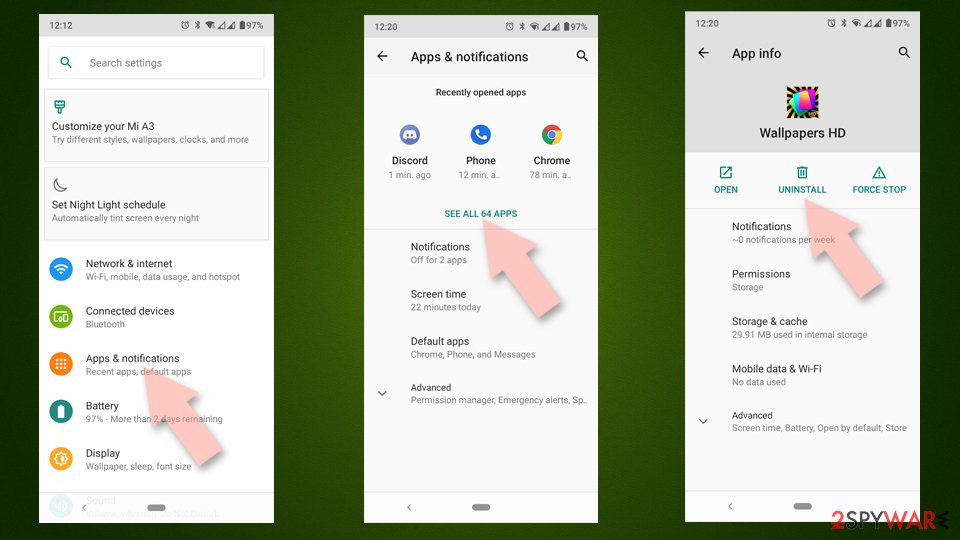
- Go to Settings -> Apps/Applications.
- Expand the full list of the installed apps.
- Scroll through the list and tap on a suspicious application once.
- Tap on it and select Uninstall.
- Reboot the device.

Clear Storage and data files on Android from Google Chrome or other apps:
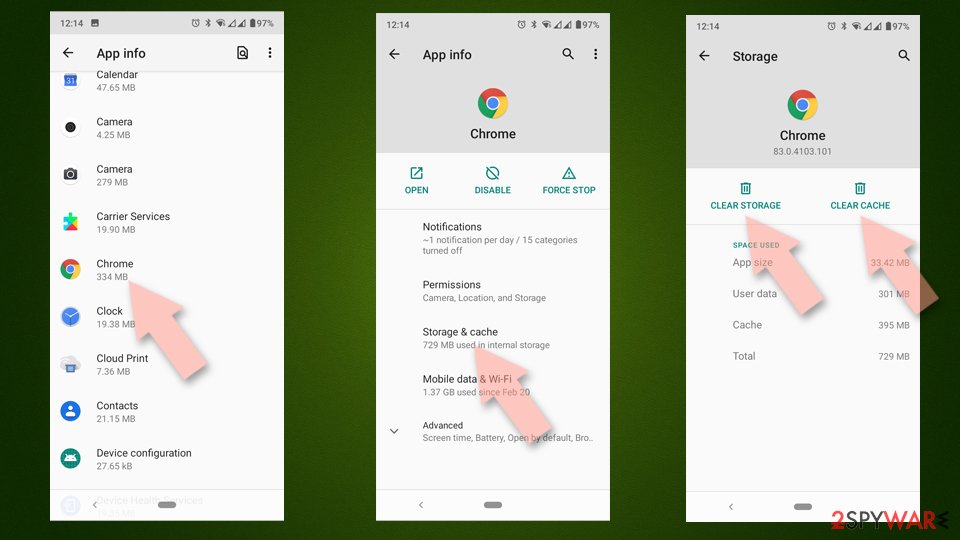
- Go to Settings > Apps/Applications.
- Expand the full list of the installed apps.
- Tap on Chrome and select Storage & cache.
- Clear storage and clear cache of the app.

If the removal is unsuccessful, we recommend you factory reset your phone. The process varies depending on the model of your phone, so please refer to the manufacturer's official website.
Did this guide help?
Be the first to comment