

ClicoCrypter targets computer users in Poland and gives ridiculous data recovery instructions
ClicoCrypter is a ransomware virus that is known under the name of CLICO Cryptor Ransomware[1] in Poland.[2] The virus is designed to attack Polish computer users and encrypt their files with RSA 2048 encryption. Due to the newly appended .enc file extension, documents, image, audio or video files are impossible to use or open.
Malware executable Ksiegowosc2017.pdf.exe mostly spreads via malicious spam emails. Once it is download on the PC, crypto-malware makes few changes to the system and deletes Shadow Volume Copies. Therefore, once ClicoCrypter virus encrypts the files, there might be impossible to recover them without backups or specific decryption key.
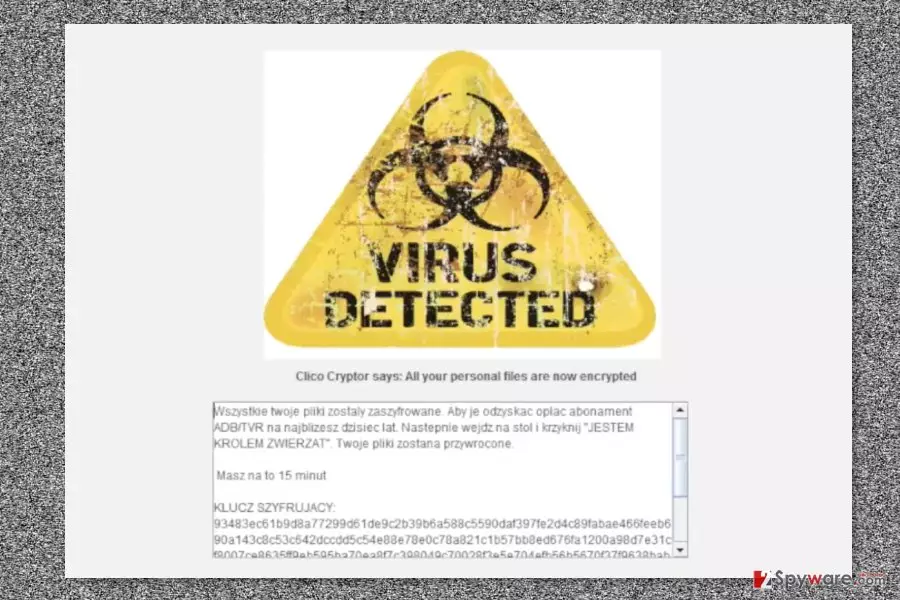
Of course, authors of the ClicoCrypter ransomware provides instructions how victims can obtain a software that can get back access to the files. The ransom note is delivered in READMYFIRST.info file that runs a lock screen message that states:
Clico Cryptor says: All your personal files are now encrypted
The further message is written in the Polish language. The content itself seems strange and do not remind a serious letter from cyber criminals. Victims are asked to recover their ADB / TVR subscription fee for the most recent year. Then they have to go to the table and shout “I am in control of animal.” Supposedly, it’s enough to do these tasks within 15 minutes in order to restore encrypted files.
We do not believe that these recovery instructions will help to decrypt files. Therefore, instead of doing ridiculous things, you should remove ClicoCrypter from the computer. You have to perform this procedure using reputable security software, such as FortectIntego.
As soon as ClicoCrypter removal is over, you can think about data recovery options. If you have backups, you are the lucky one because you have all necessary data. If not, you should try alternative methods presented at the end of the article. Hopefully, these tools will help to recover at least some of the files.

Tips for ransomware precautions
Ransomware is most likely to travel and infiltrate devices using these methods:[3]
- malicious spam emails;
- illegal downloads;
- fake software installers or updates;
- malvertising;
- exploit kits.
In order to avoid unintentional installation of malicious software, you should:
- never open suspicious spam emails and content included in them (attachments, links, buttons);
- not open unknown links received in social networks;
- not visit potentially dangerous websites;
- never click on aggressive or suspicious ads even on legitimate websites;
- keep your software updated;
not download illegal content; - not use unauthorized or unknown file-sharing websites;
- create backups!
Wipe out ClicoCrypter with the help of professional software
ClicoCrypter removal requires obtaining professional security software, for instance, FortectIntego or SpyHunterCombo Cleaner. In order to install malware elimination program, you may need to reboot the computer to Safe Mode with Networking. Once it’s done, you have to update anti-malware and run a full system scan.
The instructions below will show you how to remove ClicoCrypter using security software and suggests few ways how you can restore our files.
Did this guide help?
Be the first to comment