

CommonRansom ransomware – a file locking virus which urges 0.1 Bitcoin as the ransom price
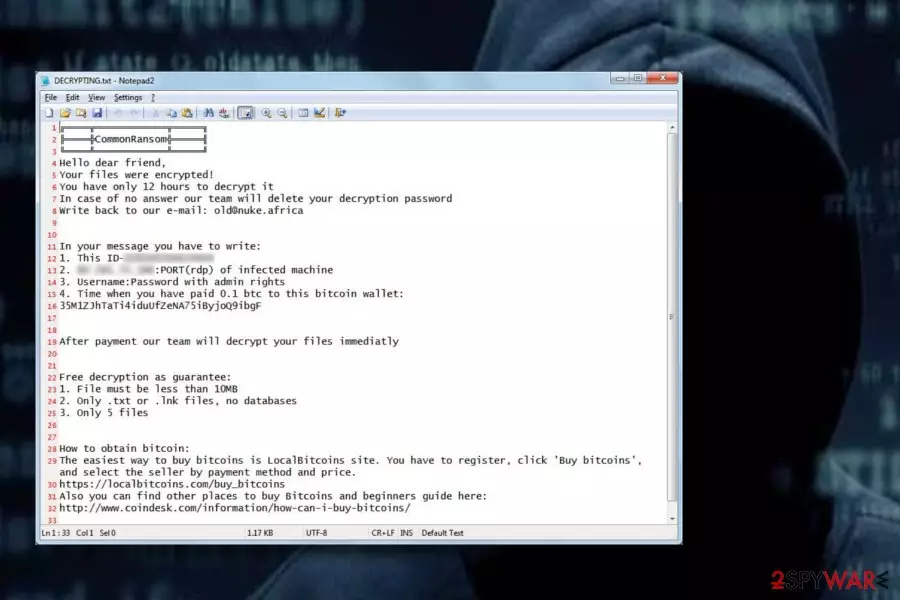
CommonRansom ransomware is a file-encrypting cyber threat which locks up important files and displays a ransom note. This type of viruses reaches the system through phishing email letters and start performing the damaging activity immediately. CommonRansom virus encrypts files by adding the .[old@nuke.africa].CommonRansom extension. Moreover, it uses the AES cipher to lock the documents, such codes are unique and differ each time the ransomware infects a different computer system. After the encryption process[1], a ransom note named DECRYPTING.txt shows on the computer screen. This message demands 0.1 in Bitcoin as the ransom price which needs to be transferred in 12 hours in order to receive the decryption key.
| Name | CommonRansom |
| Type | Ransomware |
| Extension | .[old@nuke.africa] |
| Cipher | AES |
| Ransom note | DECRYPTING.txt |
| Demanded price | 0.1 in Bitcoin |
| Ransom transfer time | 12 hours |
| Purpose | To gain income from users who decide to transfer the ransom |
| Prevention | Do not open any questionable messages and their attachments |
| Removal | Delete the virus permanently. You can also install FortectIntego to detect the damage |
When CommonRansom ransomware enters the computer system it starts the encryption process by using a unique algorithm called AES. Codes which are generated by this cipher are almost impossible to identify because each time they come different. However, this does not mean that you should run and pay the demanded ransom. No, actually, this is a bad idea as you are taking a risk of getting scammed.
Moreover, ransomware viruses[2] such as CommonRansom usually demand cryptocurrency as the type of ransom which needs to be transferred. Why so? Crooks often urge Bitcoin, Ethereum[3], etc., because these type of currencies keep the process safe and untrackable as no personal details are required while performing them.
However, we recommend performing the CommonRansom removal and then thinking about the data recovery process. You can get rid of the ransomware virus with the help of reputable tools. Moreover, try a program such as FortectIntego to check your system for any damaged components. Note that proceeding with the elimination will require getting rid of all virus-related content, so, the manual method is not recommendable for this case.
Remove CommonRansom virus and free your computer from the cyber threat. Some researchers have discovered that ransomware-type viruses might have an ability to make your PC more vulnerable to other infections. We guess that you definitely do not want to get your system affected by other malware. This is one of the main reasons' why you need to remove ransomware ASAP.

Avoid ransomware viruses
Ransomware can be distributed in a few different ways. However, the most common spreading technique is email spamming. The hazardous payload comes attached to the dubious email message and executes the virus when opened. Be careful with email messages that you receive, even with those which fall in the inbox section. Sometimes a rogue message can fall in inbox too.
Moreover, having a reputable antivirus tool will increase your computer's safety. Make sure you choose a truly reliable one. Do not be afraid to invest in your computer's protection! After you install the antivirus program, you need to regularly perform updates, otherwise, various outdated components might start causing struggles and the software will not operate as supposed to.
Get rid of CommonRansom ransomware
Spotting encrypted files means that your computer system is infected with ransomware. To remove CommonRansom ransomware, you will need to download and install a reputable anti-malware program which will effectively complete the elimination process as manual removal is not possible for this case, ransomware might leave various hazardous and hard-finding components in the system.
After performing the CommonRansom ransomware removal, you can try recovering your locked files. For this purpose, try out our provided third-party software which can be found under this article. Choose the most suitable tool for you and perform the process as shown in the instructions. According to tech experts[4], paying the demanded ransom is not a good option as there is a chance to be scammed, so, better try other ways to get files back.
Did this guide help?
Be the first to comment