

Crowti virus is the ransomware that locks the screen with a payment-demanding message
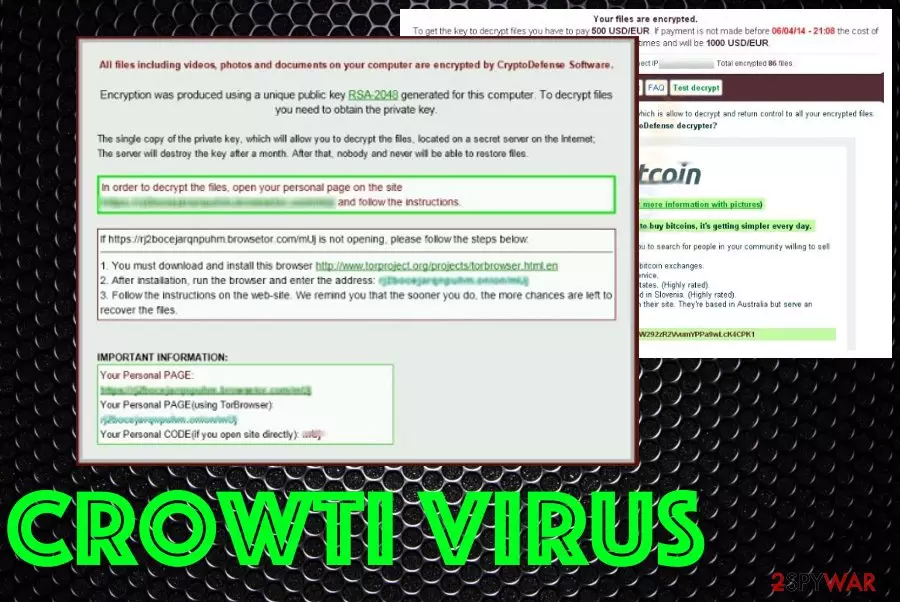
It was first spotted back in 2014. Since then, ransomware has improved and made more dangerous than ever before. The particular threat has other names like CryptoDefenseCryptoWall or CryptoWall ransomware, Crowti ransomware. You can find your files renamed using random characters or replaced with PNG or HTML files like HELP_FILE_4BAACA128.PNG, HELP_FILE_4BAACA128.HTML. These are indications that your machine is affected by this Cryptowall ransomware and you need to take immediate actions to fight it as soon as possible.
| Name | Crowti virus |
|---|---|
| Type | Ransomware |
| Also know as | Crowti ransomware, CryptoWall virus |
| Encryption method | RSA-2048 |
| Files added on the system |
|
| ransom amount | Goes up to $500 |
| Detection names | Win32/Crotwi or Ransom:Win32/Crowti, Win32/Crowti-b |
| Symptoms | Demands ransom, affects files, freezes the machine |
| Distribution | Fake installers, spam email attachments, malicious program cracks |
| Elimination | Install anti-malware to remove Crowti virus from the machine. Try FortectIntego for virus damage elimination |
Crowti virus delivers a message on the screen int he form of either a lock screen or a separate file that is placed on various folders. The message states about possible ways of paying the demand or even scares the victim into downloading something. It reads the following:
WARNING – Your files are encrypted. To get the key to decrypt files you have to pay 500 USD/EUR. If payment is not made made before -specific date- the cost of decrypting files will increase 2 times and will be 1000 USD/EUR
Another CryptoWall/ Crowti ransomware message:
Cannot you find the files you need? Is the content of the files that you have watched not readable?
It is normal because the files' names, as well as the data in your files have been encrypted.
Congratulations!!! You have become a part of large community CryptoWall.
If you are reading this text that means that the software CryptoWall has removed from your computer…..
What is encryption?
Encryption is a reversible transformation of information in order to conceal it from unauthorized persons but providing at the same time access to it for authorized users. To become an authorized user and make the process truly reversible i.e. to be able to decrypt your files you need to have a special private key.
In addition to the private key you need the decryption software with which you can decrypt your files and return everything in its place.
I almost understood but what do I have to do?
The first thing you should do is to read the instructions to the end…..
When Crowti virus affects the machine, your files may be changed, renamed with ransom characters or marked with a different extension. In simple words, this virus affects your files and makes them useless, un-openable. This is the main indication besides the direct ransom-demanding message that shows up on the screen.
You need to remove Crowti virus, no matter how important your files are to you. It is possible to recover them later, but you need to eliminate malware as soon as possible, to avoid crucial damage to your computer. This threat has many more functionalities like altering system settings or disabling programs, functions. This is one of the oldest variants of ransomware that may have tons of versions.
Crowti ransomware can infect the machine, install programs, other malware, encrypt files and make them impossible to decrypt unless you pay for the tool. This virus also deletes Shadow Volume Copies, backups and databases or archives, so react to the infection as soon as possible until your computer is damaged permanently.

Unfortunately, there is no guarantee that making this Crowti ransomware payment will help you recover connection to your affected files.[2] That's why we highly recommend people, enterprise, and home users, to make sure that they have made alternate copies of their important files. They can use Cloud storage technologies, Dropbox, Flash Drive, or even CDs for that.
In addition, you should always keep your anti-spyware up-to-date in order to prevent infiltration of this virus. You can avoid this infiltration and keep yourself from performing Crowti virus removal in the first place if you keep the machine virus-free properly.
If Crowti virus has already started showing you a warning that is filled with specific instructions explaining how you can unlock your files (it usually requires making a payment of $100, $200 or even $500 in bitcoins), you should waste no time and scan your computer with updated anti-spyware. It will help you to remove this and other cyber threats from the system.

Ransomware delivery methods
Just like any other ransomware threat, this virus is spread using several misleading techniques. You can easily fall into downloading this virus to your computer by clicking on fake pop-up notification offering you to update your Flash Player, Java, download manager or similar program.
In addition, spam campaigns have also been actively used when spreading this virus around. So, you should be very careful with every email that looks suspicious and actively asks you to download its attachment. According to our PC security experts[,[3] you should stay away from such and similar attachments: VOICEXXXX.scr, IncomingFaxXXXX.exe, info_XXXX.pdf.exe, etc. You need to delete any suspicious emails immediately after receiving them.
If you have already been tricked into downloading any of these attachments to your computer, you should waste no time and scan it with the reputable anti-spyware. It will help you to remove all malware and viruses, including the file-locking virus. If you have already received a warning asking you to pay for decrypting your blocked files, you shouldn't pay the ransom because you may be left with nothing. Instead of that, follow these steps and remove this threat.
Ways to remove Crowti virus from the machine completely
In order to prevent the appearance of Crowti virus, you should ignore all suspiciously-looking mails and ignore every ad that offers you to update your Flash, Java, and similar programs. In addition, make sure you scan your PC with a reputable anti-spyware if your PC is already affected by this ransomware. For that you can use FortectIntego or SpyHunterCombo Cleaner, MalwarebytesMalwarebytes. If you can't launch any of these programs and there is no luck, try:
- Rebooting you infected PC to Safe mode with networking to disable the virus
- Run Regedit
- Search for WinLogon Entries and write down all the files that are not explorer.exe or blank. Replace them with explorer.exe.
- Search the registry for these files you have written down and delete the registry keys referencing the files.
- Reboot and run a full system scan with updated anti-spyware.
We highly recommend thinking about the prevention of such infections, so you don't need to repeat anything similar to Crowti virus removal. If you need any help with the malware elimination, follow the steps below and look for possible ways to recover affected files.
Did this guide help?
Be the first to comment