

Understanding CryptoFortress ransomware virus
CryptoFortress virus [1] is a file-encrypting malware that has been attacking computers and encoding users' personal files since the March 2015. Researchers have revealed that malware is an updated version of TorrentLocker ransomware [2] because it uses the source code for the ransom notes and other web pages from Torrent Locker. It has also been called as a “new generation” ransomware [3] as it can block unmapped network shares as well. Cyber criminals distribute malware via malicious spam emails and infected links, and when the victim clicks on it, malware steps into the system and starts looking for targeted file types (.unity3d, .blob, .wma, .avi, .rar, .DayZProfile, .doc, .odb, .asset, .forge, .cas, .map, .mcgame, .rgss3a, .big, .wotreplay, .xxx, .m3u, .png, .jpeg, .txt, .crt, .x3f, .ai, .eps, .pdf, .lvl, .sis, .gdb). CryptoFortress ransomware uses AES encryption algorithm and appends either .frtrss or .ecc extension to each encoded picture, document, audio or video files. When data encryption is completed, malware delivers a warning message to the victims:
All your important files (such as files on the network disks, USB devices, etc.): photos, videos, documents were encrypted with CryptoFortress virus. The only way to get your files back is to buy our decryption software. Otherwise, your files will be lost.
Caution: Removing of CryptoFortress will not restore access to your encrypted files.
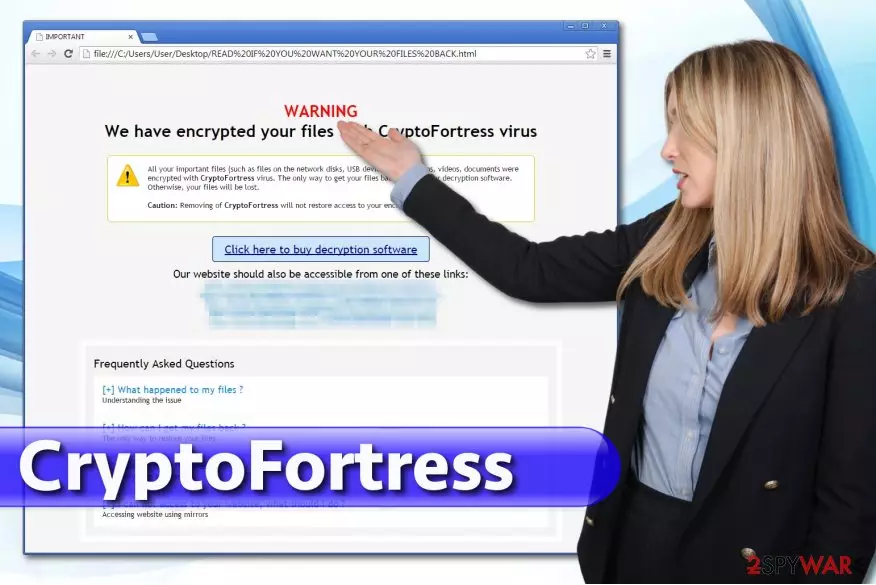
However, you should not let crooks scare you and blackmail you. On the one hand, they tell the truth – CryptoFortress removal will not recover your files. On the other hand, hackers are lying to you about the recovery pf your files because there are other ways to get back access to the lost data. However, in the ransom message hackers included links that lead to the official website and urge to send a certain amount to a particular address and then to transmit a transaction ID to validate the payment. The developers of CryptoFortress have been demanding 1 Bitcoin (about $300), but before transferring the ransom, victims can decrypt two files that are up to the size of 500 Kb for free. Of course, you can panic and fall for paying the ransom. However, don't be surprised after you lose not only the data from your PC but also money from the bank account. To prevent this from happening, make sure that you remove CryptoFortress virus from the system as soon as possible using FortectIntego or SpyHunterCombo Cleaner. Then you can try to restore your files from backups or use additional data recovery methods.
How can this ransomware step in my PC?
CryptoFortress malware can enter your PC system similarly to other ransomware [4], such as TeslaCrypt, CryptoDefense, SynoLocker, and many others. Usually, the virus spreads via spam emails, fake update alerts, infected links and similar means. By the way, P2P networks may also be involved in the distribution of this virus. To protect your computer from being infected, we highly recommend you to install a reputable anti-spyware and keep it up-to-date. Besides, you should stay away from suspicious email attachments and links. Before opening them, you have to double check the sender and information which is added to the message. You should always look for typo or grammar mistakes to protect yourself from malicious emails. [5] Finally, make sure you keep your important data in the safe place, e.g. external hard drives and USB sticks.
CryptoFortress removal guidelines
Ransomware viruses are one of the most dangerous and complicated computer infections, so their removal is not easy as well. For CryptoFortress removal you have to employ professional anti-malware program, for instance, FortectIntego or SpyHunterCombo Cleaner. However, if malware does not allow you to install or update security tools, you should reboot your computer with a Safe Mode with Networking and follow the steps presented at the end of the article. Unfortunately, it’s not enough to remove CryptoFortress virus from the PC to get back access to your files. For that, you will need other tools or data backups. Data recovery options are provided below. In the future, you should think about the immunity of your personal data in advance. We highly recommend you to use USB external hard drives, CDs, DVDs, or simply rely on online backups, such as Google Drive, Dropbox, Flickr and other solutions.
Did this guide help?
Be the first to comment