

What is already known about CryptoJacky ransomware virus?
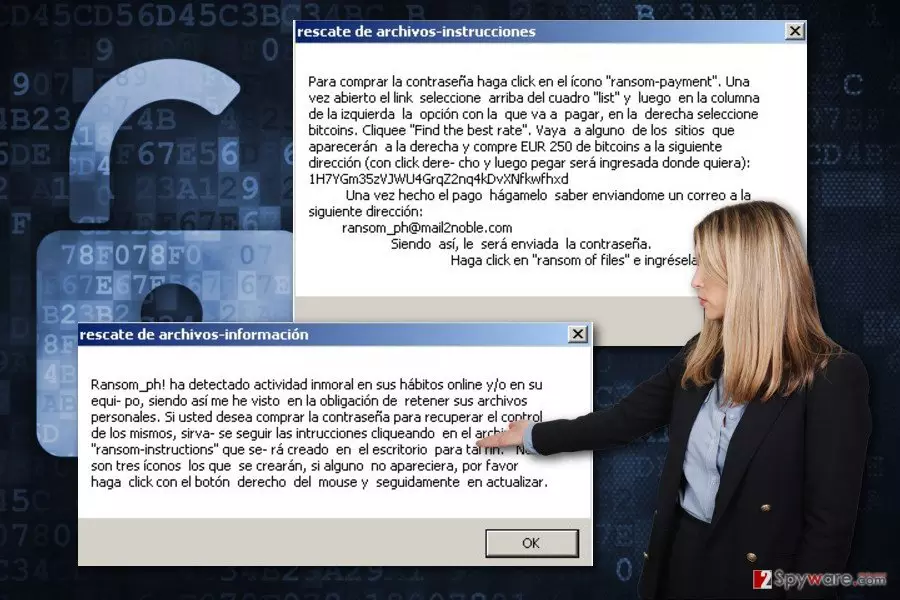
Recently, malware researchers spotted a brand new file-encrypting virus called CryptoJacky ransomware. It’s a Spanish ransomware[1] that falsely informs victims that their files have been encrypted due to particular illegal actions online. The developers of the ransomware follow the same scheme. They ask to pay the ransom in order to get back their files. It seems that CryptoJacky virus spreads and executes on the targeted computer from the cryptoJacky-setup.exe file. The specific distribution technique is unknown; though, this obfuscated file is probably being sent via malicious email campaigns. Once inside the system, it starts data encryption running an aescrypt.exe file. It seems that the virus uses AES encryption algorithm which is widely used by other file-encrypting viruses as well. This strong encoding system barely gives any chances for computer users to restore their files without a specific decryption key. This key is held in the private hackers’ servers, and they suggest to reveal it if victims pay the ransom. After data encryption, CryptoJacky malware leaves three files on the desktop which explain data decryption steps. For instance, in the “ransom payment” file, victims get instructions how to transfer the ransom. Cyber criminals demand 250 EUR in bitcoins for the decryption key. Once the transaction is made, victims are supposed to contact cyber criminals via email ransom_ph@mail2noble.com. Then, they need to wait for the decryption key, open “ransom of files” file and enter it.
Nevertheless, instructions provided by the developers of CryptoJacky ransomware is quite simple and easy to follow; we do not recommend following them quickly. We understand that losing personal documents is a disaster; however, paying the ransom might not end up as you are expecting. What is more, this particular ransomware hasn’t launched active distribution campaign yet, so you should make data backups and store them in the external devices. Backups are crucial nowadays when ransomware attacks are frequent and keep growing[2]. In the case of the attack, you will be able to focus on CryptoJacky removal without thinking how to restore your files. Bear in mind that paying the ransom does not guarantee that you will receive a necessary password to unlock the files. Cyber criminals might gladly take your money and use them for further cyber crimes. Thus, you might be left with money and data loss. It’s better to remove CryptoJacky from the computer as soon as it shows up than relying on hackers’ words. For virus removal, we recommend FortectIntego.
Is it possible to avoid ransomware?
CryptoJacky virus distribution methods are still unknown because the virus hasn’t been started spreading actively yet. However, the majority of hackers rely on the same distribution techniques, such as malicious email campaigns[3], malvertising[4], and bogus software downloads or updates. Thus, you should be careful with emails and do not rush opening their attachments. Even safely-looking Word or PDF files called as invoice or statement might include malware executable. Bear in mind that crooks might make phishing emails look like legitimate, so always double-check the information before opening email attachments. In order to avoid file-encrypting viruses, you should be careful with ads and avoid clicking them in general. Malware-laden ads might be delivered even on legitimate websites. What is more, always install programs from the reliable sources. Bear in mind that Torrents[5], files sharing programs or ads are insecure sources for downloads.
What should I do if I got infected with CryptoJacky ransomware virus?
We hope that you won’t encounter this brand new crypto-malware. However, if it manages to get inside the system, you should be prepared and know what to do next. Obviously, you need to remove CryptoJacky from the computer. The only safe way to delete ransomware is to use professional malware removal tools, for instance, FortectIntego or SpyHunterCombo Cleaner. Of course, you can choose any other your preferred program and run a full system scan with it. Though, we want to warn that sometimes ransomware viruses block access to the security tools and prevent from installing them. If it happens to you too, reboot your PC to the Safe Mode as shown in the instructions below. Then, the virus will be disabled, and you will be able to perform the automatic CryptoJacky removal. Moreover, don’t forget that before scanning the system you need to update your chosen malware removal tool.
Did this guide help?
3 comments
lenore
I hope it wont start spreading actively. Therere too many file-encrypting viruses already!
Hudson
This one looks nasty!
cooper
thanks for informing about this cyber threat! Time to make backups!