

Cryptre ransomware is a cryptovirus that demands $200 in Bitcoin for the alleged Decryption key
| Name | Cryptre ransomware |
|---|---|
| Type | Cryptovirus |
| File marker | .encrypted |
| Related | CryptoWire ransomware |
| Ransom note | Displayed in the program window Cryptre |
| Ransom amount | $200 in Bitcoin |
| Encryption method | AES-256[1] |
| Removal | Get anti-malware tool like FortectIntego and remove Cryptre ransomware from the system completely |
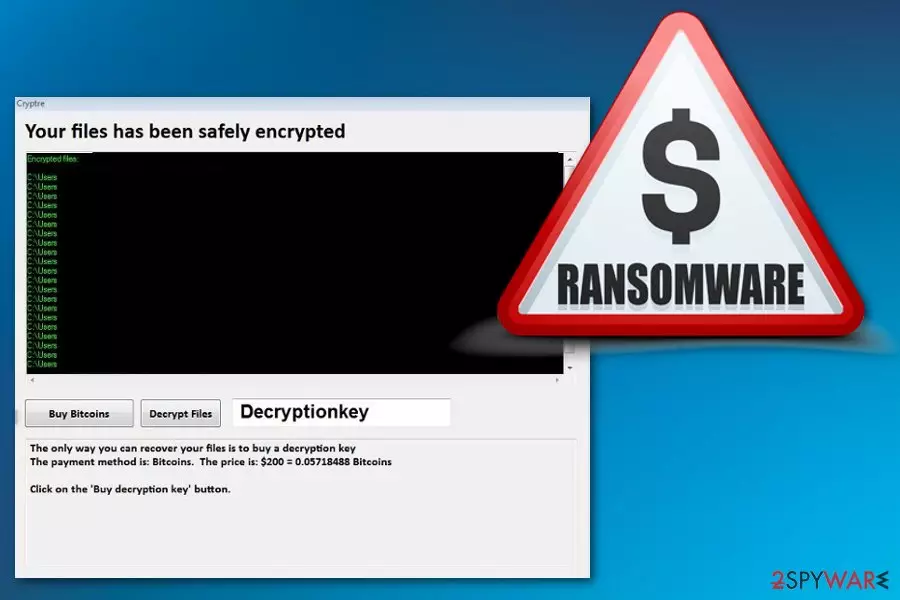
Cryptre ransomware virus developers have already released the first variant of this ransomware dubbed CryptoWire virus that also marks encoded files with .encrypted extension and demands for the same $200 amount in Bitcoin. The ransom demand tactics are not much changed because after successful encryption the program window appears on the screen.
The message encouraging victims to pay up reads the following:
Your files has been safely encrypted
The only way you can recover your files is to buy a decryption key
The payment method is: Bitcoins. The price is: $200 = 0.06023569 BitcoinsClick on the 'Buy decryption key' button.
Unfortunately, Cryptre ransomware attack starts with system changes, not the main encryption process. Ransomware firstly drops malicious files in various directories like:
- %AppData%
- %Local%
- %LocalLow%
- %Temp%
- %Roaming%
Also, Cryptre ransomware changes Windows Registry Keys or adds new meanings. Malware is set to run various commands and disable certain system functions or programs like security features or antivirus software. These tactics make the threat more persistent and the AV detection[2] rate lower because some of the antivirus tools display falsely positive detection results.
Nevertheless, you can and need to remove Cryptre ransomware from the device as soon as possible so that no additional changes can be made. You should find a reputable anti-malware program and scan the machine entirely to delete all possible threats.
The best Cryptre ransomware removal tip security experts[3] can give is to get tools like FortectIntego from official sources and to pay close attention to the system scan and virus termination process. You need to clean the system thoroughly and eliminate virus damage if you want to restore your files later.
You should use data backups for file recovery or employ software designed to recover your files. We have prepared a few suggestions down below. You can find anti-malware program options, data recovery methods and a few additional tips that should improve the malware elimination results.

Various tools can be used to spread ransomware script via spam email
The main ransomware distribution technique is spam email campaigns. The aim is to infect targeted system quickly and successfully. Various tools can be used to achieve the goal:
- Malicious HTML;
- Infected URLs with JavaScript;
- Files filled with macros[4];
- Malicious servers;
- Other spamming services.
These tools spread ransomware directly on the system when the malicious script gets triggered by the user or malicious file automatically spreads malware designed to infect the system further. You should notice suspicious emails sent from questionable senders and containing file attachments in a format like Word or Excel. Malicious actors often misuse names of well-known companies to disguise the malware.
The main solution for Cryptre ransomware removal is professional anti-malware tools
To remove Cryptre ransomware completely from the affected device, you need to employ trustworthy anti-malware tools and scan the system thoroughly. FortectIntego, SpyHunterCombo Cleaner and MalwarebytesMalwarebytes are the ones that we can recommend as reputable tools suitable for the virus termination process.
You can choose other antivirus programs for Cryptre ransomware removal if you want. Remember to select official sources for your software to avoid additional cyber infiltrations. Clean the system entirely and double-check before attempting any data recovery.
Cryptre ransomware virus should be deleted from the computer completely before you enter any external devices on the machine or add files from cloud services because ransomware can encrypt newly added files again. Clean the system and remove virus damage then try data recovery methods listed below.
Did this guide help?
Be the first to comment