

Fake crypter CVLocker locks computer screen and demands payment
CVLocker ransomware virus is another fake crypto-ransomware [1] imitator which locks computer screen to make it look like the device has been attacked by ransomware. The bright lime green pop-up window addresses victims with a bold “oops, your files are encrypted” and continues to mockingly explain that the encryption has occurred because the victim was “Watching MLG Montage Parodies,” “Expanding Dong” or “Creating Bonzi Buddy.” Near the bottom of the screen, a timer counts down minutes until the supposedly encrypted files are decrypted. In order to stop the countdown and decrypt files, the victims are demanded to send an indicated email address. Unfortunately, half of the email is simply cut off, leaving the victims with “ f*ck-off-from-my-p…”. This already suggests that this ransomware has been created more as a joke than actual malicious business. If the extortionists don’t indicate where and what the victims should pay them, there is probably no payment system at all. Luckily, the virus does not cause damage, encrypt or delete the files, so simply terminating its executable CVLocker.exe should be enough to remove CVLocker from your computer and recover access to your files. You can do that with the help of such tools like FortectIntego. Remember though that before you are able to tackle the virus, you will have to go past program’s lockscreen first. We will give suggestions how to do that at the end of the article.
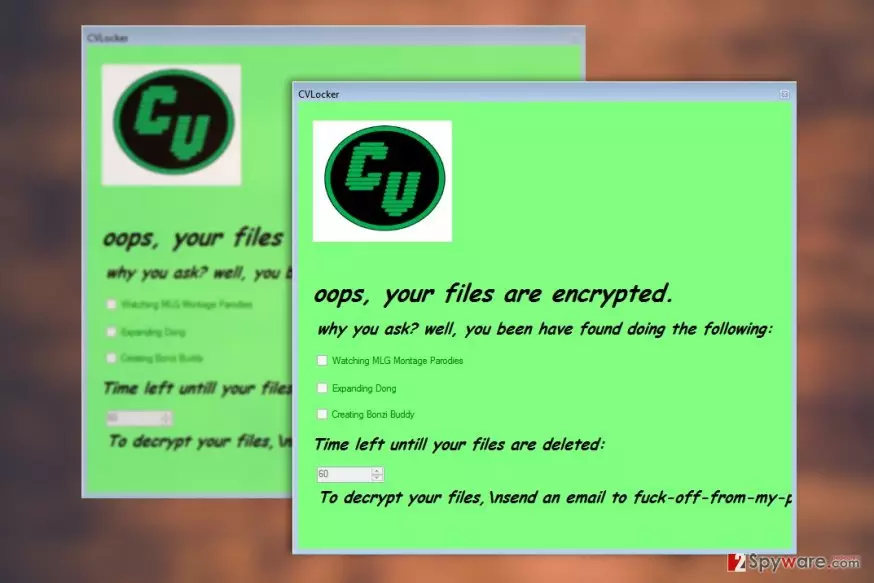
CVLocker is not the pioneering software in the prank-like ransomware [2] arena. Fake crypters accompany almost every major ransomware family. We’ve already discussed Locky, Globe or Cerber virus imposters and there are numerous individual fake crypters roaming the web. You should be very careful and observant because some of them may look identical to the actual ransomware and result in financial loss and completely unnecessary damage to your nerve cells. If it turns out that the ransomware is fake — simply kick it out of your computer without much consideration. You will speed up the CVLocker removal by allowing professional antivirus software to scan your computer.

Ransomware travels around via email
Though the experts are not entirely sure how CVLocker spreads around the web, most likely it is being distributed by some malicious spam campaign which makes sure the virus lands directly in the victim’s inbox. From there, the victims are expected to download the malware on their computers directly. Fortunately, more tech-savvy users are already aware of such dishonest malware distribution strategies and simply ignore the emails that come from unfamiliar sources and carry suspicious attachments. If you have not been doing this already, it is high time you start changing your habits. Though CVLocker is not a serious ransomware itself, you should keep in mind that dangerous parasites spread the same way too, so it is only a matter of lottery which one is going to infect your device.
Methods of approaching CVLocker removal
If you are getting ready to remove CVLocker virus from your computer, please choose the elimination method very carefully. Keep in mind that the elimination technique you choose should be compatible with the level of your computing skills. If you are a regular home user, we highly recommend you opt for the automatic CVLocker removal method and scan your computer with some reputable antivirus utility. Remember, manual malware decontamination operation can only be performed by the professionals! Don’t attempt to dispose of the virus yourself because with ransomware, it is very easy to make a mistake which would damage your files and corrupt your system.
Did this guide help?
Be the first to comment