

CyberDrill a HiddenTear-based virus that does not reveal the size of the ransom
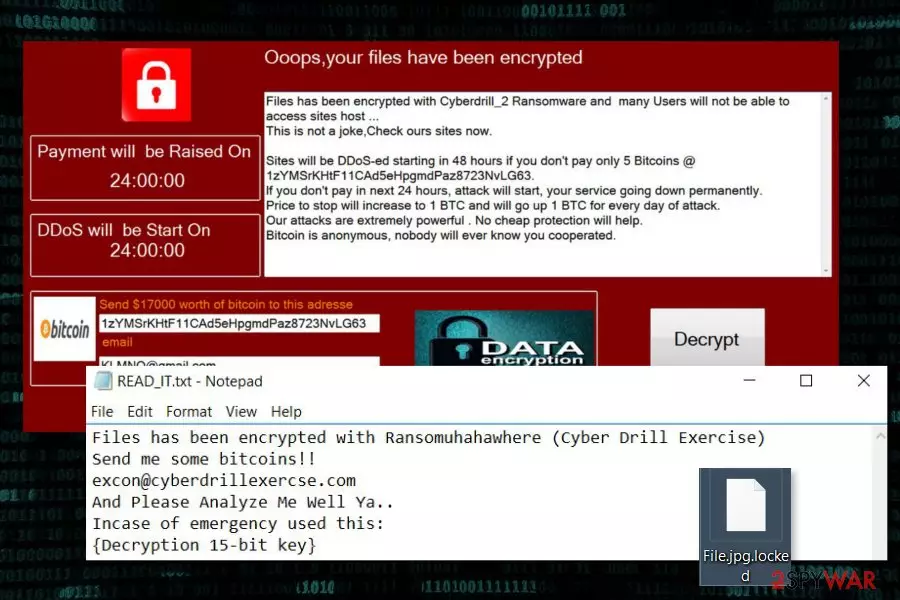
CyberDrill is another variant of HiddenTear ransomware virus.[1] It appends .locked file extension to various files. Following data encryption, it presents recovery instructions in READ_IT.txt file, which also contains a decryption key. Obviously, author of malware is not willing to reveal it for free.
Crypto-virus spreads as an obfuscated Ransomuhahawhere.exe file. Due to its name, the malware is also known as a Ransomuhahawhere virus. Once payload is executed, it creates a new folder called “CyberDrill.” Here ransomware downloads the ransom note too.
Furthermore, the file-encrypting virus makes connections to remote servers. It connects to ransomuhahawhere.cyberdrillexercise.com website and 128.199.240.181:80 address in order to download malware-related files on the computer. Once CyberDrill virus can communicate with C&C server, it starts the most important task – encryption.
The ransomware aims at these file types and protects them with .locked file extension:
.asp, .aspx, .csv, .doc, .docx, .html, .jpg, .mdb, .odt, .pdf, .php, .png, .ppt, .pptx, .psd, .sln, .sql, .txt, .xls, .xlsx, .xml
In the ransom note, author of the CyberDrill ransomware demand to send Bitcoins for data recovery. However, he or she does not tell the exact size of the ransom. However, victims are also asked to send an email to excon@cyberdrillexercise.com.
However, communicating with cyber criminals and following their demands should not be considered. There’s no proof that they have decryption software. Besides, you may never get a chance to use it even if you pay the ransom. Paying the ransom is a high-risk action which probably will result in money loss.
Therefore, we recommend focusing on CyberDrill removal and looking for data recovery instructions later. There’s a chance that some of the files can be decrypted with HiddenTear decryptor. In addition, there’re alternative ways to restore your data even if you do not have backups.
Please keep in mind that you can remove CyberDrill only with reputable antivirus or malware removal tool, for instance, FortectIntego. However, sometimes ransomware is designed to block access or installation of security tools. Thus, you may find our prepared instructions handy.

CyberDrill 2.0 ransomware – a new updated version of ransomware
It did not take long to create an updated version of CyberDrill. The virus was discovered at the end of September 2017. However, it is still in development. However, it’s clear that the virus aims at Arabic computer users. For the communication with victims, criminals use KLMNO@gmail.com email address.
CyberDrill 2.0 is executed from Cyberdrill_2.exe file and starts data encryption procedure immediately. To the encrypted files, it appends .cyberdrill file extension. Following data encryption, it drops a bilingual ransom note. Data recovery instructions are presented in English and Arabic languages. Therefore, the virus might expand its target field and spread all over the world as well.
The ransom note tells that users have to pay 5 Bitcoins to recover their files and avoid DDoS attack. Victims have only 24 hours to pay such a huge amount of money. Currently, one Bitcoins equals to 3,872 USD.[2] It said that the size of the ransom would increase by 1 Bitcoin every day after the deadline.
Malware researchers from No Virus[3] advise not to follow these instructions and do not pay such an enormous amount of money. You should remove CyberDrill 2.0 immediately with powerful antivirus.
CyberDrill might spread using multiple methods
Developers of ransomware might spread via:
- malicious spam email attachments;
- bogus software updates or downloads;
- malware-laden ads.
However, researchers note that malicious payload is mostly distributed using malspam. Therefore, you might show up in your inbox. Keep in mind that social engineering helps to make these emails look credible and legit. Thus, you have to be vigilant and do not rush opening attachments. Always double-check the information about the sender, topic and search for silly grammar mistakes.
CyberDrill removal requires installing professional security software
This malicious program might make numerous changes to the system. Therefore, CyberDrill removal must be performed using strong malware removal software, such as FortectIntego or SpyHunterCombo Cleaner. It might be nearly impossible to find and safely delete malicious components from the computer without proper tools. Thus, you should not risk it.
Once you remove CyberDrill entirely, you can plug in the external device with backups, try HiddenTear decryptor or alternative recovery methods. All these options, as well as detailed removal instructions, are presented below.
Did this guide help?
Be the first to comment