

The main traits of a deceptive DeadSec-Crypto v2.1 virus
DeadSec-Crypto v2.1 virus is a new cyber infection which infiltrates computers and generates a lock screen [1] preventing victims from accessing their files. In other words, DeadSec-Crypto is not an encryption-based virus which encrypts the actual contents of the files. The creators of this ransomware merely imitate the workings of the real encrypting infections without doing much of the programming work themselves. A stand-out feature of this ransomware is the fact that it is targeted at Brazilian and Portuguese users since the ransom note is displayed in the Portuguese language. So, if you live in either of these countries, stay cautious. Keep in mind that the scammers will try to make the scam look more convincing, by appending files with .locked extensions, though their structure does not change. They may also name the virus executable as WindowsApplication1.exe to make it seem like a legitimate Windows application. More experienced users will notice this trap right away, but the problem is that the criminals usually aim for the less tech-savvy people, who are easier to convince that their data has been encrypted and that they must pay the around 900 dollar ransom for its “recovery.” Nevertheless, the hackers don’t make it easy for the inexperienced users to make the payment. They demand the ransom to be transferred in Bitcoins [2] which have to be purchased with real money first. The transaction screenshot must be sent to the criminals by email thecrackerOday@gmail.com, and only then victims receive the recovery key. But all that’s just theory. In reality, the extortionists wait for their Bitcoin accounts to fill up and then vanish. Luckily, DeadSec-Crypto v2.1 removal can solve these issues. The problems should disappear as soon as the malware is out of the system. You will fix your PC quicker with the help of FortectIntego.
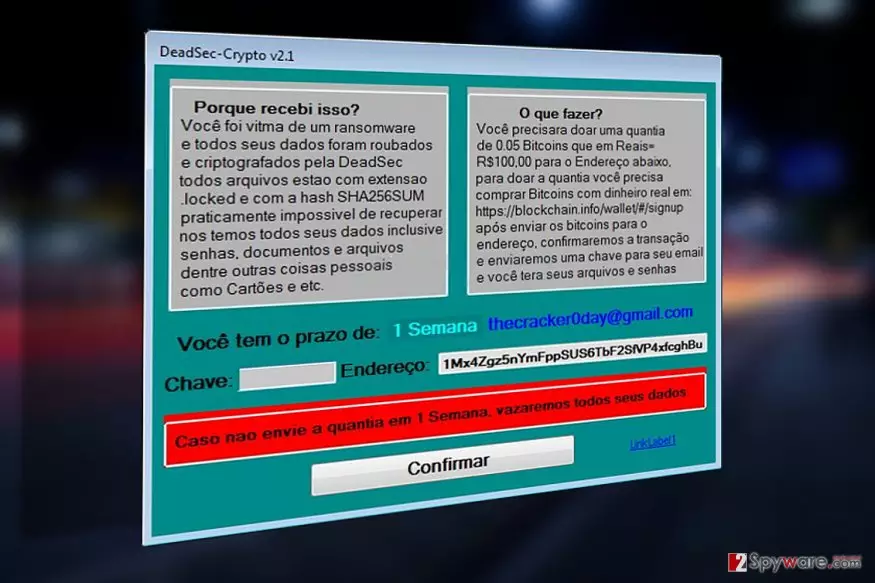
When dealing with DeadSec-Crypto v2.1 or similar malware, you have to remember one thing: these programs are not only dangerous because of their apparent traits but also because they may interfere with the smooth system’s performance or even lead it into developing various vulnerabilities. In the case of this particular virus, these underlying processes may be even more damaging to the system. So, the sooner you remove DeadSec-Crypto v2.1 from your computer, the better. Don’t wait until your device gets corrupted entirely!

Ways ransomware creators deploy ransomware on the targeted computers:
DeadSec-Crypto v2.1 is a new virus and some of it’s parts still seem to be under development. So, at the moment, it is rather difficult to say how the virus reaches computers. It is most likely that the malicious WindowsApplication1.exe file arrives disguised as some legitimate application or software update, which the users download on their computers unknowingly. If you don’t want to get infected with DeadSec-Crypto v2.1, you should also be careful when browsing through your email. Stay away from the “Spam” folder because most of the spam emails with malicious attachments will end up there.
Detailed DeadSec-Crypto v2.1 removal guide
In the instructions below the article, you will find detailed and comprehensive step-by-step instructions which will help carry out DeadSec-Crypto v2.1 removal smoothly. Keep in mind though, that these are only the additional guidelines which may come in handy when decontaminating most malicious virus processes, such as disabling the lock screen or preventing security software blocking. If you wish the elimination to be carried out thoroughly though, you will have to remove DeadSec-Crypto v2.1 automatically. Antivirus software will assist you in this process.
Did this guide help?
Be the first to comment