

Deos – a new crypto-malware that asks to pay 0.1 BTC to redeem files
Deos ransomware is a file-encrypting virus that uses AES cipher to lock various files on the affected computer. Malware appends .locked file extension to each of the following file types and make them impossible to open: .asp, .aspx, .csv, .doc, .docx, .html, .jpg, .mdb, .odt, .php, .png, .ppt, .pptx, .psd, .sln, .sql,.txt, .xls, .xlsx, .xml. Once all targeted data is strengthened with strong cipher, malware might delete Shadow Volume Copies of encrypted files. This feature makes data recovery a complicated procedure. However, developers of Deos provide a ransom-demanding message where they explain how victims can obtain the decryption key. People have to transfer 0.1 Bitcoin to the provided address. According to the crooks, the decryption key will be destroyed if victims don’t rush to make the payment. The ransom note has a timer that shows how much time people have until the irreparable disaster. However, cyber security experts warn that obtaining a decryption software from hackers might end up with money loss or installation of other malware. The main purpose of ransomware-type viruses is to swindle the money from the computer users. Thus, data recovery is just the matter of hackers’ conscience. Instead of being naive and trusting evil-minded people, we recommend scanning the computer with strong malware removal program, such as FortectIntego or SpyHunterCombo Cleaner. With the help of your chosen software, you will be able to remove Deos entirely.
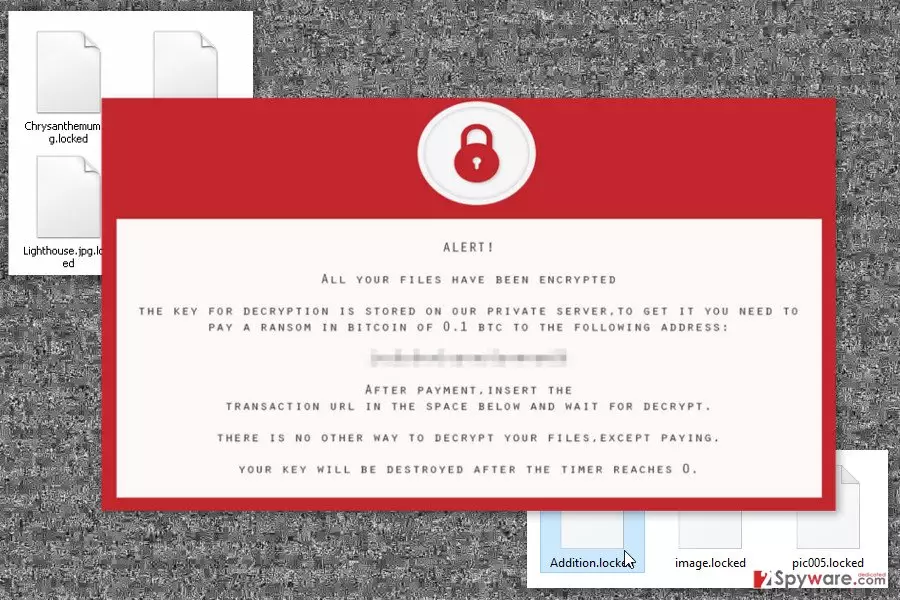
This cyber infection is executed from Locker.exe file that is distributed via emails. However, the malicious payload is obfuscated and delivered as a safe-looking document attached to an email. Once a victim is tricked into opening this file, malware is dropped on the system. Deos consists of many dangerous files that are installed and located in various places on the affected computer. Malicious files might be find in %AppData%, %Roaming%, %Local%, %LocalLow% and %Temp% directories. However, trying to locate and delete these entries manually is not recommended. Some files might be renamed as legitimate Windows files, or malicious code might be injected in system processes. Thus, attempts to perform manual Deos removal may end up with a damaged system. What is more, ransomware is designed to run automatically whenever a user turns on the computer. In order to do that, this file-encrypting virus creates entries in Windows Registry. Therefore, malware not only takes documents, pictures and other files to a hostage, but it also makes computer’s system vulnerable. As a result, other cyber threats might launch cyber attacks and cause other problems. Thus, if you got infected with Does, you should scroll down to the end of this article and learn more about ransomware removal.

The main ways how ransomware enters the system
Developers of Deos ransomware virus might use several distribution strategies, including spam emails, malvertising or bogus software updates. The most common way to allow a virus to enter the system is to click on an infected email attachment.[1] Indeed, cyber criminals use various social engineering techniques to convince people into opening a safe-looking document provided in the email. Additionally, ransomware might come up as a useful software or crucial update. Such fake programs and updates might be presented in pop-ups and banners, as well as in suspicious download websites and other shady online sources. In order to avoid Deos and other crypto-malware, you should be careful and look for the safe sources to download programs, avoid clicking online ads even on legitimate websites and keep all the programs updated. Some advanced cyber infections may take advantage of outdated software and security vulnerabilities[2] in order to attack the device.
Instructions for Deos virus removal
Deos removal has to be performed using professional and powerful malware removal program. As we have mentioned in the article, malware makes modifications in Registry, hides its components in various directories, and might use names of legitimate Windows processes. Thus, you can unintentionally delete wrong files. To avoid irreparable damage to the system, you should install reputable software. We recommend to install FortectIntego, MalwarebytesMalwarebytes or SpyHunterCombo Cleaner. Using this tools, you can remove Deos entirely. If you encounter some obstacles or look for data decryption solution, please scroll down below. Our team has prepared detailed instructions how to fight ransomware and recover your files.
Did this guide help?
Be the first to comment