

All victims of DNRansomware can use the same decryption password to restore their files now
Have you been infected with a ransomware that calls itself DNRansomware virus? If so, you can decrypt[1] your files for free. DNRansomware virus, also known as DN ransomware virus or DoNotOpen ransomware is currently on the hunt for new victims and is believed to be distributed via mail spam[2] campaigns. For data encryption, the virus uses a static key[3] and then launches a lock screen, which contains some information about the infection. According to this ransom note, the virus claims to be using “extremely powerfull new RIJNDAEL encryption.” Let us explain what Rijndael is – it is simply the old name of AES cipher[4].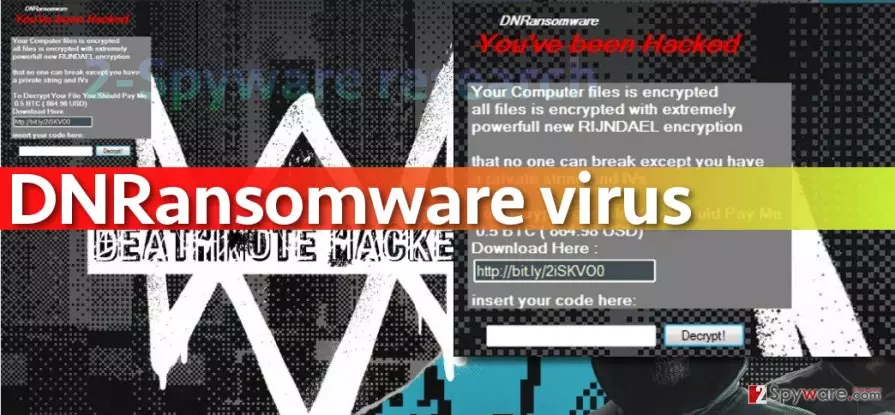
During the encryption, this hideous virus adds .fucked extensions to files that it affects. The virus wants to get 0.5 BTC from the victim (and says that it is equal to 864.98 USD, which is absolutely not true). At the moment of writing this article, 0.5 Bitcoin was equal to 460,82 USD. You shouldn’t follow any commands by cyber criminals and insert 83KYG9NW-3K39V-2T3HJ-93F3Q-GT into the password box and click “Decrypt!” This will decrypt all files with .fucked extensions for free. You will also have to scan the system with anti-malware tools such as FortectIntego or SpyHunterCombo Cleaner and see if there are any DNRansomware leftovers. You must remove DNRansomware files in order to clean the system entirely, so be attentive and use proper tools for DNRansomware removal. We definitely do not recommend you to try deleting the virus manually!
How can I avoid ransomware attacks?
Word “Ransomware” instantly reminds us of standard malware dissemination techniques[5]. There is nothing interesting about methods that are used to spread ransomware – cyber criminals typically rely on good old distribution tactics such as mail spam or exploit kits. To spread the virus via email, criminals obfuscate the malicious file by renaming it into something like Document/Invoice/Scan/Report/Phone bill/CV and so on. Sometimes such file has double file extensions such as .pdf.exe, and in such case, it is enough to open the file to activate the ransomware. In some other cases, the attached document contains scrambled text and asks the victim to enable Macros function. If the victim enables this function, the malicious Macro script added to the document downloads the ransomware from a remote server. And finally, we have mentioned exploit kits – these are simply set of tools meant to scan the victim’s system for vulnerable software and use it to infect the computer with malware. Exploit kits are typically hosted on infectious websites, so we suggest you to avoid visiting unknown websites!
How can I remove DNRansomware malware from my computer?
It is easy to remove DNRansomware virus if you have an anti-malware program. If you do not, we highly suggest you install it. It is better to use automatic tool for DNRansomware removal because even if it is a poorly made ransomware, it is still a very dangerous piece of software. You can delete the virus using FortectIntego or SpyHunterCombo Cleaner programs, or MalwarebytesMalwarebytes if you wish. Before you start one of these programs, reboot your PC using instructions provided below.
Did this guide help?
4 comments
Sergio
Thanks a lot! I was about to pay the ransom already... Im glad that I didnt!
Juliane24
What a foolish ransomware... Its authors are major losers!
Guerln
epic. I believe it is one of the worst attempts to create a ransomware ever. Experts cracked it in a day or so.
chasenstatus
Ahh!!! I recovered my files! Thank you so much, guys! You saved my life, literally.