

Donald Trampo takes files to hostage using strong encryption algorithm
Donald Trampo is a new crypto-malware[1] that locks files on the affected computer using sophisticated cryptography. During data encryption, it appends .SN-16_digits-webmafia@asia.com_donald@trampo.info file extension to each of the targeted file. This file-encrypting virus aims at various documents, audio, video, picture, databases, and other data and makes the impossible to open and use. Once all files are distorted, it changes computer’s wallpaper with the short ransom note. Cyber criminals only inform about data encryption and necessity to send an email to donald@trampo.info or webmafia@asia.com in order to restore files. As you can see, these two emails are also mentioned in the malicious file extension. Authors of the Donald Trampo does not reveal the size of the ransom. It seems that the sum of money might be set individually based on the number of encrypted files. However, we do not recommend contacting crooks and following their orders. Undoubtedly, they will use scare tactics and psychological terror to make you pay the demanded sum of money. Bear in mind that even if you transfer the money, there’s no guarantee that crooks will give you decryption tool or restore your files automatically. [2]Thus, instead of causing yourself more problems, you should scan the computer with FortectIntego and remove Donald Trampo from the computer. Virus removal won’t recover your files. However, you can try alternative recovery options presented at the end of the article.
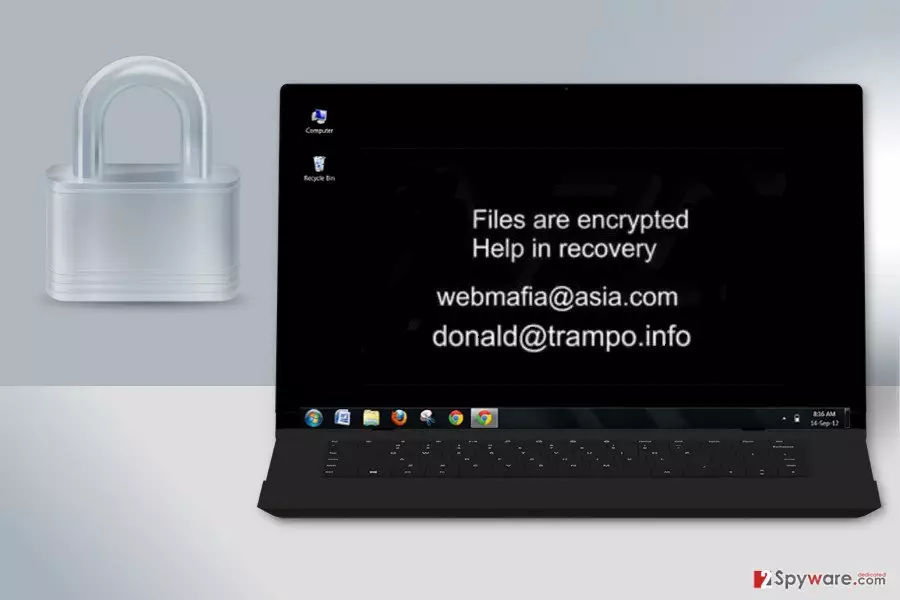
The name of the virus reminds us of Donald Trump ransomware that has been spotted around US President Election in 2016. However, recent analysis hasn’t revealed any relations between these two viruses. On the affected computer, Donald Trampo might install various malicious files, modify the registry and inject malicious codes into the legitimate system processes. Thus, whenever users launch the operating system, the virus also starts running. Apart from damaging data, malware might also open the backdoor to other cyber threats. Thus, if you delay Donald Trampo removal, you can experience other malware attacks. We want to point out that you should not try to delete virus manually. It’s a complicated program that might hide numerous malicious components on the system. Hence, it’s better to rely on the security program.

Distribution of malware is based on malicious spam email campaigns
The main way how Donald Trampo ransomware spreads is malicious email attachments. Cyber criminals use various social engineering techniques and create clever letters that ask to open an infected document. Usually, such files are presented as statements or invoices, and the message itself warns about some serious issues. Crooks often pretend to be from well-known companies or organizations. Thus, users do not suspect anything shady and click on obfuscated Word or PDF file. As soon as the document is opened, Donald Trampo sneaks inside the system and starts its damaging tasks. If you haven’t suffered from ransomware yet, you should be aware that your inbox might be quite dangerous. Therefore, before opening suspicious emails and especially clicking on provided documents, links or buttons, you have to double-check the information about the sender, look up for grammar or spelling mistakes, and other things that might be suspicious. Furthermore, we want to add that developers of the malware rarely rely on only one distribution channel. Thus, you can encounter Donald Trampo virus when downloading programs from unreliable Internet sources, installing bogus updates from online ads, when visiting high-risk websites or ignoring other online security tips. Bear in mind that any security software cannot protect your device 100%. Your actions and taken precautions matter a lot.
Elimination of the Donald Trampo ransomware virus
To remove Donald Trampo from the system safely, you have to employ a powerful and professional malware removal program. Ransomware should be eliminated only automatically. Manual removal may lead to irreparable system damage because crypto-malware is capable of modifying Windows Registry and infecting legitimate system processes. Thus, to spot and stop these activities without professional help is nearly impossible. For virus removal, we recommend choosing one of these tools: FortectIntego, SpyHunterCombo Cleaner or MalwarebytesMalwarebytes. If ransomware prevents from the installation, reboot device to the Safe Mode with Networking. Then you will be able to install your chosen tool and remove Donald Trampo automatically.
Did this guide help?
Be the first to comment