

Driver Support – a system optimization tool that is advertised as a premium technical support service
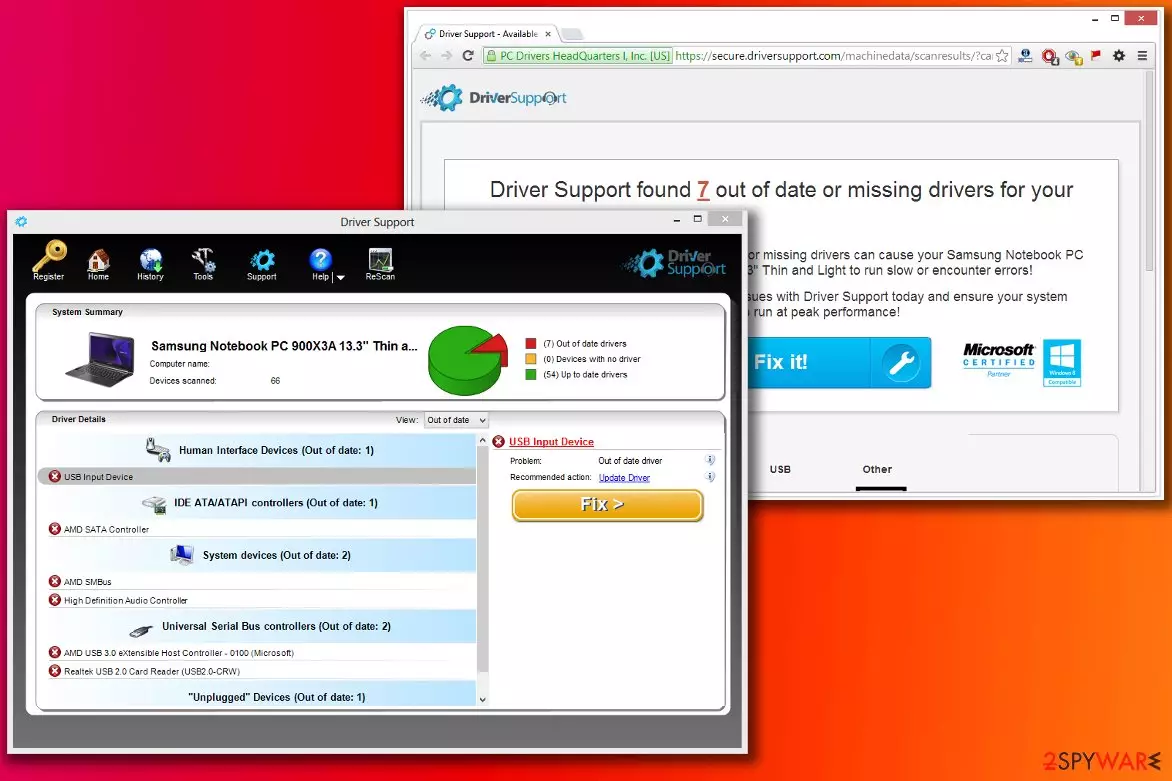
Driver Support is a legitimate application described as the only program on the market that finds the matching driver to the make and model of the consumer's PC hardware to reach the best PC optimization and prevention of crashes, BSoDs, and other Windows OS issues.
Even though this application can detect missing drivers, the only solution is to pay $9.99 per month to download them. Likewise, security experts categorize the application as a potentially unwanted program (PUP) because it most commonly spreads as an optional component in software bundles that can be downloaded from third-party websites.
To make matters worse, several reputable security engines detect this app and suggest removing it immediately. This is not surprising, as users complained about being tricked into paying for the app's license and not being able to uninstall the program easily.
| Name | Driver Support |
|---|---|
| Category | System tools |
| Related files | driversupport.exe |
| Similar tools | Advanced Mac Cleaner, Winthruster, KMSPico |
| Main issues | Reports about exaggerated PC issues; displays fake errors and other computer-related problems |
| Main dangers | The money loss. The paid program's version is presented as the only way to fix the system |
| Other problems | Continuous interruption by the program's ads and notifications, sudden redirects to sponsored websites |
| Removal | You can safely remove this PUP by scanning your device with a reliable anti-malware tool |
| system health | To properly fix Windows issues and delete all tracking cookies, you should use the time-proven FortectIntego PC repair tool |
Even though you can install the article's culprit by downloading it from the official website, people report that it also appears on the systems out of nowhere. According to the IT experts, developers of this PUP use a popular distribution tactic called bundling, which helps the application enter the computer unnoticed.
So, no matter that it is presented as an innovative tool, which can be used for detecting missing, out-of-date, and corrupted drivers[1], users are annoyed by the fact that they are not asked for permission to install the software and started calling it Driver Support virus in online forums.

While we do NOT claim that it is a malicious application, we want to warn you that it can lead you to some inconveniences. If you think that you are ready for its removal, you should follow a step-by-step guide or go to the program's official website and use the provided tips.
Furthermore, it seems that the most annoying issue that DriverSupport users typically discuss is its scan result notifications. According to them, these pop-up messages appear quite often and inform about an excessive amount of detected driver and optimization issues.

Even though there is a substantial risk that there might be some errors present on your computer, security researchers believe that these scan notifications can be pretty deceptive. In other terms, the developers might exaggerate the scan results to encourage users to purchase the program's registration key.
However, if you really think you need to improve your computer's performance, we suggest researching and choosing a more reliable system optimization software. In case you have already installed this tool and want to remove Driver Support, you can use the free elimination guidelines below this article.
You should try to find and then uninstall every component of this application to eliminate this program completely. A quick way to get rid of it is to use dependable security tools, such as MalwarebytesMalwarebytes or SpyHunterCombo Cleaner. Merely download either of them and run a full system scan to clean your computer. Once that's done and your PC runs sluggishly, you should consider using a time-tested system diagnostics tool like the FortectIntego.

Reasons why PUPs appear on the system without your notice
As we have already mentioned, usually, people install this potentially unwanted program from its official website. However, if it has appeared on your computer without your consent, it might have sneaked into the system as an optional component of freeware[2]. This distribution technique can help infiltrate your PC with various PUPs without your notice.
In order to avoid potentially unwanted programs, you should choose only the Custom or Advanced installation method when downloading free programs from the web. In addition, experts[3] warn that you should uncheck checkmarks that claim that you agree to install “free additions” on your PC system.
As soon as it enters the system, this program scans the system and then shows a detailed Driver Support review. You will receive information about outdated drivers and similar issues. However, we must warn you that these alerts may appear every time when you decide to launch your computer. Before you pay for this licensed version of the app, we think that you should check the system with an alternative application.

Easy ways to get rid of the so-called virus
Note that the only reason why you might encounter the Driver Support virus term online is that this application can sneak into your system without your consent. Experts note that this system optimization tool is not malicious itself and more likely falls into the category of potentially unwanted programs that should be eliminated from the system.
Suppose you have decided that you want to switch to more reliable software and remove Driver Support from your computer. In that case, you have two easy options — manual or automatic elimination of the PUP. Regular computer users are advised to download and install an antivirus to help them uninstall this program automatically.
More advanced computer users can perform manual removal. Although, if you feel that you might need some help with the procedure, feel free to check the step-by-step instructions, which are appended at the end of this article. They are entirely free of charge.
Uninstall from Windows
Uninstall from Windows 10/8:
- Type Control Panel into the Windows search box and open the result.
- Under Programs, select Uninstall a program.


Uninstall from Windows 7/XP:
- Click on Windows Start > Control Panel (Windows XP users should click on Add/Remove Programs).
- In Control Panel, select Programs > Uninstall a program.


Remove the unwanted program:
- In the Programs and Features window, look for any recently installed suspicious entries, select them, and click Uninstall.
- If User Account Control appears, click Yes to confirm, then complete the removal.


Did this guide help?
6 comments
David
Well it doesnt show up under the add/remove program list but it still comes out all the time. I also have and run SpyHunter and it doesnt help. SpyHunter says all is well and next time I reboot Driver Support Ad is back.Any other suggestions.
tracy willits
please remove your program now
Kellie
What if there is nothing to uninstall? I have checked in the software and it isnt there yet I get constant popups that are from Driver Support. This is freaking annoying!!! I have run 2 different malware programs and nothing is helping!!
Bob
Did you ever get rid of it? Ive got the same problem.
Adam
it makes me so angry that losers and evil people make software and viruses like this. And they cant put their skills and abilities put to use for something good. These are sick people and they deserve the worst...
MedMarine64
Your advice is great. It just does NOT work as No Program shows to uninstall.