

Erica Encoder ransomware – the self-named cryptovirus that requires ransom in Bitcoin after the file encryption
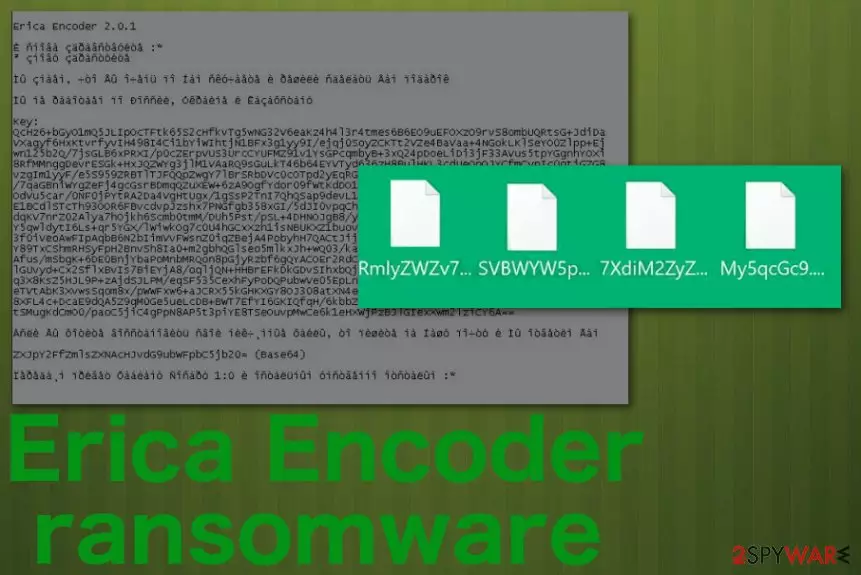
Ransom-demanding message insults users because of the short phrases placed through the text file, all state about the importance of backups, and calls the victim loser. This is a new threat, and Erica Encoder ransomware virus also gets called Erica2020 or Erica Encoder 2.0.1 ransomware because of the mentions in the same text file. Victims are encouraged to pay for virus creators because it is the only way to get back affected files, but contacting these criminals via provided erica2020@protonmail.com, erica_files@protonmail.com emails is not recommended.[1] You may get exposed to dangerous content and get additional malware instead of those decryption keys that hackers promise.
| Name | Erica Encoder ransomware |
|---|---|
| Danger | The threat infects the targeted machine and makes common files useless by encrypting them. Criminals claim that the only way to bet files recovered is to pay the demanded amount in the ransom note. Additional processes running int he background affect the performance, and victims suffer from speed issues. Since many programs get disabled or differently affected, the computer may end up permanently damaged |
| Ransom note | HOW TO RESTORE ENCRYPTED FILES.txt – a file that appears placed in various folders and on the desktop that criminals form for each victim with the unique ID that is needed for later decryption and victim identification |
| Email addresses | erica2020@protonmail.com, erica_files@protonmail.com |
| File appendix | Files affected by the threat get renamed with a long random name formed from numbers and letters and then appended with 4 or 6 character marker |
| Distribution | Malicious advertisements, websites containing malware, and other online content can trigger payload droppers, but the main technique used for spreading such malware – file attachments injected with macro viruses. Such documents get added on various misleading emails and notifications posing as legitimate invoices or messages from companies and services |
| Elimination | To remove Erica Encoder ransomware completely without affecting the machine further, you should employ anti-malware software with the malicious behavior-based detection[2] engine. Such tools can find and terminate crypto-malware for you |
| Optimization | Unfortunately, all the changes made by this threat can interfere with the performance of the computer and damage the device significantly besides affecting the crucial functions. Get a PC repair tool or a cleaner like FortectIntego and make sure to run through system folders and preferences like startup or Windows registry |
Erica Encoder ransomware is targeting Russian-speaking countries because the ransom message is initially written in this language with a few mentions in Ukranian. The sample of the threat got out there early January 2020 and is believed to be developed by Ukrainians because of the text note, including the traces of test encryption and some more Ukranian text. However, this threat can appear in any computer despite the country because distribution mainly involves random online content.
Erica Encoder ransomware demands money from victims in the ransom note file HOW TO RESTORE ENCRYPTED FILES.txt that displays this(translated from the original – Russian):
Erica Encoder 2.0.1
Hello again :*
I greet you againWe know that you miss Us very much and decided to give you a present
We do not work in Russia, Ukraine and Kazakhstan
Key:
–If you want to restore your worthless files, then write to Our mail and we will answer you
ZXJpY2FfZmlsZXNAcHJvdG9ubWFpbC5jb20 = (Base64)
We give greetings to Fabian Sosar 1: 0 and the rest mentally retarded: *
Commonly, Russian-speakers get targeted by such malware due to political conflicts and general hate, but that doesn't mean Erica Encoder ransomware is not going to affect your machine if you are in another country of Europe or in the U.S. Cryptocurrency extortion-based threats are focusing on wide-spreading techniques and can end up on devices all over the world. You need to be cautious to avoid any infection no matter what.
The infiltration happens without any notice because the payload of the virus gets dropped directly on the system. You may notice some speed issues or affected performance of the machine, but encryption is not the process that you can spot. Also, it happens quickly since Erica Encoder ransomware developers mainly focus on this. 
Other experts[3] all over the world and we note that it is better to remove Erica Encoder ransomware without keeping the contact with criminals. It is not an easy process, and it involves security software help, but you can clean the machine and recover your files without the intervention from malicious people. If you have file backups up to date, you should do that as soon as possible.
If not – make sure to collect those encrypted files with the hope of recovering them with a later-developed decryption tool before you terminate the malware using AV tools. When ransomware gets deleted, most of the files needed for decryption get also deleted, so keep that in mind.
The particular Erica Encoder ransomware encrypts files using the AES encryption algorithm that allows the threat actors to change the original code of the image, document, video, audio file, database, or archive. There are no tools developed for the decryption, so the best way to recover those files is to restore them using safe copies stored on your external devices – backup.
Also, if you don't have backups that could help you with these encrypted files, rely on third-party software that can restore such affected data. Only do that after the proper Erica Encoder termination because any program or file related to malicious threat can lead to repeated encryption.
Once Erica Encoder virus is eliminated, and all the programs get disabled, removed from the machine, it is time to tackle virus damage on the machine. To do that properly without causing any damage to your machine, you should use a PC optimization tool or a repair software like FortectIntego. Programs like this can be helpful because Windows registry entries or system files affected by the malware may get repaired, and virus damage eliminated without any danger. If you try to alter startup preferences or registry entries, you can cause problems with essential PC functions. 
Protecting yourself and your valuable data from crypto-extortion malware
Since there are tons of different malware types, distribution methods also go all over the place and depend on a particular virus, malicious campaigns, and malware developers. Ransomware is a category also has many ways that are commonly used to deliver the payload of such intruders.
One of the more common ones- spam email campaigns when legitimate-looking emails are received and include attachments injected with malicious scripts directly or macro malware that is designed to trigger the drop on the machine with a few clicks. You need to note that any email that is not expected can deliver malware and delete suspicious notifications as you get them.
Also, a few red flags to look out for:
- grammar mistakes in emails;
- shortened links in the notification itself;
- typos or slightly altered names of well-known companies;
- invoices, receipts, order details got from services you don't use.
Terminate Erica Encoder ransomware and clean virus damage with professional tools to avoid infection repetition
Erica Encoder ransomware virus is not a simple threat because it involves encryption, file altering functions, and blackmailing victims directly. Additionally to the primary encoding function, this threat interferes with crucial settings, disable functions helpful for virus termination, and file recovery, so the victim has fewer solutions.
These symptoms can make people frustrated and desperate to find the best way to remove Erica Encoder ransomware. Unfortunately, since security tools get blocked or disabled and programs designed to fight against malware cannot work correctly there are some steps you need to take additionally.
We have listed a few methods below, like Safe Mode and System Restore, that can help to achieve better results of Erica Encoder ransomware removal. An additional recommendation is to choose a trustworthy anti-malware tool for system scanning. FortectIntego, SpyHunterCombo Cleaner, MalwarebytesMalwarebytes can also help to tackle virus damage and repair affected system parts.
Did this guide help?
Be the first to comment