

Explorer ransomware is a file-encrypting Trojan that demands ransom
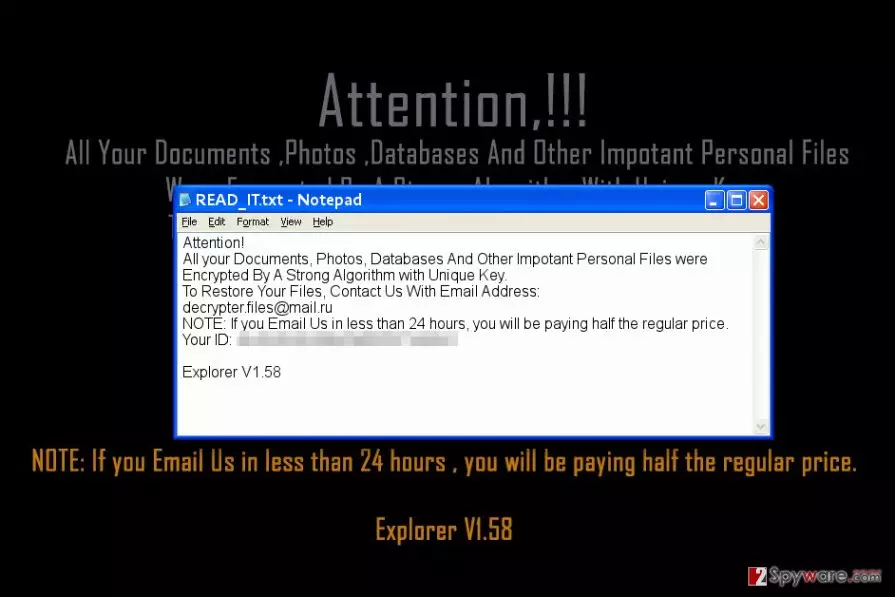
Explorer ransomware is a computer virus that encrypts files with a strong algorithm and prevents the user from accessing them. Each encrypted file gets an additional .explorer extension. In the ransom note called READ_IT.txt, the virus presents itself as Explorer V1.58.
The ransomware[1] approaches the victim as an explerer.exe file, which, once executed, start encrypting victim’s photos, videos, databases, and videos with AES algorithm. Then it creates a ransom note that contains victim’s ID and a suggestion to write to decrypter.files@mail.ru.
The virus doesn’t state how much money it wants to receive from the victim in exchange for data decryptor, although usually, such viruses ask for $200-$1000 in Bitcoin. Developers of this particular ransomware claim that if the victim contacts them within 24 hours, one needs to pay only half of the ransom price.
Explorer virus is created using an open-source code of HiddenTear ransomware[2]. It means that victims might be introduced to a free data recovery tool quite shortly. Until then, you must remove Explorer ransomware from the system.
It is not advisable to use a compromised computer because the ransomware may have additional features such as keylogging. If you care about your privacy, run a full system scan right now to delete the virus from the system.
Ransomware is not a typical computer program, and you won’t be able to complete Explorer removal manually. If course, if you are an experienced IT expert, your attempts might be successful. However, each ransomware sample is different and dangerous in its own way.
Therefore, we believe that using a security software developed by malware analysts is the best idea. Besides, such software cleans all spyware and malware from the system, leaving it clean and safe-to-use. Researchers from LesVirus.fr[3] suggest applying several layers of protection (creating data backup, using anti-malware software, installing regular software updates) to ward of ransomware in the future.

Keep ransomware viruses away from your computer
To keep ransomware at bay, you need to follow certain rules. Methods used to distribute ransomware are quite basic, and cyber criminals introduce new techniques very rarely.
In our opinion, even inexperienced computer users can easily keep up with the latest malware distribution trends. Knowledge about them is what helps to keep unwanted software at bay. However, you should also follow these tips.
- First of all, you can avoid ransomware simply by deleting suspicious emails from your Inbox. Do not let eye-catching subjects convince you to open them or files attached to them.
- Second, enable automatic updates to keep all of your programs up-to-date. The outdated software contains security vulnerabilities that criminals can easily exploit.
- Third, avoid visiting suspicious websites or downloading illegal software. These two are the top sources of malware.
- Finally, create a data backup and use a trustworthy security software to ward unwanted programs off your computer.
Remove Explorer ransomware
It is a must to remove Explorer virus because there is no reason for keeping it on your computer system. What is even more important, you shouldn’t pay the ransom as it does not guarantee data recovery. We do not think that sending money to cybercriminals is a good idea because frauds can invest that money in further illegal projects.
We suggest that you make Explorer ransomware removal your top to-do task. With the help of tutorial that we provided, you can complete this task today. Do not forget to choose anti-spyware or anti-malware software that you want to use first. Do not attempt to uninstall the ransomware manually because you can never know what files or programs it dropped on your PC.
Did this guide help?
Be the first to comment