

Free-Freedom virus: should you be scared of malware developed by 13-year-old?
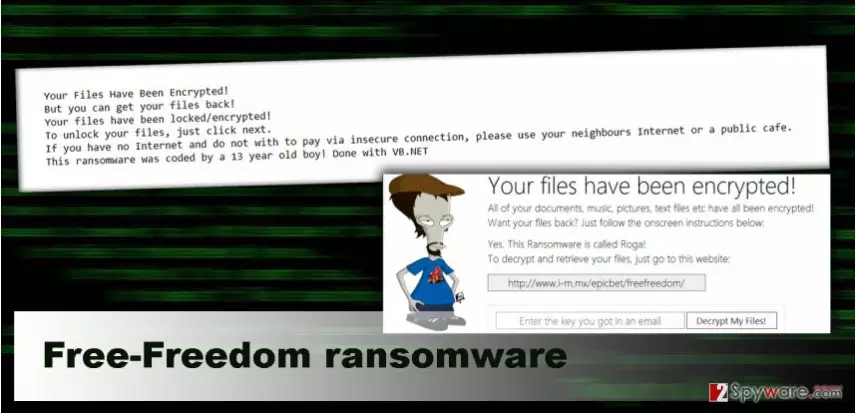
Free-Freedom virus is a new ransomware[1] that tries to convince victims that their personal files have been encrypted. Inexperienced computer users might get easily tricked and believe in this lie, but the truth is that this malware only locks the files. Victims just need to know the password and use it to restore data. Therefore, if you got infected with Free-Freedom ransomware, you should be aware that the password is “adam.” To recognize this computer infection is easy by the appended file extension – .madebyadam. After data encryption, it also delivers a ransom-demanding pop-up message where victims learn about the only effective solution to get back access to their files. As you already know, it’s not true. Moreover, in the message, it is said that this ransomware has been created by a 13-year-old boy. Is it true? We have no idea. Nowadays hackers became creative and might tell various unique stories to encourage victims to transfer some money. If you got infected with the malware, you should not worry about losing your files. Just remove Free-Freedom from the computer and simply unlock your personal files.
Talking about Free-Freedom virus, it’s important to mention Roga ransomware as well. It’s an updated version of the malware that also appends the same file extension and delivers the same pop-up message informing about ransomware attack. Sadly, this version of malware can encrypt data. If you got infected with this version of the malware, you could try to decrypt your files using the password “adamdude9”, but some victims claim that the pop-up message has inactive decryption function. Therefore, if you got infected with Roga virus, we hope you have data backups. If not, after virus elimination, you should try alternative data recovery methods presented at the end of the article. Then, start thinking about solutions for data backups[2]. Both, Roga and Free-Freedom ransomware demands to pay 30 dollar ransom in Google Play gift cards[3], but you should not follow 13 year old’s orders. Even though it’s a small ransom, you should not motivate the hacker to developer bigger ransomware projects and swindle even more money from innocent computer users. Concentrate on the elimination process. For Roga and Free-Freedom removal we recommend using FortectIntego and scanning affected computer’s system.
How can you get infected with the ransomware?
The main Free-Freedom virus and Roga ransomware distribution technique are malicious spam emails. The hackers launch various campaigns and think about many ways how to trick people into opening infected email attachment. Therefore, if you want to avoid malware in general, you should not trust each email that appears in your inbox. Before opening attached PDF, Word or ZIP file, think whether you should receive it or not. If you did not expect to see some invoice, CV, information about some purchase, do not click that document. Curiosity may cause you data loss. Additionally, malware might be spreading via malicious ads and websites[4], bogus software and its updates or using exploit kits[5]. So, it’s important to keep all your programs updated and be careful while surfing the Internet.
How to remove Free-Freedom virus and recover damaged files?
After Free-Freedom attack, you should concentrate on virus elimination and only when malware is wiped out from the computer, you should think about data recovery options. As long as ransomware is on your PC, the system is vulnerable, and you can expect more malware getting inside and causing havoc. For Free-Freedom removal you have to use a professional antivirus or anti-malware program. We recommend choosing FortectIntego or SpyHunterCombo Cleaner; however, you can select your preferred software as well. But keep in mind that the virus might block access to these tools or prevent from installing it. In this case, you will have to follow our prepared instructions at the end of the article. They will help to install or access malware removal tool and remove Free-Freedom for good. Then, you can concentrate on data recovery. If you got infected with a decryptable version of the virus, just use the passwords. However, if you were not fortunate, you should try additional data recovery methods presented below.
Did this guide help?
Be the first to comment