

Freshdesk ransomware encrypts files, asks for ransom, provides support form
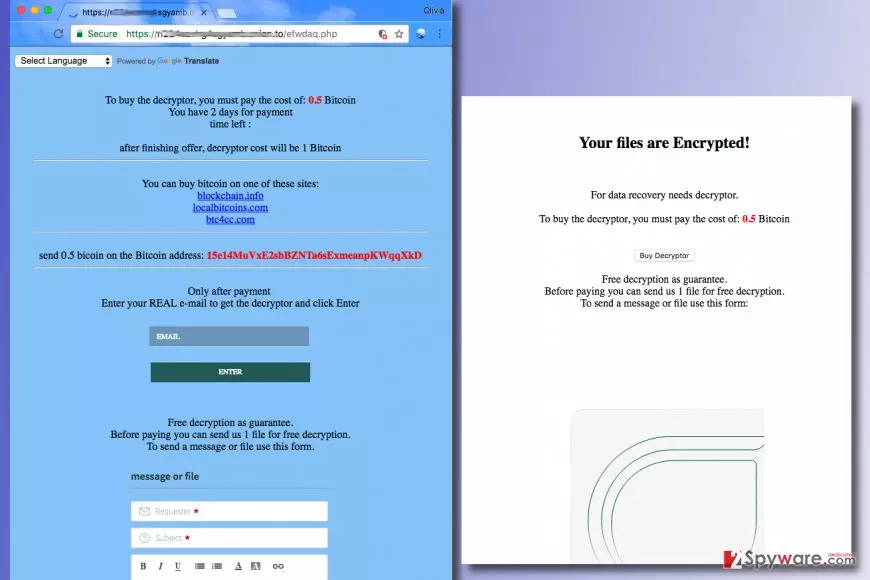
Freshdesk virus is a new ransomware[1] example that appends .www file extension to files it encrypts. As soon as the virus makes all files inaccessible, it drops a ransom note called restore_files.html, which opens via user’s default web browser automatically. The ransom note suggests buying data decryptor for 0.5 Bitcoin[2] and suggests testing the decrypter to unlock only one file. Below the message, there is a Freshdesk form that can be used for communication with cyber criminals. We must point out that although this ransomware was entitled due to the utilization of the particular support form, the developer of customer support software is NOT related to this ransomware in any way. Criminals ask the victim to buy some Bitcoins via blockchain[.]info, localbitcoins[.]com or btc4cc[.]com and then send the required sum of money to 15e14MuVxE2sbBZNTa6sExmeanpKWqqXkD Wallet address. If you pay money to a Bitcoin wallet, keep in mind that it is almost impossible to track down the offender, thanks to the perceived anonymity that cryptocurrencies provide. This ransomware virus is currently under analysis, and so far it is unclear how sophisticated it is. It might be possible to restore your files – just be patient. Until then, we recommend you to remove FreshDesk as soon as you can. For that, software like FortectIntego can be used.
Speaking of data recovery, we must repeat that ransomware viruses use particular cryptography ciphers to render victim’s files useless. It means that files are corrupted using a key that in technical terms is referred to as public key. To restore files, the private key is needed. However, this key is inaccessible as it is stored in criminals servers. Sometimes cyber criminals develop weak viruses, and although it happens rarely, in rare cases victims can restore their files for free. In this case, you might also get a chance to restore your files without paying. Before you do anything regarding data recovery, complete Freshdesk removal first.

Ransomware ways of transmission
Ransomware viruses tend to arrive in the form of a legitimate-looking email letter, which suggests clicking on a certain opening link or email attachment. Be it a fine, invoice, subpoena or another official document, criminals can insert malicious scripts into them, and opening such files leads to corruption of data stored on the compromised computer. Therefore, we recommend users to avoid opening unverified emails and use a data backup to keep your personal files safe. Usage of 3-2-1 ransomware prevention rule is also an excellent idea. Firstly, you should create two backup copies and utilize two different media formats to store them. The third copy should be stored off-site, for example, on a portable data storage device such as USB or hard drive.
Removal of Freshdesk malware
If you want to continue using your computer, you must remove Freshdesk virus from it. Our team recommends choosing FortectIntego or SpyHunterCombo Cleaner software, which helps to detect malicious programs and files and eliminate them from the system all at once. Although we always provide tutorials on how to remove unwanted computer programs manually, we want to remind you that dealing with ransomware is a whole other level and such virus if much more sophisticated. In order to remove it, you need to have specific computing skills. Making a mistake and leaving several malware components on the system can be a fatal mistake that might create a possibility for additional malware to step into your computer system. Therefore, we suggest using these instructions for a successful Freshdesk virus removal.
Did this guide help?
Be the first to comment