

Creators of Gansta do not seem to take ransomware business seriously
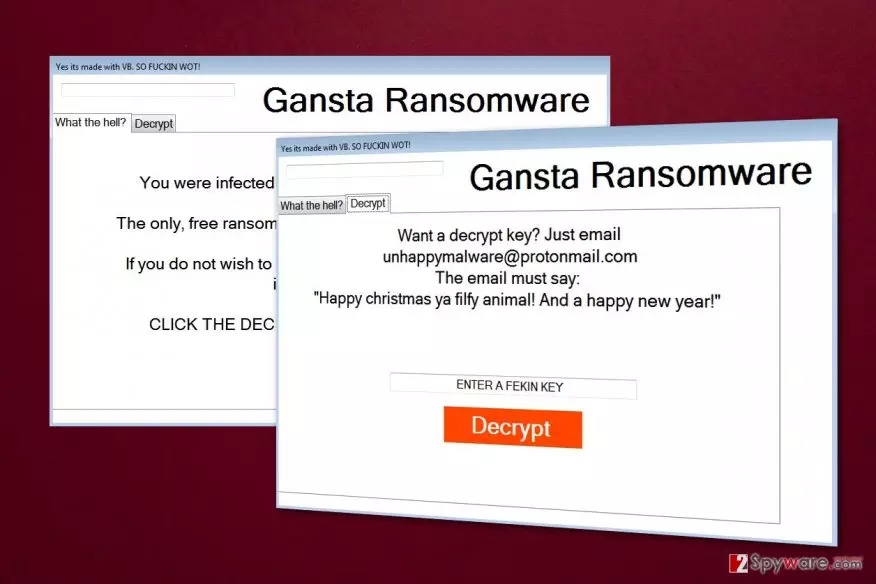
Gansta is a lockscreen ransomware [1] virus that appends .enc file extension to each of the targeted files on the affected computer. Then it delivers a ransom note that asks to send an email to unhappymalware@protonmail.com to learn data recovery possibilities.
Nevertheless, this cyber threat seems to be still under development; this does not mean the virus is less dangerous. On the affected device it might make critical changes in order to boot together with Windows. What is more, it might inject malicious code into various system processes and install dangerous files.
However, the most important task for Gansta virus is to encrypt targeted files and prevent users from using them. It uses a strong encryption algorithm to lock victim’s files. The video, music files, documents, and archives will all become inaccessible and most likely unrecoverable after the virus is done with the encryption process.
Just like any other file-encrypting malware, this one also downloads a ransom note as soon as all files are given .enc extension. Looking at the virus ransom note labeled “Yes its made with VB. SO FUCKIN WOT!” we can see that the malware creators are not taking their work seriously.
The hackers claim they don’t want any payment for the encrypted files and all they want is for the victims to contact them via unhappymalware@protonmail.com email address:
Gansta Ransomware
What the hell?
You were infected with gansta Ransomware.
The only, free ransomware! you just need an email!
If you do not wish to decrypt your files, then ur an idiot! XD
CLICK THE DECRYPT TAB AT THE TOP
Decrypt
Want a decrypt key?Just email
unhappymalware@protonmail.com
The email must say:
“Happy christmas ya filthy animal! And a happy new year!”
Instead of writing an email and waiting for shady data recovery solutions, you should remove Gansta from your PC. Nevertheless, authors of this crypto-malware claim having no interest in victim’s money; it might be just a trick.
People standing behind this “free ransomware” might ask to install suspicious security or data recovery program that is supposed to decrypt corrupted files. However, it might be a malicious program that might cause you more problems.
What is more, even if hackers provide you safe and working decryption software, the virus remains in the system. Remember that this cyber infection might be still under development. Thus, it might be updated soon, and your files might be encrypted again. However, this time data recovery might be expensive.
The first important task after ransomware attack is to delete it immediately from the system. Gansta removal is performed using professional security software like FortectIntego. It assures safe virus elimination.

Distribution methods of the file-encrypting virus
This cyber infection can affect computers using multiple methods. It helps to spread wider and infiltrate more devices in the entire world from China[2] to Germany, and other countries in Europe, United States or Asia.
Developers spread Gansta using these common methods:
- malicious spam emails and their attachments;
- exploit kits;[3]
- fake software downloads and updates;
- illegal downloads;
- malware-laden ads.
The research has shown that Gansta is most likely enter the system with the help of malicious email attachment. Thus, if you receive a suspicious email, you should not rush opening provided document. Make sure that it’s not dangerous.
The malicious link with malware payload may also be embedded on some insecure, software sharing web pages, peer-to-peer networks [4] or hide behind some legitimate-looking ad.[5]
Be careful; deceptive ads often offer to download software updates for a supposedly outdated software. When the malicious executable is extracted on the computer, the virus payload automatically uploads malware on the PC. Stay wary of such downloads and always double-check their legitimacy before allowing them on the computer.
Gansta virus removal guide
To remove Gansta from the computer safely, you need to obtain a professional security program and run a full system scan with the help of it. Trying to locate and uninstall malicious components manually, might end up with irreparable damage to the device.
Nevertheless, developers of the virus may threaten that closing the lockscreen or deleting the program will result in the destruction of files. However, you can’t be sure if the collaboration with the cybercriminals will not result in the same faith. Besides, if the criminals ask you to pay the ransom, you may suffer financially as well.
We recommend performing Gansta removal using FortectIntego or SpyHunterCombo Cleaner. These programs will help to get rid of the virus immediately and protects your device from similar threats in the future. However, if you encounter some obstacles with malware elimination, please check the instructions below.
Did this guide help?
Be the first to comment