

Ghost ransomware is a cryptovirus that increased the ransom amount from 0.08116 to 0.10692946BTC since the first attack
| Name | Ghost ransomware |
|---|---|
| Also known as | GhostHammer ransomware |
| Type | Cryptovirus |
| File extension | .ghost |
| Ransom amount | 0.08116 BTC or 0.10692946 BTC |
| Ransom note | Displayed on a screen in the program window |
| The main executable | Ghost.exe |
| Associated files |
|
| Contact email | paymemen@gmail.com |
| Possible origin of hackers | Spanish or Portuguese |
| Distribution | Spam email attachments |
| Elimination | Download and use FortectIntego for Ghost ransomware removal |
According to virus detection results[2], this GhostHammer ransomware virus is not easily detectable and quite persistent. The initial ransomware infection starts with changing registry keys and adding or corrupted system files. This threat adds a few DLL files on the system, one is for collecting users' files, and other is for the encryption process.[3]
When all of these system changes are made, Ghost ransomware virus starts the main process during which users' files get locked and encrypted by changing the original code of various files:
- photos;
- images;
- databases;
- documents;
- zip archives;
- music files;
- videos.

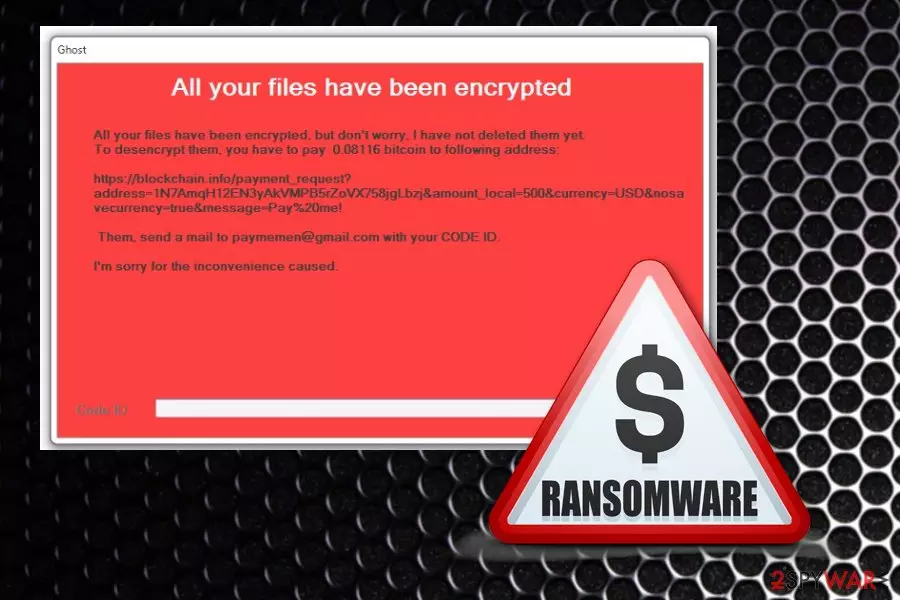
When Ghost ransomware is done encrypting your data, it develops a ransom note that is shown on the screen in a pop-up program window called Ghost. The message contains a few facts about the attack, and it also gives instructions on the payment method and the ransom amount.
The ransom message created by Ghost ransomware reads the following:
All your files have been encrypted
All your files have been encrypted, but don't worry. I have not deleted them yet
To desencrypt them, you have to pay 0.08116 bitcoin to following address:
…..
Them, sdend a mail to paymemen@gmail.com with your CODE ID
I'm sorry for the inconvenience caused
CODE ID:
You need to remove Ghost ransomware and don't even consider paying the demanded ransom. This amount may look small, but it equals $440. Also, paying gives no guarantee that your data would get decrypted eventually. The safest way to get your files back is terminating the virus and then replacing your encoded files with safe ones from the backup.
Unfortunately, the virus was first spotted on November 17th and in a few days, on 20th the ransomware already increased the payment amount. Since that day GhostHammer ransomware demands people to pay 0.10692946 BTC which is equivalent to 500$.
GhostHammer ransomware is a dangerous threat that can be persistent because of the alterations on the system. The main attack starts with added registry entries and various system files. You need to get rid of all of them if you want to terminate the main program.
The existence of these files make GhostHammer ransomware removal difficult:
- GhostService.exe;
- GhostService.exe.config;
- GhostService.pdb;
- GhostService.vshost.exe;
- GhostHammer.dll;
- Ghost.bat.
You can find a few decryption/data recovery methods below the article, also Ghost ransomware removal tips and software suggestions because you need to employ anti-malware tools like FortectIntego for this elimination process. Hackers who developed this virus have added a few features that allow ransomware to affect or even disable antivirus programs, so first, enter the Safe Mode and then scan the device entirely.

Ransomware malicious payload hides in safe-looking documents
Spam email campaigns can be used in a wide range of cyber attacks and distribute anything from adware, scams or even malware designed to spread other infections. Ransomware spreading trojans can be one of them. Spam email attachments often look legitimate and safe because malicious actors disguise their products with well-known names and even put a malicious script on documents named as receipts or invoices.
Researchers[4] note that email from PayPal, FedEx, eBay or Amazon might be infected with malicious macros on those MS Word or Excel, PDF files. This is the main ransomware distribution method because the minute user downloads and opens affected record on the system direct ransomware payload gets on the device. It's also possible that trojans or other malware gets on your system this way and runs additional background processes or infiltrates the ransomware virus.
Eliminate Ghost ransomware the proper way – with anti-malware tools
Since Ghost ransomware virus is not a scam, adware or PUP, you cannot terminate the malicious program manually. You need to clean your system thoroughly, and you can only do that with professional malware-fighting programs like FortectIntego, SpyHunterCombo Cleaner or MalwarebytesMalwarebytes.
To remove Ghost ransomware, you should download one of these suggestions or employ antivirus tool of your choice and perform a thorough system scan on your infected device. This scan allows you to see what intruders are affecting the performance of your device and delete them entirely.
This automatic Ghost ransomware removal eliminates all possible intruders and improves the performance of your device because it removes useless programs and corrupted files. You may need to enter the Safe Mode first before that scan, and you can find a step-by-step guide below to know how.
Did this guide help?
Be the first to comment