

Brief analysis of the Guster ransomware
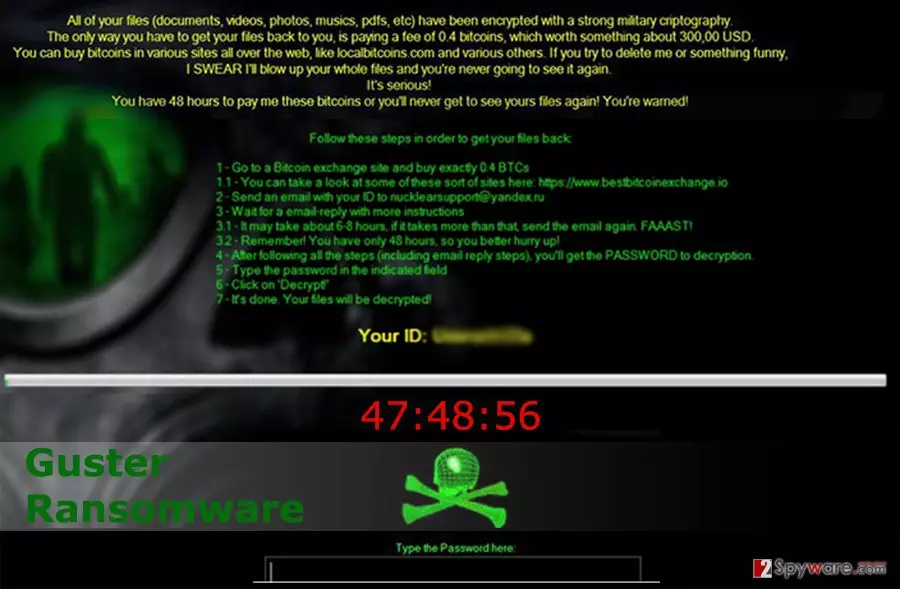
Guster ransomware virus is a dangerous computer infection that encrypts files stored on the targeted computer. Following data encryption, it delivers a lock screen with a ransom demanding message where victims are asked to pay 0.4 Bitcoins[1] for data recovery. Malware encrypts files using strong military cryptography and appends .locked file extension to each photo, audio, video and other encoded documents. Then, Guster virus delivers a black lock screen with a ransom-demanding message and plays a VBS audio file[2]. Hearing the first two lines of the ransom note can frighten any computer user who has encountered this ransomware. Hackers love to play with people’s fears and emotions. It helps to convince them to follow the orders and transfer the money. However, in situations like this, it’s important to stay calm and remember that any cyber criminal is not worth your money. The moment when you learn about the attack, unplug all the devices from the infected computer and start Guster removal process. For that, you will need to run a full system scan with FortectIntego or other reputable malware removal tool. Unfortunately, anti-malware programs cannot decrypt your files, but keep in mind that hackers might not provide the decryption key after receiving the ransom.
Guster virus uses psychological terror to convince people transferring the money. Crooks give victims only 48 hours to make the payment, send their unique ID to nucklearsupport@yandex.ru, and then, wait for 6-8 hours for the response. However, it takes longer than the set deadline, victims should contact crooks again because their time is running out. According to the ransom message, after 48 hours Guster ransomware deletes all encrypted files as well as their unique decryption key. However, it’s just another technique to scare victims. Losing personal files usually seems like a disaster for many computer users; however, you can avoid this terrifying situation by taking precautions[3] and backing up your files regularly. Making backups[4] have never been such an important task as nowadays when thousands of different malware launches numerous attacks to take users’ data to hostage. Having data backups prevents you from risking your money, and you can simply remove Guster without worries that you might never get back your personal documents.
How do hackers spread the malware?
The developers distribute Guster malware via spam emails and suspicious software downloads. Therefore, if you want to avoid it, you should be aware of possible threats hiding in your email inbox and carefully choose sources for software downloads. Hackers get better and better in convincing people about the importance of attached documents in the email. They pretend to be from the legitimate institutions, banks, financial organizations and other well-known companies or retailers. They might use the same design of the original email and confuse people; however, infected emails are usually sent from strange emails and have lots of grammar mistakes. Therefore, before opening any document received in your inbox[5], you should make sure that it is said from the real institution. The executive file of the Guster ransomware might also be hidden in the bogus software installers, so choose necessary programs carefully and download them from the trustworthy websites. Keep in mind that downloading software from the shady domains, file-sharing programs or downloading illegal application might lead to the ransomware attack.
Guster removal guidelines
Guster ransomware virus is a dangerous computer infection that should not be removed manually. It might be hidden deeply in the system and installed lots of malicious files that might be impossible to detect manually. For this reason, we highly recommend employing strong and professional malware removal tools, such as FortectIntego or SpyHunterCombo Cleaner, that can remove Guster virus with all its components. Before installing one of these programs, read the instructions below because malware might prevent you from doing it and try to stay as long on your PC as possible. After Guster removal, you can try to restore your files from backups or use additional data recovery methods that are presented at the end of this article.
Did this guide help?
1 comment
waiting
Im still patiently waiting for the decrypor...