

hc6 – decryptable ransomware virus
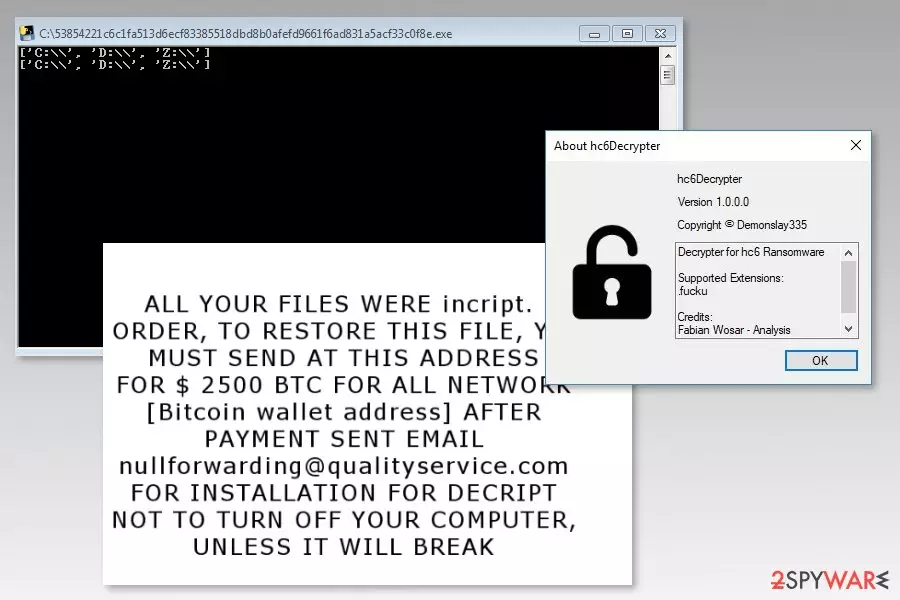
hc6 ransomware[1] is a malicious program that appends .fucku file extension to the targeted files on the affected machine. Nevertheless, it delivers a data recovery offer in the recover_your_fies.txt document; there’s no need to follow them. The free hc6 decryptor is already released.
This recently discovered cyber threat aims at computer networks. Once one device connected to a network gets infected, the hc6 continues spreading further causing havoc in workplaces, educational institutions, and other organizations.
Malware executable hc6.exe is downloaded into the c:\windows\ directory and launched immediately. Then it starts data encryption procedure using AES-256 CBC and SHA256 ciphers. Once it finishes damaging files, the virus drops a ransom note full of grammar mistakes:
ALL YOUR FILES WERE incript.
ORDER, TO RESTORE THIS FILE, YOU MUST SEND AT THIS ADDRESS
FOR $ 2500 BTC FOR ALL NETWORK
[Bitcoin wallet address] AFTER PAYMENT SENT EMAIL nullforwarding@qualityservice.com
FOR INSTALLATION FOR DECRIPT
NOT TO TURN OFF YOUR COMPUTER, UNLESS IT WILL BREAK
As you can see, authors of the hc6 virus follow traditional ransomware model. Victims have to transfer bitcoins and send an email to nullforwarding@qualityservice.com in order to get decryption software. However, doing that is not needed. As we have mentioned in the beginning, the free decrypter is already released.
But before data recovery, you have to remove hc6 from the affected computers and network. While ransomware resides on the system, all recovered files will be encrypted again after restarting the computer.
In order to remove all malware-related files and components, you have to obtain FortectIntego or another reputable malware removal tool. Ransomware is a complicated cyber infection. Thus, hc6 removal has to be performed properly.

Spam emails are the most common ransomware distribution method
Computers usually get infected with file-encrypting viruses when a user opens a malicious email attachment. Typically, infected emails look like legit letters that contain important information. Unfortunately, it’s just an image created using social engineering tactics.
Users should open email attachments, clicking links or buttons only if they are certain that it’s not a dangerous file and they can trust the sender. However, other cybersecurity tips are also needed to follow, such as:
- avoid downloading illegal content;
- not installing software or their updates from pop-ups;
- staying away from questionable commercial offers, ads or banners;[2]
- keeping software and operating system updated;
- installing antivirus software.
Terminate hc6 ransomware virus
If you are thinking about manual hc6 removal, we want to discourage you from this activity. Crypto-malware consists of numerous files and processes that are nearly impossible to detect and terminate them manually. Experts from Les Virus[3] note that manual ransomware removal is achievable only for experienced IT specialists.
Thus, regular computer users are advised to dedicate hc6 removal for security software, such as FortectIntego or MalwarebytesMalwarebytes. However, ransomware might prevent you from running automatic elimination. Thus, the instructions below will help you. Additionally, you will find data recovery guide and decryptor's download link.
Did this guide help?
Be the first to comment