
Hgsh ransomware: what it is and how to remove it
Hgsh ransomware is a malicious program designed to encrypt all personal data on the computer and then demand ransom for the return. The threat claims about the only possible solution - paying the ransom, but there are various tricks and methods that criminals use to scare people into transferring money for the alleged decryption.
Facts checked October 6, 2026. Removal steps tested on Windows 11 (26H2) and checked against Microsoft's and the browser makers' current documentation. Sections marked as our earlier report are the original text: they describe the threat as it was then and have not been reviewed since. The 2026 status, the removal steps and the questions are current.
Automatic
Get a free scan and check if your PC is infected.
Fortect finds malware, unwanted programs and the Windows damage they leave behind, and repairs it in one pass.
Before you restore backups, a full scan can confirm the program that added .hgsh is gone.
Do it yourself · free Remove Hgsh ransomware yourself 6 steps, about 18 minutes, no software needed.
Start the steps
Hgsh ransomware: summary
| Distribution | Files with the payload of this virus get distributed via spam emails or pirating services because criminals manage to spread the infection undetected |
|---|---|
| Name | Hgsh ransomware |
| Type | Ransomware, cryptovirus, file locking virus |
| Malware family | STOP ransomware/Djvu virus |
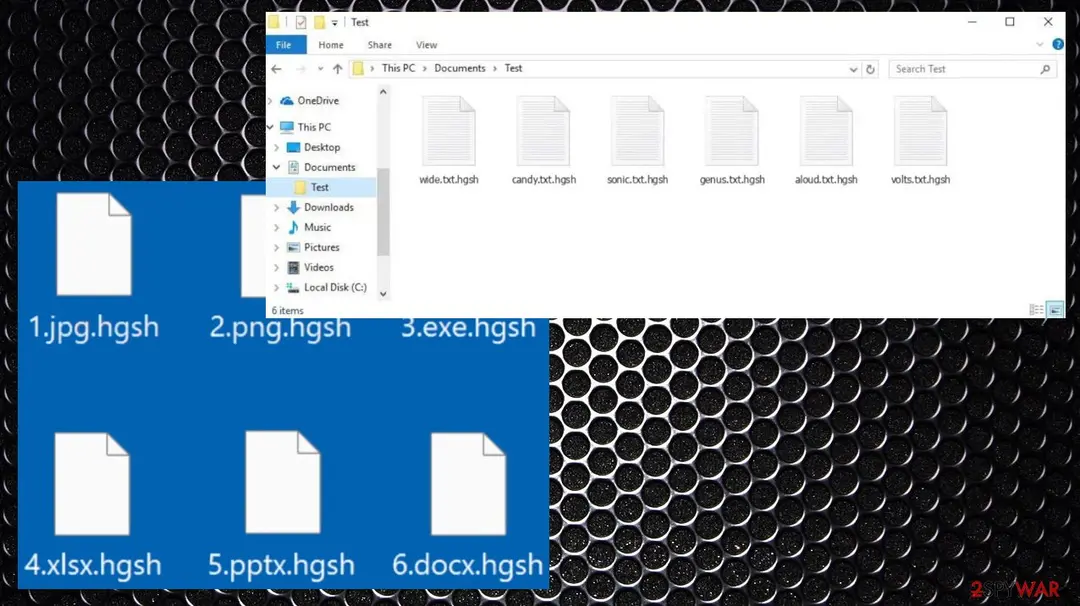
| Extension | Files appended with .hgsh extension, e.g., "picture.jpg" is turned into "picture.jpg.hgsh" |
| Ransom note | _readme.txt |
| Removal | Scan the PC with security software to find and remove the malware and anything installed with it. Fortect scans Windows for malware and repairs the system files and settings it damaged. Remove it nowTo use the full-featured product, you have to purchase a license for Fortect. The scan is free. |
Show 14 more facts
| Contact | manager@mailtemp.ch, helprestoremanager@airmail.cc |
|---|---|
| File recovery | If no backups are available, recovering data is almost impossible. Nonetheless, we suggest you try the alternative methods that could help you in some cases – we list them below |
| Detection names | Microsoft: Ransom:Win32/StopCrypt.KM!MTB; Avast: FileRepMalware; AVG: FileRepMalware; ESET-NOD32: A Variant Of Win32/Kryptik.HNOS; Kaspersky: UDS:Trojan.Win32.Scarsi.gen |
| Encrypted file extension | .hgsh |
| Decryptor | No free decryptor is known for this variant; check No More Ransom (nomoreransom.org) for updates |
| Damage | Not recorded in the old report |
| Symptoms | Files renamed with a new extension and a ransom note left in folders |
| Evidence | 4 write-ups by security sites; no sample analysed yet |
| Encrypted files | .hgsh |
| Attacker contacts | manager@mailtemp.ch |
| Free decryptor | No free decryptor is known (checked 6 October 2026) |
| First seen | 7 December 2021 |
| Microsoft Defender name | Ransom:Win32/StopCrypt.KM!MTB |
| Facts checked | 6 October 2026 |
Which name will your scanner show?
Microsoft's name for Hgsh ransomware is Ransom:Win32/StopCrypt.KM!MTB.
Defender sorts threats by category first, so the word before the colon tells you what kind of program was found, even if the family name means nothing to you.
Do not search for a removal tool by the detection name alone; fake "removal tools" use the same keywords. How the naming works is explained in our guide to antivirus detection names.
- File extension:
.hgsh - Note file:
_readme.txt - Contact:
manager@mailtemp.ch
From our report of Dec 2021 · not reviewed since
More from our earlier report on Hgsh ransomware
- Perform a full system scan with powerful security software, such as ,
- Malware can seriously tamper with Windows systems, causing errors, crashes, lag, and other stability issues after it is terminated.
How Hgsh ransomware behaves
From our report of Dec 2021 · not reviewed since
Hgsh ransomware – a cyber infection that might result in complete data compromise
Hgsh ransomware is a malicious program designed to encrypt all personal data on the computer and then demand ransom for the return.
The threat claims about the only possible solution - paying the ransom, but there are various tricks and methods that criminals use to scare people into transferring money for the alleged decryption.
Once inside the system, the ransomware encrypts all personal pictures, videos, documents, archives, and other files by using a strong encryption algorithm, which also appends a .hgsh extension in the process to mark the altered files. Victims can no longer access their data and are required a unique key that is in possession of cybercriminals behind the ransomware.
Once the encryption is complete, the virus drops a ransom note _readme.txt - instructions from cybercriminals. It explains to victims what happened to their files and claims that the only method to return them is by paying a ransom for a decryption tool. For negotiation purposes, crooks also provide emails manager@mailtemp.ch, helprestoremanager@airmail.cc.
The full ransom note text:
Hgsh ransomware is a cryptovirus that belongs to a malware family known as Djvu ransomware. This malware family encrypts all the important files on a Windows computer and restricts access to them.
The ransom note, its contents, emails, and even the ransom amount have not been changed for years now and the criminals behind this family continue to release new variants over and over. At least one a week including the latest Yqal, Moia, Palq.
While it is true that Hgsh virus files require a unique decryption key to unlock them, experts recommend not paying the ransom in any circumstances. Many companies why encounter file-locking threats even stay away from the payment as cybercriminals might not keep their promises, resulting in financial losses.
From our report of Dec 2021 · not reviewed since
More about the ransomware
Hgsh ransomware is a virus that attacks Windows computers by using various infiltration methods, and one of the more common ways this family is spreading around includes cracks for games and software, cheats, other pirated files.
Once inside, it uses an army-grade encryption algorithm to lock up all commonly used files, including documents, archives, videos, music, and other files. Data gets locked and unreadable immediately after the code alteration. Ransom note _readme.txt is the message directly from victims.
According to Hgsh virus authors, victims need to contact them via email and provide their personal ID. Once that is done, users should receive further instructions to proceed with the payment provided in bitcoin cryptocurrency, and eventually, get the decryption tool and key for the complete file recovery.
The price of the alleged decryption service can vary, but it is offered for $490 by this family. Users have 72 hours to react and get their data encrypted before they get hit with a ransom amount increase because it gets doubled.
However, we do not recommend contacting the attackers because they might not deliver the required decryption tool. Check out the alternative methods we provide below instead. The payment may not get you to the file recovery options and lead to malware installations or more direct scams. it is not considered safe to contact criminals. Especially when these criminals are known for their stealthy methods.
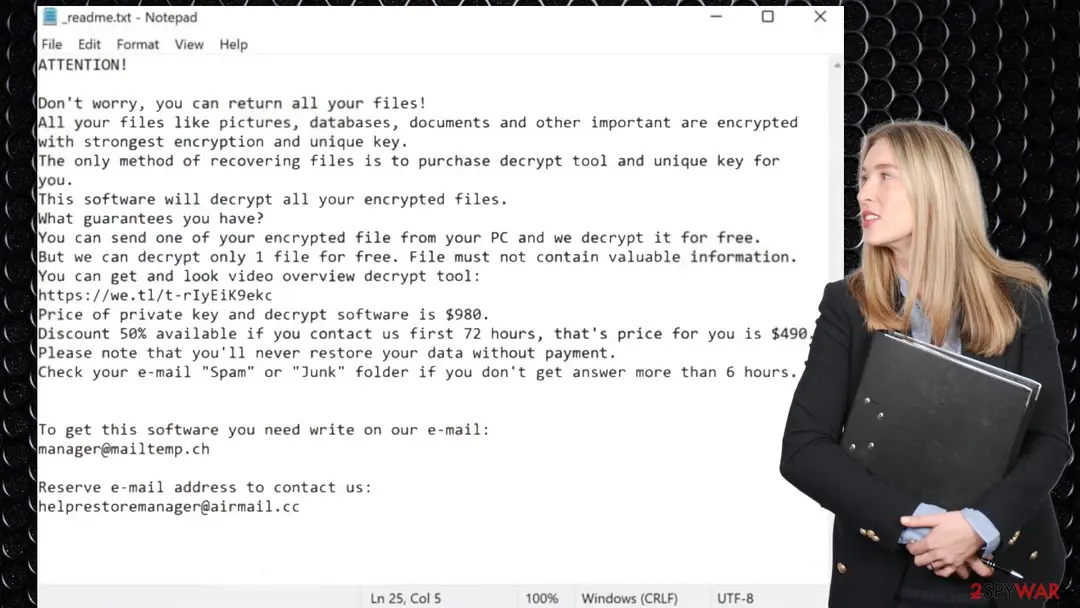
The Hgsh ransomware note
ATTENTION!
Don't worry, you can return all your files!
All your files like pictures, databases, documents and other important are encrypted with
strongest encryption and unique key.
The only method of recovering files is to purchase decrypt tool and unique key for you.
This software will decrypt all your encrypted files.
What guarantees you have?
You can send one of your encrypted file from your PC and we decrypt it for free.
But we can decrypt only 1 file for free. File must not contain valuable information.
You can get and look video overview decrypt tool:
hxxps://we.tl/t-pk3SGFlmek
Price of private key and decrypt software is $980.
Discount 50% available if you contact us first 72 hours, that's price for you is $490.
Please note that you'll never restore your data without payment.
Check your e-mail "Spam" or "Junk" folder if you don't get answer more than 6 hours.
To get this software you need write on our e-mail:
manager@mailtemp.ch
Reserve e-mail address to contact us:
supporthelp@airmail.cc
Your personal ID:
How to remove Hgsh ransomware
Tools you'll need
All of these are free except where noted. Download them on a clean device if the infected PC is offline.
- A USB stick: to keep the ransom note, two or three encrypted files and screenshots off the infected PC.
- Microsoft Defender Offline: built into Windows 11 and Windows 10; scans before Windows starts, so running malware cannot hide.
- Microsoft Safety Scanner: a second, portable scanner with current signatures; each download works for 10 days.
- ID Ransomware: identifies the family from the note and one encrypted file and says whether a decryptor exists.
- No More Ransom: the free decryptors from police and security companies; check it again every few months.
- Fortect (optional): scans Windows for malware and repairs the system files and settings it damaged. The free scan is in the box above.
How to remove Hgsh ransomware and get your files back
Work in this order.
Disconnecting comes first, removal comes before any restore, and nothing here asks you to contact the attackers.
Step 1: Disconnect the PC and unplug backup drives
Hgsh ransomware encrypts everything it can reach, including drives and shares you connect later. Cut the network first: cable out, or Wi-Fi off from the taskbar.
Then unplug every USB stick and backup disk and pause cloud sync, so the encrypted versions do not replace your online copies. Do not reconnect any of them until the ransomware is removed from the Windows 11 or Windows 10 PC.
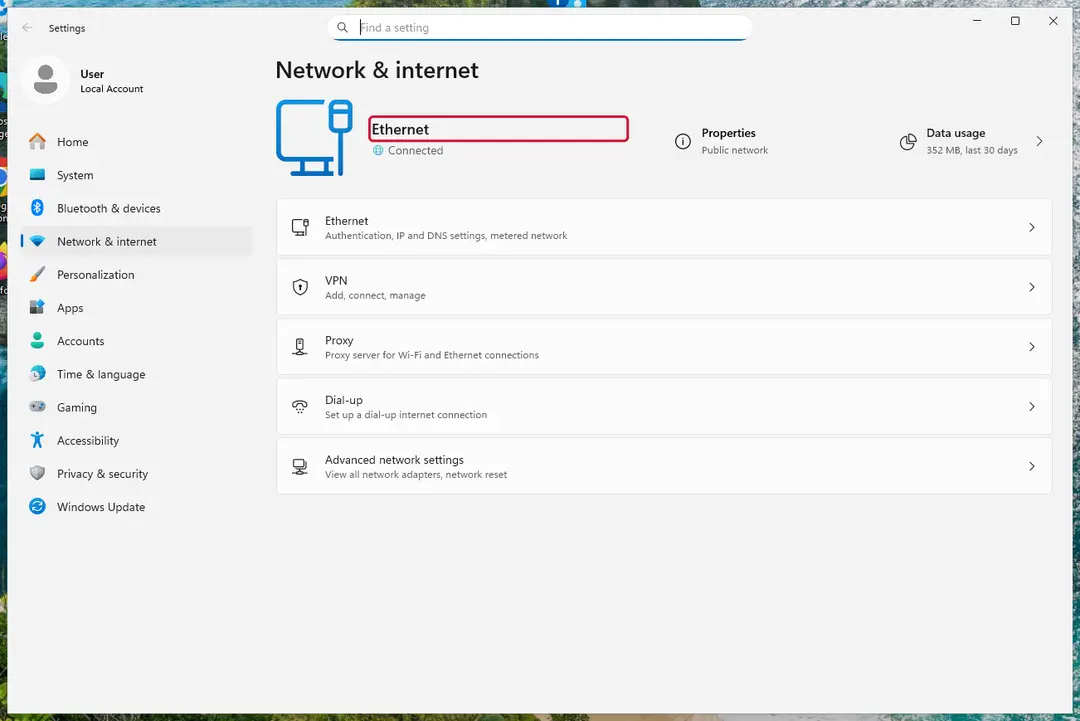
Windows 11: turn off Wi-Fi to take the PC offline. Full procedure with screenshots: Ransomware: first steps, finding a decryptor and recovering files
Step 2: Save the ransom note and confirm the family
Copy
_readme.txtand one or two files ending in.hgshto a USB stick, and leave the originals where they are.From another device, upload the note and a sample file to ID Ransomware or No More Ransom's Crypto Sheriff, which name the family from the note, the extension and the file structure.
Write down the contact address and your personal ID from the note, because a decryptor or the police may ask for them.
Warning: Never contact the attackers from the infected Windows 11 or Windows 10 PC.
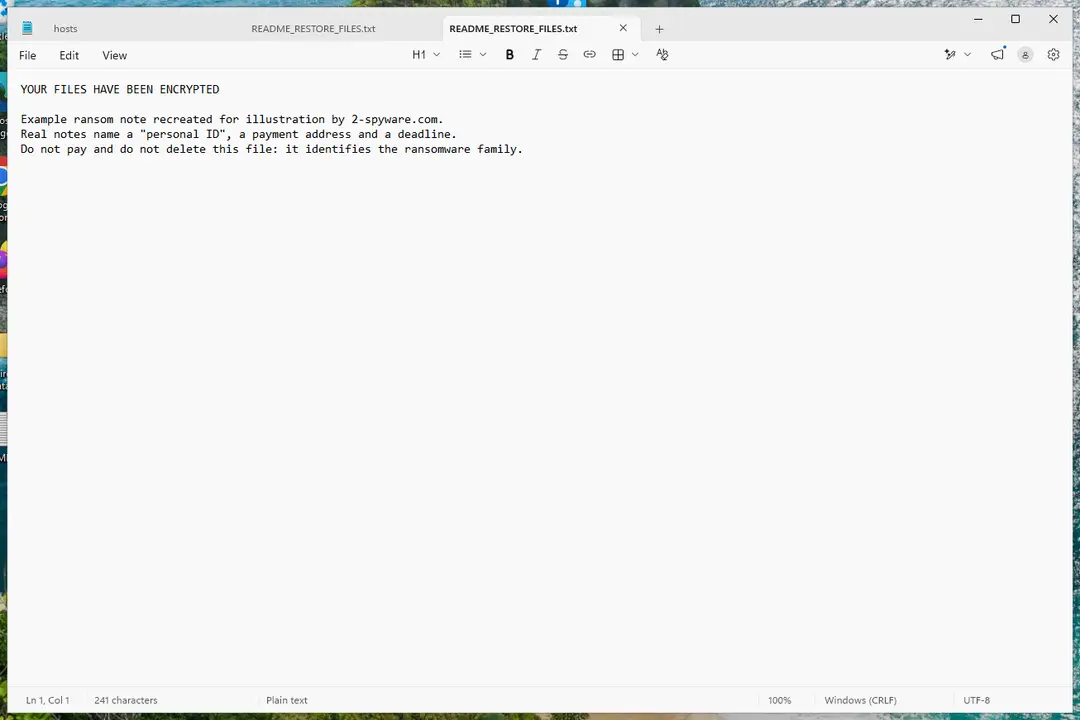
Windows 11: the ransom note and encrypted files to copy for identification. Full procedure with screenshots: Ransomware: first steps, finding a decryptor and recovering files
Step 3: Check for a free decryptor
For Hgsh ransomware, no free decryptor is known (checked 6 October 2026). Search the family name in the No More Ransom decryption tools list and in the free decryptors of Emsisoft, Avast and Kaspersky, because new tools appear years after an attack.
Important: Keep the encrypted files even if nothing works today, and do not pay before every free option is ruled out: payment does not guarantee a working key.
Decryptors run on Windows 11 and Windows 10, but only after the ransomware itself is removed.
Full procedure with screenshots: Ransomware: first steps, finding a decryptor and recovering files
Step 4: Remove the ransomware before you restore or decrypt
Restoring or decrypting files while Hgsh ransomware still runs lets it encrypt them again. Run a Full scan in Windows Security > Virus & threat protection > Scan options, then the Microsoft Defender Antivirus (offline scan).
If the ransomware blocks Windows Security, start Safe Mode with Networking and scan from there. Some families install a password stealer as well, so let both scans finish on Windows 11 or Windows 10.

Windows 11: Windows Security > Virus & threat protection > Scan options. Full procedure with screenshots: Run a Microsoft Defender Offline scan
Step 5: Look for shadow copies of the files
Open Command Prompt as administrator and run
vssadmin list shadows. If it lists copies dated before the attack, right-click a folder with encrypted files in File Explorer, choose Properties > Previous Versions, and open or restore a version from before that date.ShadowExplorer, a free tool, shows the same copies when the tab is empty or hidden. Most current families delete shadow copies, so an empty list is normal, but the check takes two minutes on Windows 11 or Windows 10.
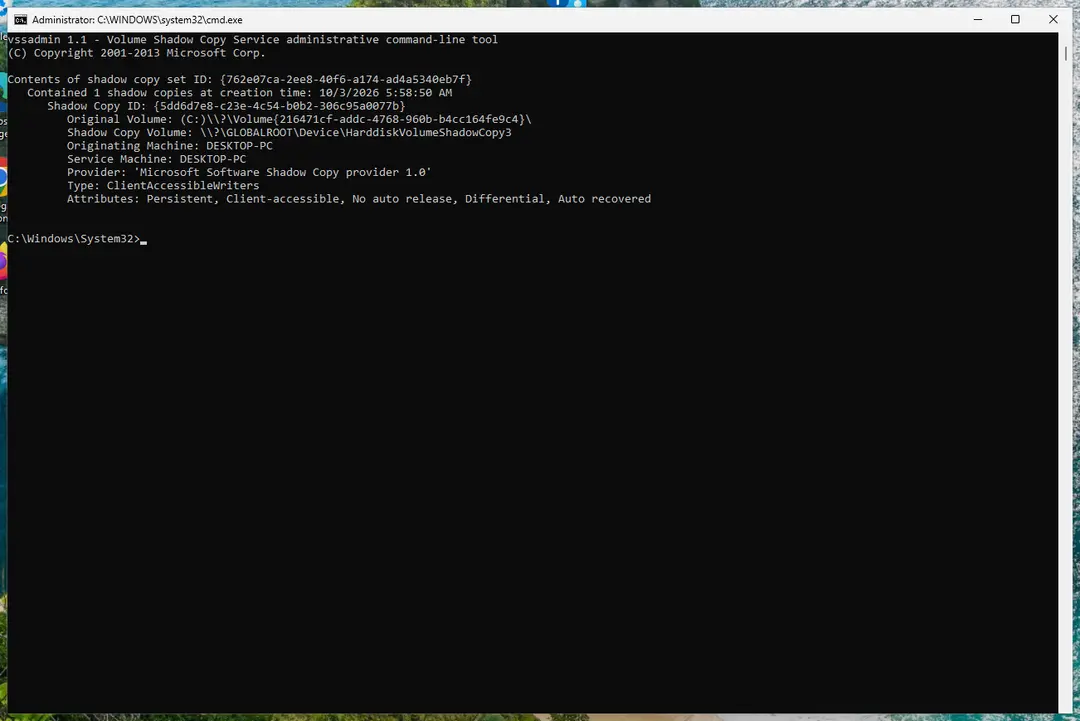
Windows 11: vssadmin list shadows shows whether shadow copies exist. Full procedure with screenshots: Ransomware: first steps, finding a decryptor and recovering files
Step 6: Restore the files from a backup or recover deleted originals
Restore from an external backup, File History or OneDrive's version history, choosing a date before the attack. Connect the backup drive only after the scans are clean, or the ransomware encrypts it too.
If there is no backup, file recovery software can sometimes find the deleted originals, because some ransomware writes an encrypted copy and deletes the original file.
Stop writing to the drive and try recovery on Windows 11 or Windows 10 before new files overwrite the space.
Full procedure with screenshots: Recover deleted files (Recycle Bin, backups, OneDrive) On uGetFix
Instructions for each browser and system
The detailed steps for every browser and system this guide covers. Open the one you use.
Manual removal using Safe Mode
Important! →
Manual removal guide might be too complicated for regular computer users. It requires advanced IT knowledge to be performed correctly (if vital system files are removed or damaged, it might result in full Windows compromise), and it also might take hours to complete. Therefore, we highly advise using the automatic method provided above instead.
Step 1. Access Safe Mode with Networking
Manual malware removal should be best performed in the Safe Mode environment.
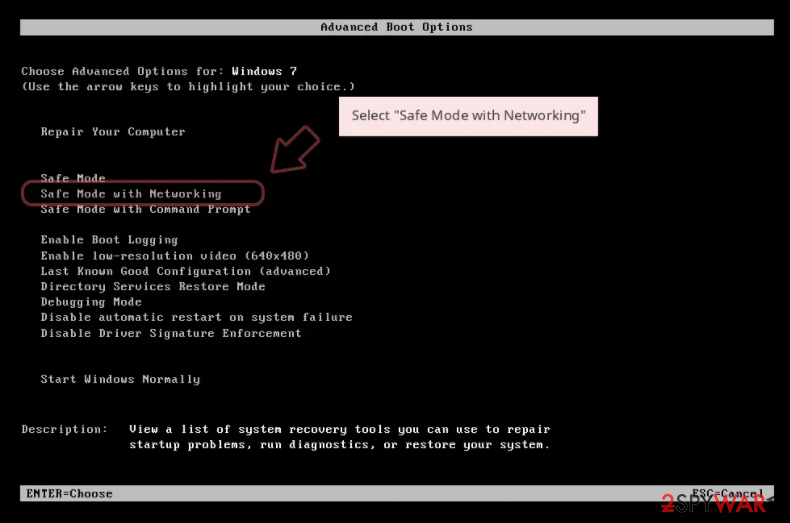
Windows 7 / Vista / XP
- Click Start > Shutdown > Restart > OK.
- When your computer becomes active, start pressing F8 button (if that does not work, try F2, F12, Del, etc. - it all depends on your motherboard model) multiple times until you see the Advanced Boot Options window.
- Select Safe Mode with Networking from the list.
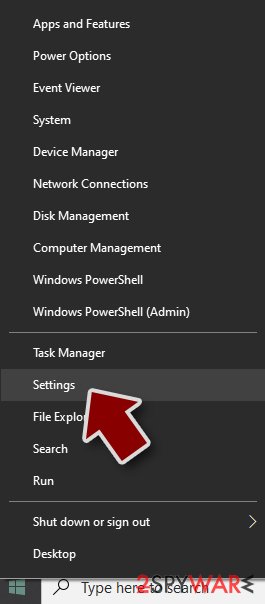
Windows 10 / Windows 8
- Right-click on Start button and select Settings.
- Scroll down to pick Update & Security.
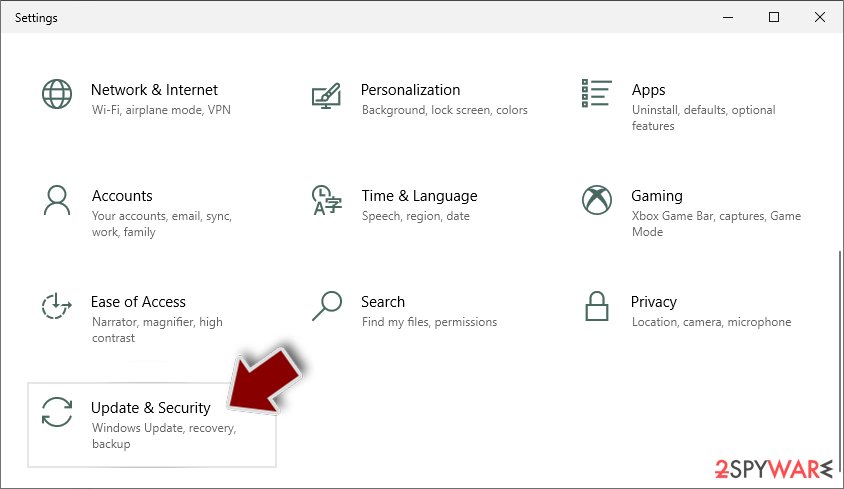
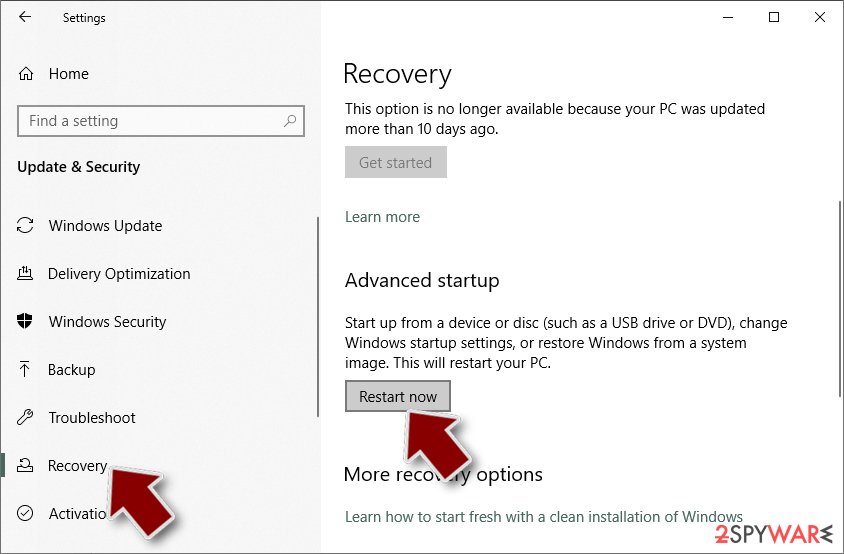
- On the left side of the window, pick Recovery.
- Now scroll down to find Advanced Startup section.
- Click Restart now.
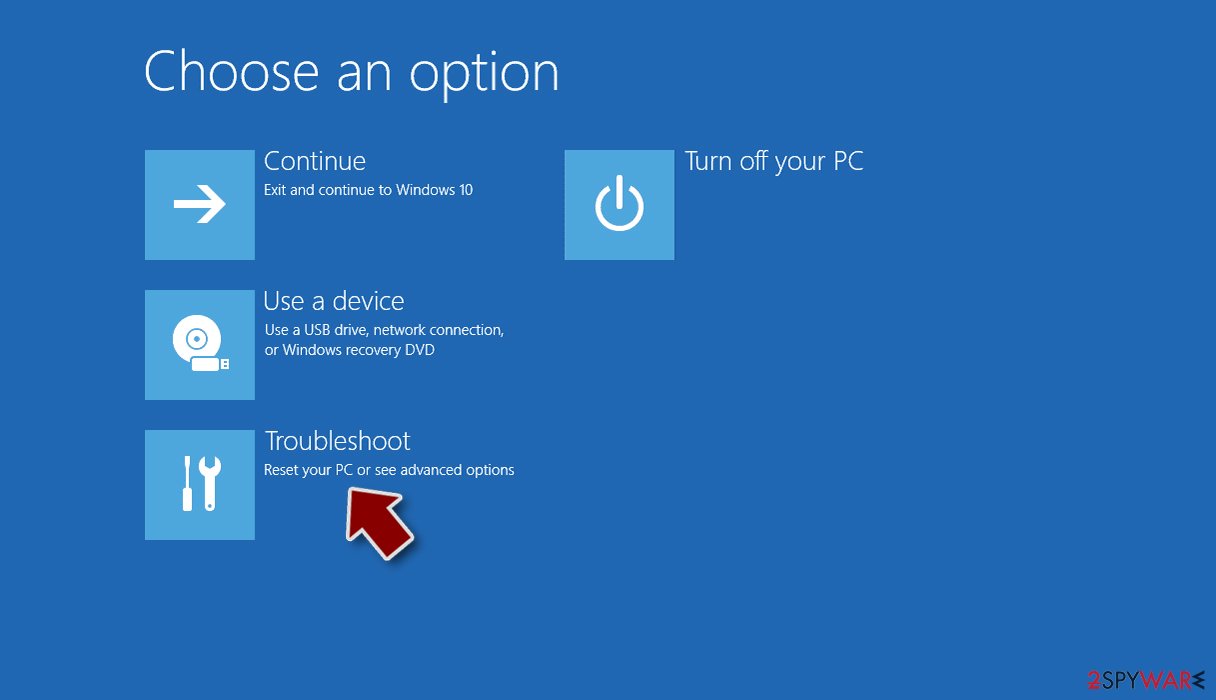
- Select Troubleshoot.
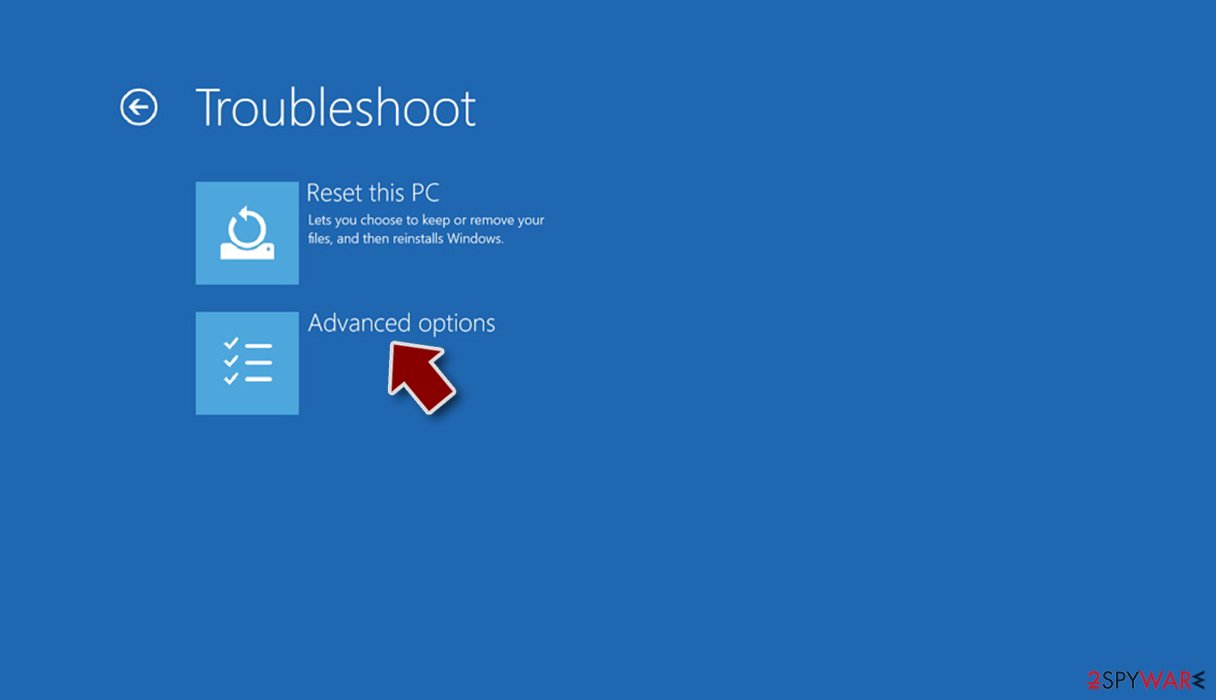
- Go to Advanced options.
- Select Startup Settings.
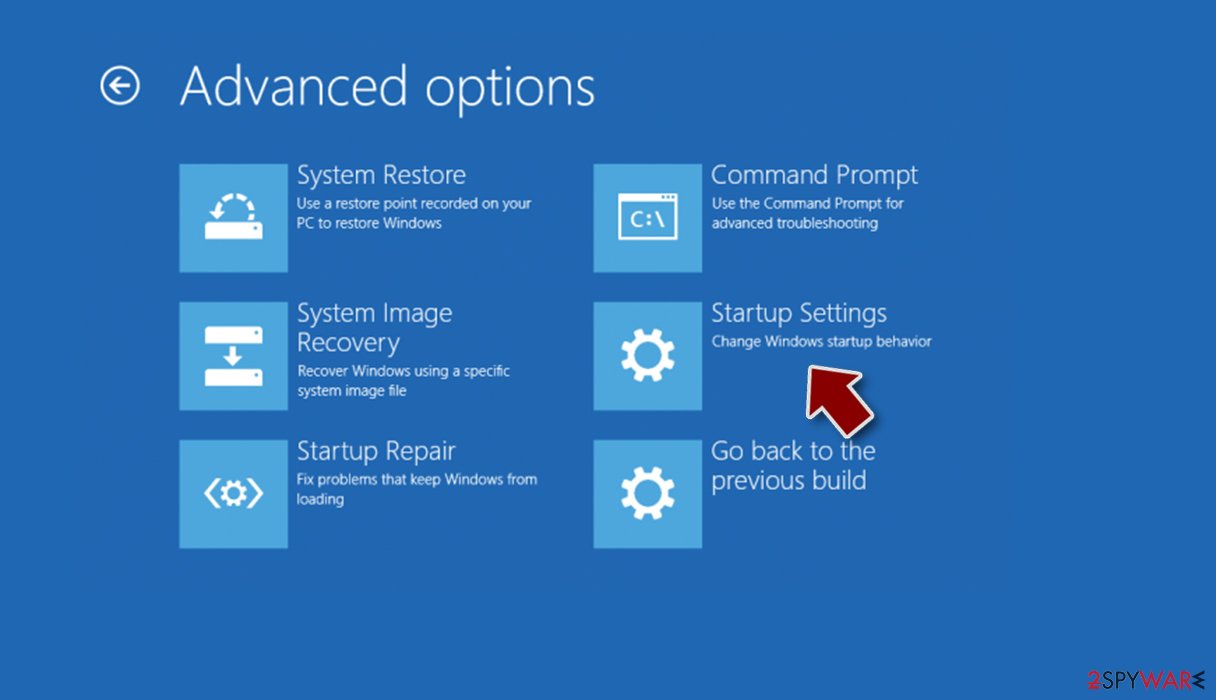
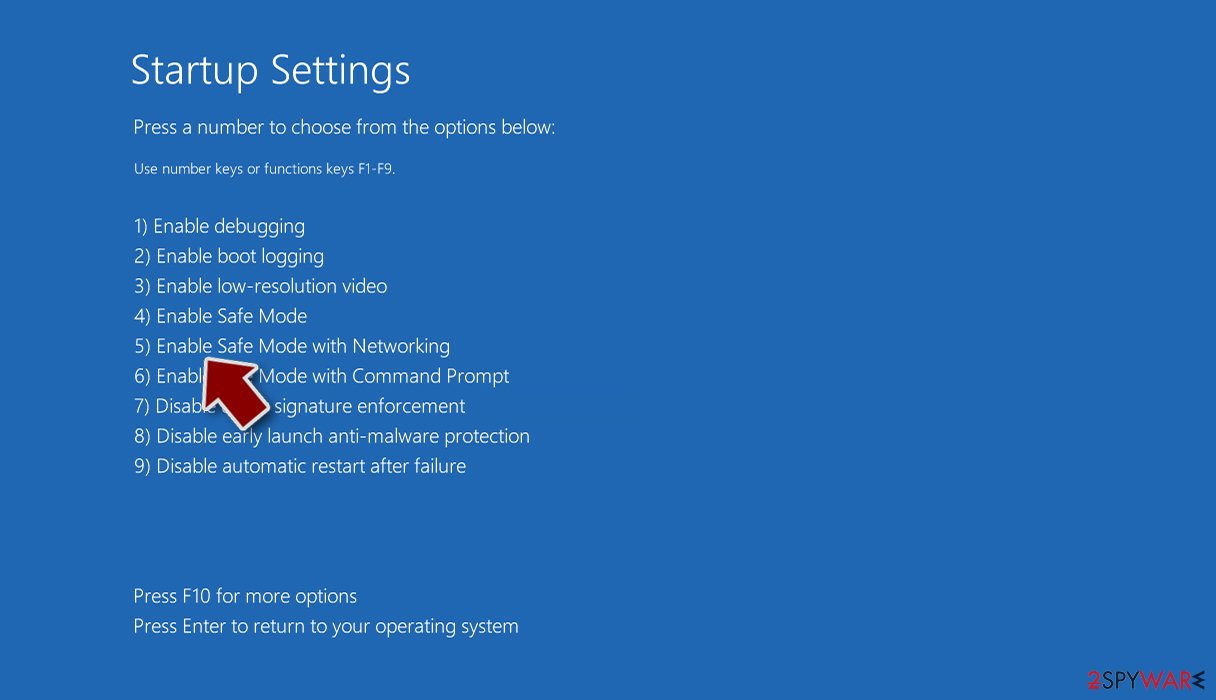
- Press Restart.
- Now press 5 or click 5) Enable Safe Mode with Networking.
Step 2. Shut down suspicious processes
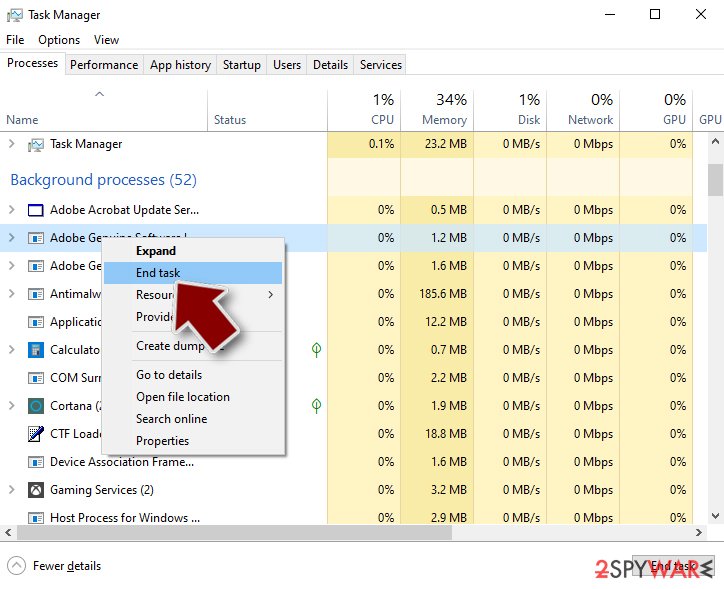
Windows Task Manager is a useful tool that shows all the processes running in the background. If malware is running a process, you need to shut it down:
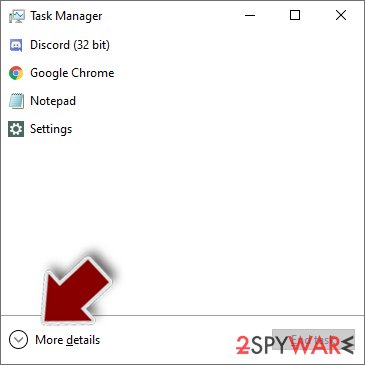
- Press Ctrl + Shift + Esc on your keyboard to open Windows Task Manager.
- Click on More details.
- Scroll down to Background processes section, and look for anything suspicious.
- Right-click and select Open file location.
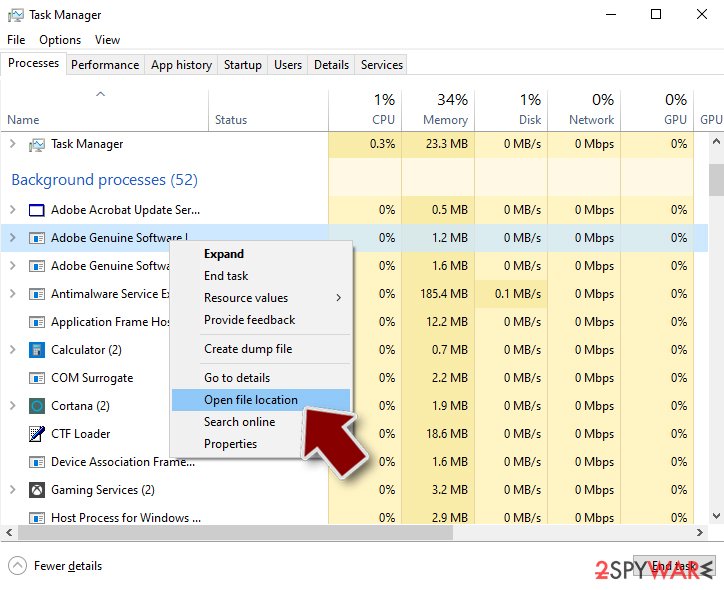
- Go back to the process, right-click and pick End Task.
- Delete the contents of the malicious folder.
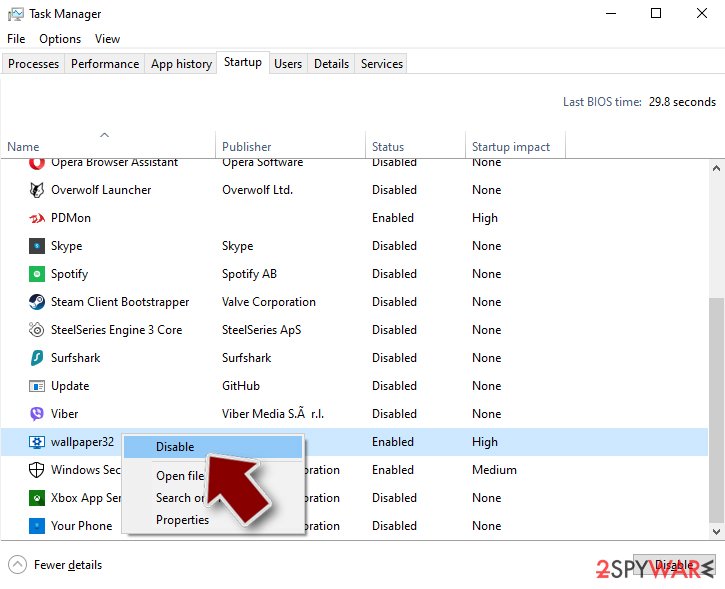
Step 3. Check program Startup
- Press Ctrl + Shift + Esc on your keyboard to open Windows Task Manager.
- Go to Startup tab.
- Right-click on the suspicious program and pick Disable.
Step 4. Delete virus files
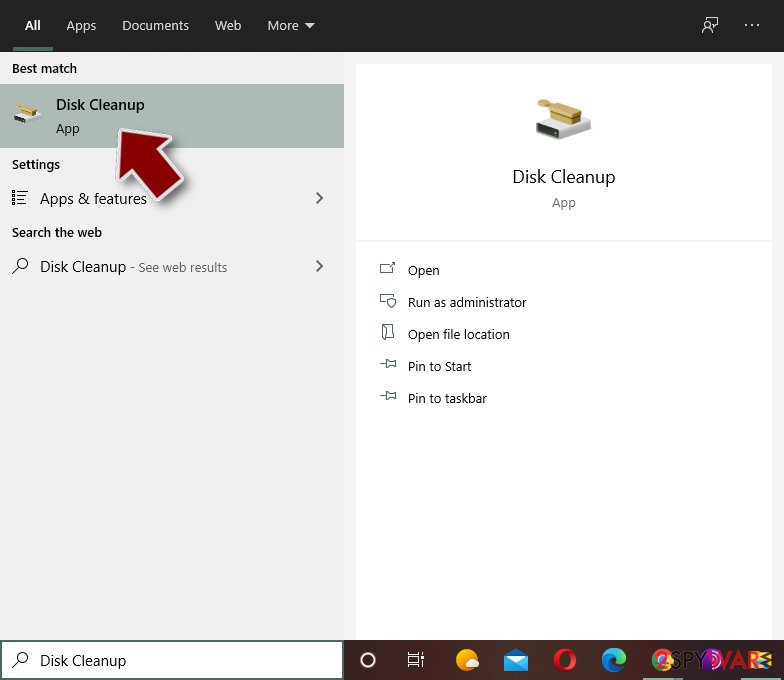
Malware-related files can be found in various places within your computer. Here are instructions that could help you find them:
- Type in Disk Cleanup in Windows search and press Enter.
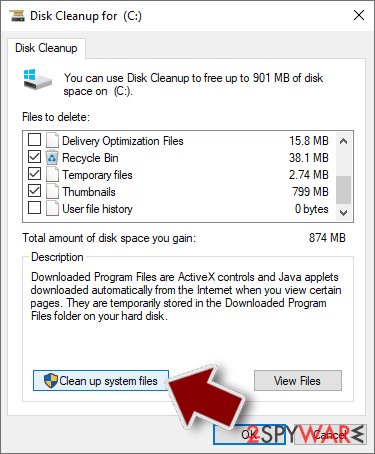
- Select the drive you want to clean (C: is your main drive by default and is likely to be the one that has malicious files in).
- Scroll through the Files to delete list and select the following:
Temporary Internet Files
Downloads
Recycle Bin
Temporary files - Pick Clean up system files.
- You can also look for other malicious files hidden in the following folders (type these entries in Windows Search and press Enter):
%AppData%
%LocalAppData%
%ProgramData%
%WinDir%
After you are finished, reboot the PC in normal mode.
Important steps to take before you begin malware removal
File encryption is one component of a ransomware infection, which may also include credential theft, persistence mechanisms, and lateral movement. However, it is important to understand that malware may perform various changes within a Windows operating system, including persistence, scheduled tasks, registry modifications, and security feature tampering.
IMPORTANT for those without backups! →
If you attempt to use security or recovery software immediately, you might permanently damage your files, and even a working decryptor then would not be able to save them.
Before you proceed with the removal instructions below, you should copy the encrypted files onto a separate medium, such as USB flash drive or SSD, and then disconnect them from your computer. The storage device should remain disconnected after copying to prevent accidental modification or deletion. Encrypted data itself does not contain active malicious code, but only the encrypted files—not executables or scripts—should be transferred.
The instructions below might initially seem overwhelming and complicated, but they are not difficult to understand as long as you follow each step in the appropriate order. This comprehensive free guide will help you to handle the malware removal and data recovery process correctly.
If you have any questions, comments, or are having troubles with following the instructions, please do not hesitate to contact us via the Ask Us section.
IMPORTANT! →
It is vital to eliminate malware infection from the computer fully before starting the data recovery process, otherwise ransomware might re-encrypt retrieved files from backups repeatedly.
Restore files using data recovery software
Since many users do not prepare proper data backups prior to being attacked by ransomware, they might often lose access to their files permanently. Paying criminals is also very risky, as they might not fulfill the promises and never send back the required decryption tool.
While this might sound terrible, not all is lost - data recovery software might be able to help you in some situations (it highly depends on the encryption algorithm used, whether ransomware managed to complete the programmed tasks, etc.). Since there are thousands of different ransomware strains, it is immediately impossible to tell whether third-party software will work for you.
Therefore, we suggest trying regardless of which ransomware attacked your computer. Before you begin, several pointers are important while dealing with this situation:
- Since the encrypted data on your computer might permanently be damaged by security or data recovery software, you should first make backups of it - use a USB flash drive or another storage.
- Only attempt to recover your files using this method after you perform a scan with anti-malware software.
Install data recovery software
- Download .
- Double-click the installer to launch it.

- Follow on-screen instructions to install the software.
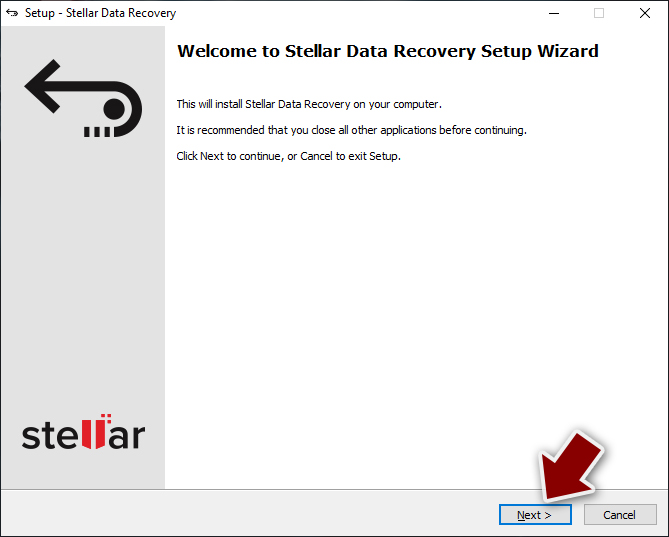
- As soon as you press Finish, you can use the app.
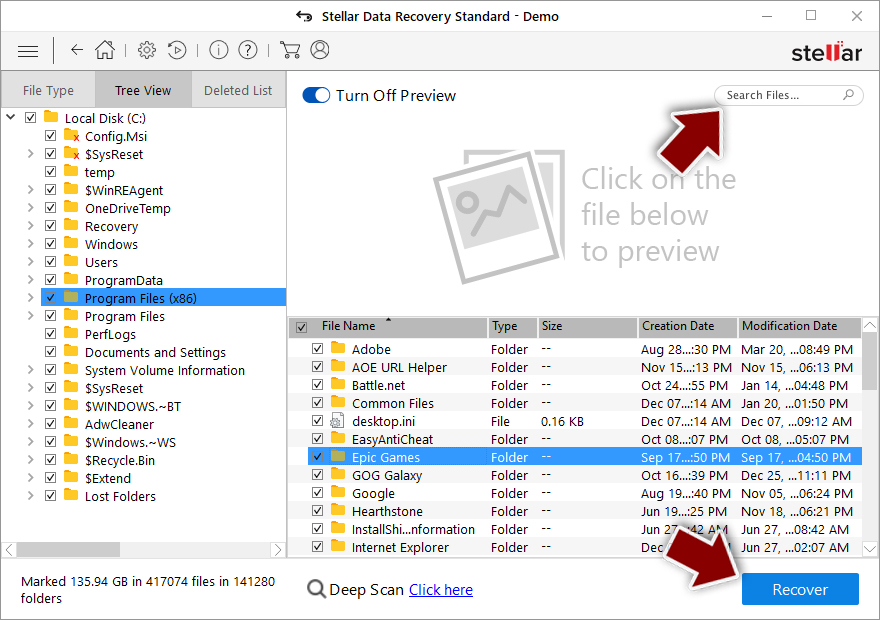
- Select Everything or pick individual folders where you want the files to be recovered from.
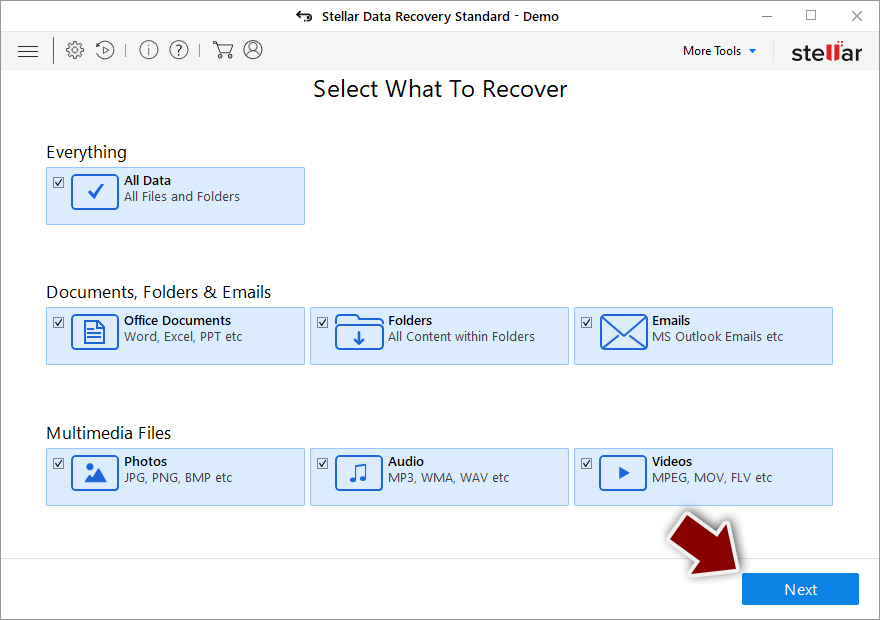
- Press Next.
- At the bottom, enable Deep scan and pick which Disks you want to be scanned.
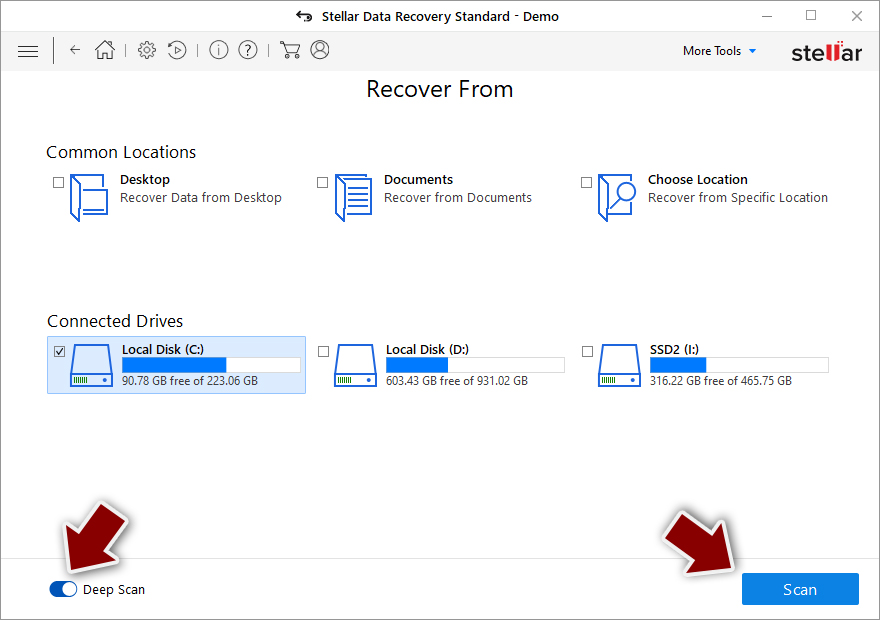
- Press Scan and wait till it is complete.
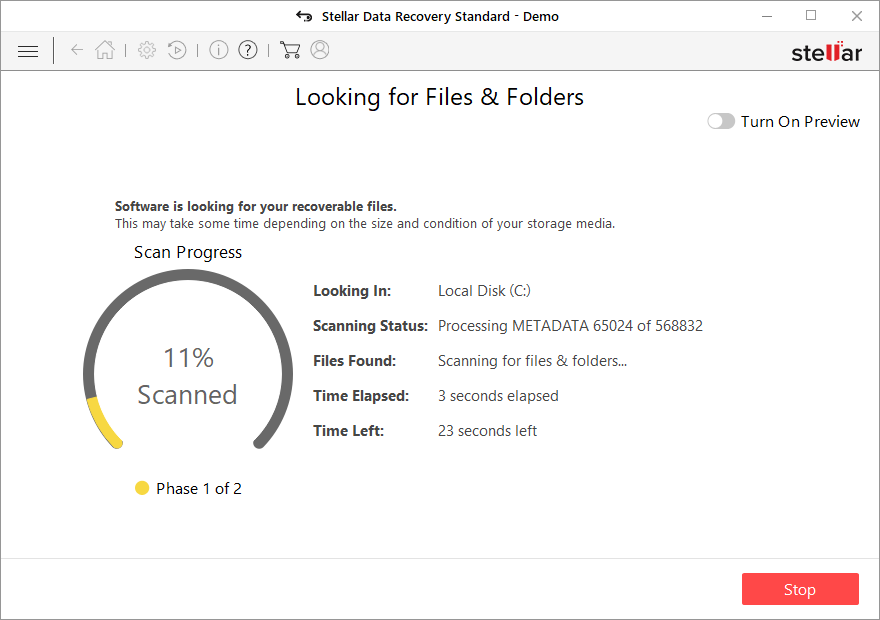
- You can now pick which folders/files to recover - don't forget you also have the option to search by the file name!
- Press Recover to retrieve your files.
Create data backups to avoid file loss in the future
Report the incident to your local authorities
Ransomware is a lucrative, highly illegal business, and authorities are actively targeting ransomware operators. The level of investigation and follow-up depends on the country, the scale of the incident, and whether the attack is linked to known ransomware groups. To increase the likelihood of identifying the culprits, the agencies need information. In many cases, reports are used primarily for intelligence gathering, trend analysis, and victim support rather than immediate identification of attackers.
Therefore, by reporting the crime, you could help stop the cybercriminal activities and catch the threat actors. Reporting does not guarantee investigation or recovery of data, but it contributes to broader efforts to track ransomware campaigns. Make sure you include all the possible details, including how did you notice the attack, when it happened, etc. Relevant details may also include affected systems, ransom demands, cryptocurrency wallet addresses, and any communication with the attackers. Additionally, providing documents such as ransom notes, encrypted files, or malware executables would be beneficial.
Law enforcement agencies typically deal with online fraud and cybercrime, although it depends on where you live. Here is the list of local authority groups that handle incidents like ransomware attacks, sorted by country:
- USA - Internet Crime Complaint Center IC3
- United Kingdom - ActionFraud
- Canada - Canadian Anti-Fraud Centre
- Australia - ScamWatch
- New Zealand - ConsumerProtection
- Germany - Polizei
- France - Ministère de l'Intérieur
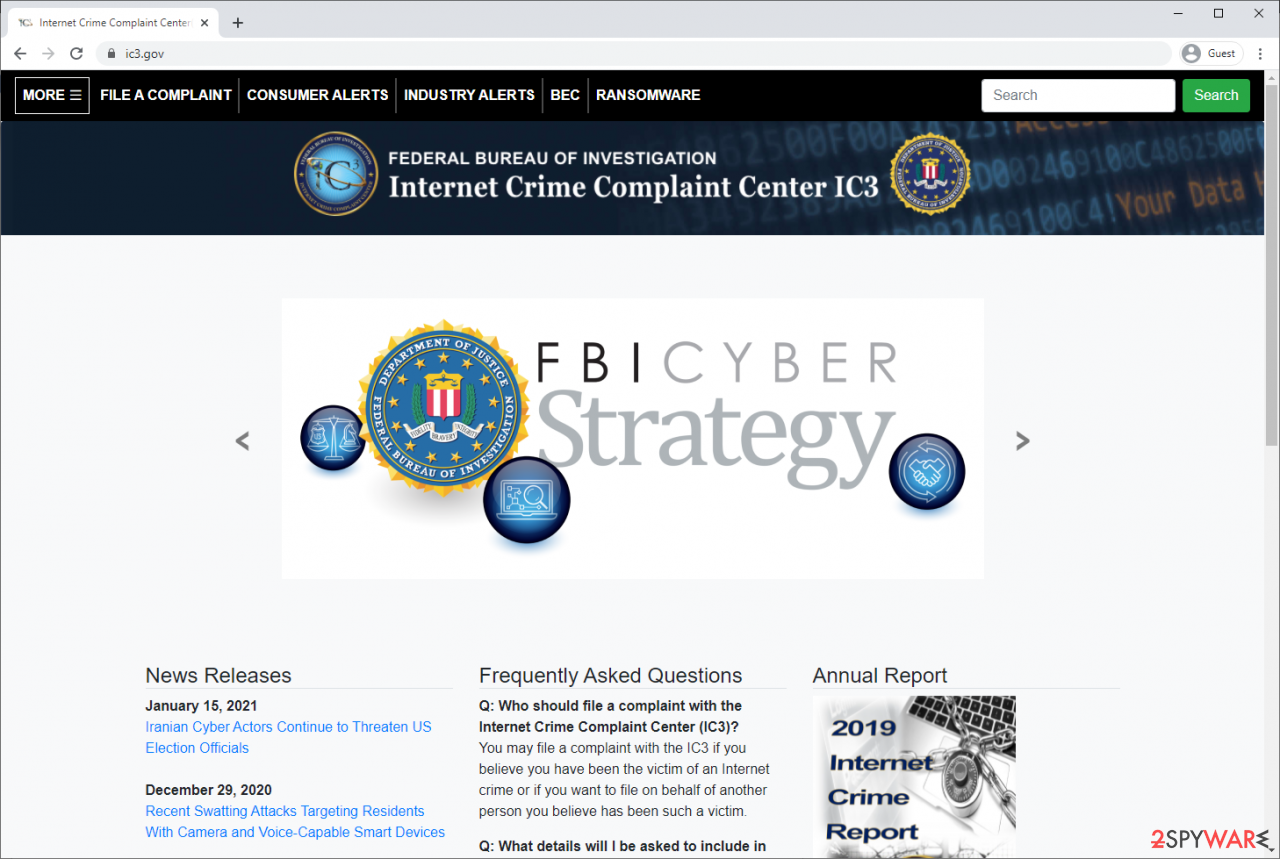
If your country is not listed above, you should contact the local police department or communications center.
Isolate the infected computer
Some ransomware strains aim to infect not only one computer but hijack the entire network. As soon as one of the machines is infected, malware can spread via the network and encrypt files everywhere else, including Network Attached Storage (NAS) devices. NAS devices are commonly compromised via reused administrator credentials and remote access services, and attackers may also delete existing snapshots. If your computer is connected to a network, it is important to isolate it to prevent re-infection after ransomware removal is complete.
In modern environments, ransomware often spreads using stolen credentials, remote management tools, VPN connections, and cloud synchronization services, not only through shared network drives.
The easiest way to disconnect a PC from everything is simply to plug out the ethernet cable. This does not disconnect wireless networks, VPN connections, or cloud services, which must also be disabled separately. However, in the corporate environment, this might be extremely difficult to do (also would take a long time). In many organizations, devices are centrally managed, and network isolation is typically performed by IT or security teams using endpoint security or device management tools. The method below will disconnect from all the networks, including local and the internet, isolating each of the machines involved.
On modern Windows systems, network connections can also be disabled through the Settings app or automatically isolated using endpoint detection and response (EDR) tools.
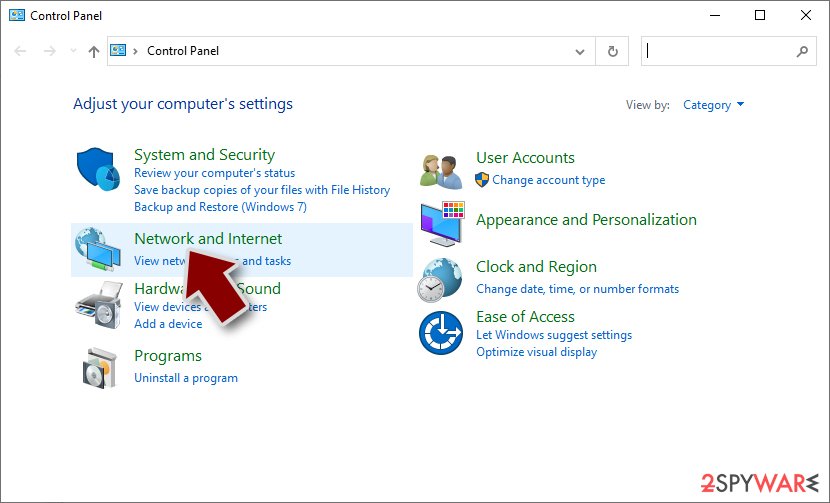
- Type in Control Panel in Windows search and press Enter
- Go to Network and Internet
- Click Network and Sharing Center
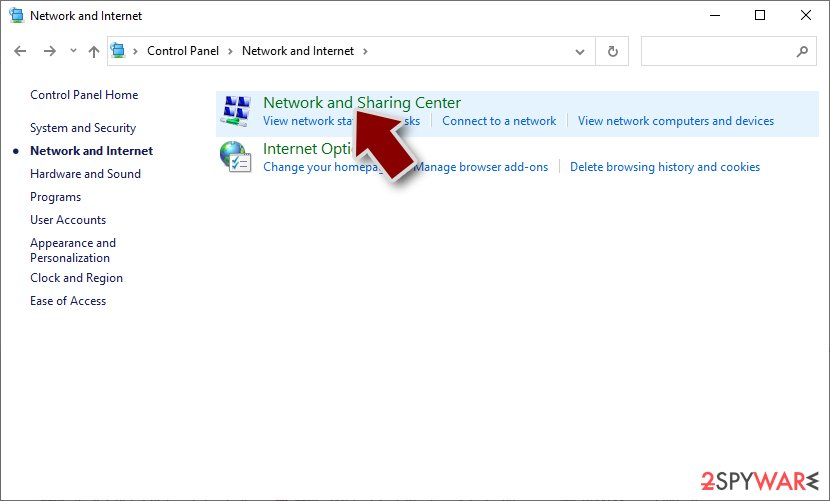
- On the left, pick Change adapter settings
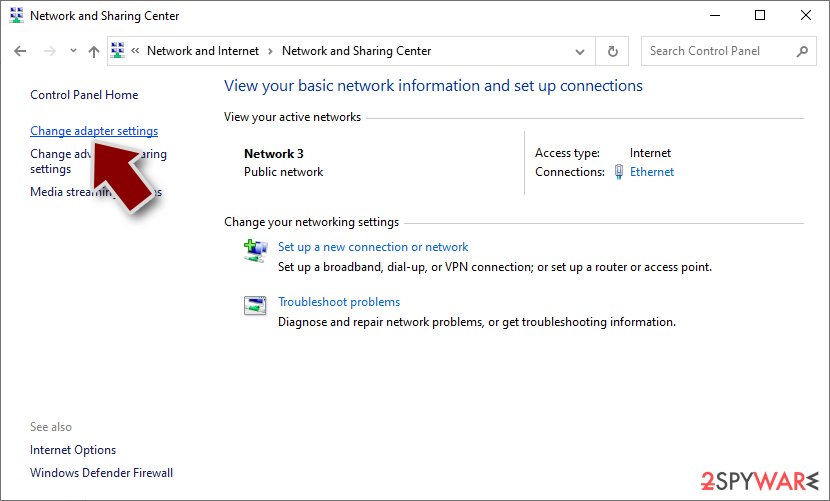
- Right-click on your connection (for example, Ethernet), and select Disable
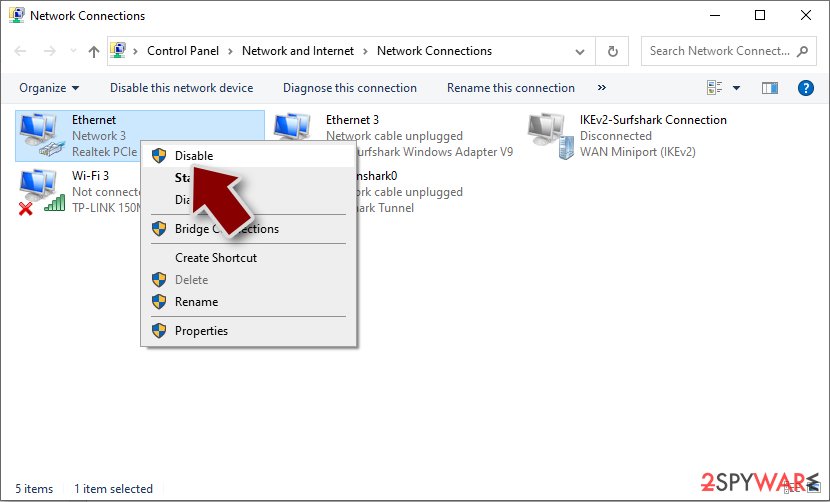
- Confirm with Yes.
If you are using some type of cloud storage you are connected to, you should disconnect from it immediately. It is also advisable to disconnect all the external devices, such as USB flash sticks, external HDDs, etc. Once the malware elimination process is finished, you can connect your computers to the network and internet, as explained above, but by pressing Enable instead. Before reconnecting, credentials should be reset, persistence mechanisms checked, and backups verified to ensure reinfection does not occur.
From our report of Dec 2021 · not reviewed since
Decryption options
It is important to copy the encrypted files onto a separate medium before removing them from your computer.
You might wait for an unlocking tool and later on restore those that were not recoverable at the time. Hgsh is a type of virus that is classified as ransomware and it comes from the known family that was previously decryptable. These threats are known for accessing user machines without permission and encrypting all files on them, but the recent update ensures the persistence and unrecoverable data.
Hgsh is a malware that has the ability to hide from anti-malware programs by scattering its malicious files across your system and hiding them in different folders. It means that you only notice the infection once those files get locked. From there, limited options are available only.
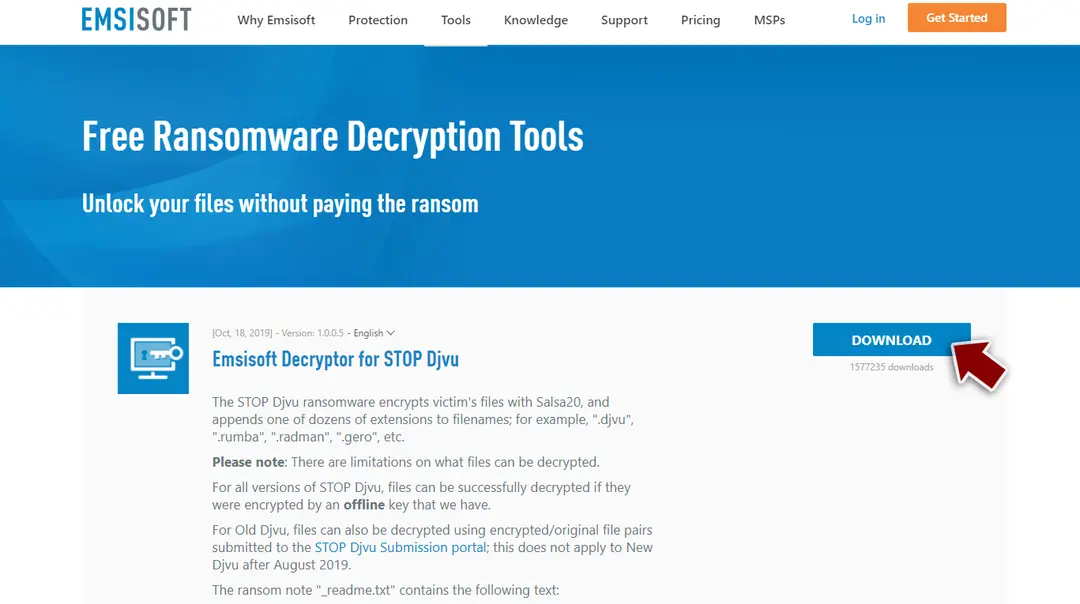
If your computer got infected with one of the Djvu variants, you should try using Emsisoft decryptor for Djvu/STOP. It is important to mention that this tool will not work for everyone - it only works if data was locked with an offline ID due to malware failing to communicate with its remote servers.
Even if your case meets this condition, somebody from the victims has to pay criminals, retrieve an offline key, and then share it with security researchers at Emsisoft. As a result, you might not be able to restore the encrypted files immediately.
Thus, if the decryptor says your data was locked with an offline ID but cannot be recovered currently, you should try later. You also need to upload a set of files - one encrypted and a healthy one to the company's servers before you proceed.
From here, there are three available outcomes:
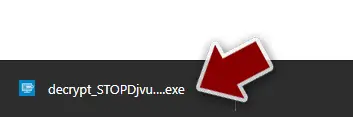
- After pressing Download button, a small pop-up at the bottom, titled decrypt_STOPDjvu.exe should show up - click it.
- If User Account Control (UAC) message shows up, press Yes.
- Agree to License Terms by pressing Yes.
- After Disclaimer shows up, press OK.
- The tool should automatically populate the affected folders, although you can also do it by pressing Add folder at the bottom.
- Press Decrypt.
- "Decrypted!" will be shown under files that were decrypted successfully - they are now usable again.
- "Error: Unable to decrypt file with ID:" means that the keys for this version of the virus have not yet been retrieved, so you should try later.
- "This ID appears to be an online ID, decryption is impossible" - you are unable to decrypt files with this tool.
From our report of Dec 2021 · not reviewed since
Malware removal steps - the most important
Make sure you remove the infection properly in order to avoid further damage and be able to repair any files that need recovery yourself or use a reputable data recovery program. It is possible that another decryption tool might come along later, but this takes time, so keep some of these affected files on a separate device. Those files cannot affect the security of the machine, do not worry.
Hgsh file virus is a type of threat that encrypts your files and then forces you to pay in order for them to restore access. For their gains, cybercriminals behind this ransomware first infect computers through emails containing attachments with malicious scripts or use pirated software downloaded. However, there are tons of additional issues created when the virus is running.
Get the tool like or and properly clear the machine from any infections. Make sure to choose a program that can detect all threat pieces and help recover after the infection. You should never risk getting those files damaged or permanently locked, so remove the threat and double-check before you worry about file recovery.
Once a computer is infected with malware, its system is changed to operate differently. For example, an infection can alter the Windows registry database, damage vital bootup, and other sections, delete or corrupt DLL files, etc. Once a system file is damaged by malware, antivirus software is not capable of doing anything about it, leaving it just the way it is.
Consequently, users might experience performance, stability, and usability issues, to the point where a full Windows reinstallation is required.
Therefore, we highly recommend using a one-of-a-kind, patented technology of repair. Not only can it fix virus damage after the infection, but it is also capable of removing malware that has already broken into the system thanks to several engines used by the program.
Besides, the application is also capable of fixing various Windows-related issues that are not caused by malware infections, for example, Blue Screen errors, freezes, registry errors, damaged DLLs, etc.
- Download the application by clicking on the link above
- Click on the ReimageRepair.exe
- If User Account Control (UAC) shows up, select Yes
- Press Install and wait till the program finishes the installation process
- The analysis of your machine will begin immediately
- Once complete, check the results - they will be listed in the Summary
- You can now click on each of the issues and fix them manually
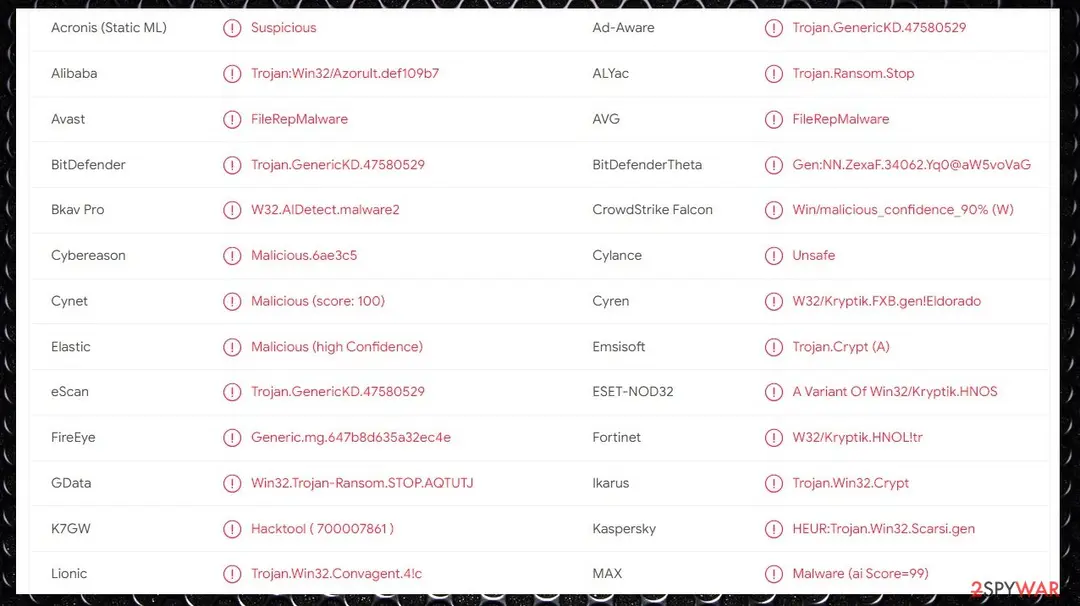

From our report of Dec 2021 · not reviewed since
Other tips when dealing with an infection like this
Some ransomware might modify Windows hosts file in order to prevent users from accessing certain websites online.
For example, Djvu ransomware variants add dozens of entries containing URLs of security-related websites, such as 2-spyware.com. Each of the entries means that users will not be able to access the listed web addresses and will receive an error instead.
In order to restore your ability to access all websites without restrictions, you should either delete the file (Windows will automatically recreate it) or remove all the malware-created entries. If you have never touched the "hosts" file before, you should simply delete it by marking it and pressing Shift + Del on your keyboard. For that, navigate to the following location:
The best solution to remove the infection is by using anti-malware tools like or , but do not forget about Hgsh ransomware virus damage and the processes that run in the background in addition to file encryption. You should take care of the infection before trying to restore files affected by the threat.
By employing , you would not have to worry about future computer issues, as most of them could be fixed quickly by performing a full system scan at any time. Most importantly, you could avoid the tedious process of Windows reinstallation in case things go very wrong due to one reason or another.
Report it and recover your files
Report it
Report the attack even if you do not expect the files back: insurers and banks ask for the report number, and police use the contacts in the note to link cases.
- United States
- FBI IC3 · FTC ReportFraud
- United Kingdom
- Report Fraud (formerly Action Fraud) · NCSC
- Australia
- ReportCyber (ASD)
- EU countries
- Europol: national reporting sites
Give the victim ID, the note and the date the files were encrypted. A business that holds personal data may also have to notify its data protection authority, in the EU within 72 hours.
Backups: the 3-2-1 rule
Keep three copies of files that matter, on two kinds of storage, with one copy offline or off-site.
A disk that stays plugged in is reached by malware like Hgsh ransomware together with the PC; one you connect only for the backup is not.
On Windows 11, File History keeps versions on an external drive, and OneDrive keeps earlier versions of synced files. Before restoring anything, make sure the PC no longer shows files that end in .hgsh and no longer open.
Setting it up step by step: 3-2-1 backups on Windows 11 and 10.
Do not let government spy on you
The government has many issues in regards to tracking users' data and spying on citizens, so you should take this into consideration and learn more about shady information gathering practices.
Avoid any unwanted government tracking or spying by going totally anonymous on the internet.
You can choose a different location when you go online and access any material you want without particular content restrictions. You can easily enjoy internet connection without any risks of being hacked by using VPN.
Control the information that can be accessed by government any other unwanted party and surf online without being spied on. Even if you are not involved in illegal activities or trust your selection of services, platforms, be suspicious for your own security and take precautionary measures by using the VPN service.
Backup files for the later use, in case of the malware attack
Computer users can suffer from data losses due to cyber infections or their own faulty doings.
Ransomware can encrypt and hold files hostage, while unforeseen power cuts might cause a loss of important documents. If you have proper up-to-date backups, you can easily recover after such an incident and get back to work. It is also equally important to update backups on a regular basis so that the newest information remains intact - you can set this process to be performed automatically.
When you have the previous version of every important document or project you can avoid frustration and breakdowns. It comes in handy when malware strikes out of nowhere. Use for the data restoration process.
Questions about Hgsh ransomware
How do I open .hgsh files?
You cannot open them by renaming or by choosing another program. The .hgsh ending shows that Hgsh ransomware encrypted the content, and only the matching key can reverse it. Renaming a file back to .docx or .jpg changes nothing except the icon, and it can confuse a future decryptor, so leave the names as they are.
To get the content back, use a backup, an unencrypted copy elsewhere, or a decryptor listed on No More Ransom if one exists for Hgsh ransomware. Store the encrypted files on an external disk until then.
Should I pay the ransom?
We advise against it, and so do the FBI, Europol and national cyber agencies. Payment does not guarantee a working tool: some attackers never reply, some tools damage files, and some variants have no decryptor at all. Paying also funds further attacks and can make you a target again.
Before considering payment, try every recovery option in this guide and report the attack. Companies must involve their legal adviser and insurer, because payments to sanctioned groups can be illegal. If files are truly irreplaceable, store the encrypted copies and wait; decryptors sometimes appear later.
Did Hgsh ransomware steal my files or passwords?
We do not know yet. Nothing published so far shows data theft by Hgsh ransomware, but the only confirmed sign is files that end in .hgsh and no longer open, which says nothing about what happened before. Many current ransomware attacks copy files or run a password stealer first, so it is wise to act as if they did.
From a clean device, change the passwords that were saved in the browsers on this PC, starting with e-mail and banking, sign out of all sessions and turn on two-step verification. Watch bank statements and account activity for the next few weeks.
Is there a free Hgsh ransomware decryptor?
We last checked on 6 October 2026, and for Hgsh ransomware no free decryptor is known. We check No More Ransom, which collects free tools from police and security companies, and the decryptor pages of the major antivirus vendors. A working decryptor exists only when the encryption has a flaw or the keys were leaked or seized.
Ignore sites and videos that offer a "Hgsh ransomware decryptor" for download or for a fee: these are usually scams or malware. Real decryptors are free and come from known security companies or law enforcement. Keep the encrypted files in case a tool appears later.
Can a data-recovery company decrypt my files for a fee?
Only if a decryptor already exists or the company pays the attackers for you. Some "ransomware recovery" services advertise that they can decrypt families with no known flaw; in practice they negotiate with the attackers and add their own fee. Others use the same free tools listed on No More Ransom.
Before you hire anyone, ask in writing how they will recover the files, whether they will contact the attackers and what happens if they fail. A legitimate service answers clearly. If a free decryptor exists for your family, you can run it yourself.
How did Hgsh ransomware get on my computer?
The way Hgsh ransomware spreads has not been documented yet, so look at your own recent activity. On home PCs, ransomware most often comes with cracked programs, game cheats, key generators and fake updates, or with an e-mail attachment that was opened. On business networks, attackers usually log in through Remote Desktop with a stolen or guessed password.
Think back to what was downloaded or installed in the days before files that end in .hgsh and no longer open, and check the Downloads folder and Installed apps sorted by date. Keep anything suspicious for your report, but do not run it again.
Is Hgsh ransomware the same as other ransomware with a similar name?
Not necessarily. Ransomware names come from the file extension, the note or a word in the code, so unrelated families often end up with similar names, and one family can appear under several names. The difference matters: a decryptor or advice for one family does not fit another and can damage files.
Compare the ending added to your files and the exact name of the note with the summary table at the top of this guide, then upload the note and one encrypted file to ID Ransomware from a clean device. If the result names another family, follow the guide for that family instead.
Can I just remove .hgsh from the file names?
You can try it on a copy, but for real ransomware it will not help. The .hgsh extension is only a label; the file content has been scrambled with a key the attackers hold.
If a renamed copy opens normally, the malware only renamed files, which happens with some fake ransomware, and you can rename the rest back. If it does not open, leave the files as they are. Renaming encrypted files can confuse a decryptor later, so always work on copies.
Can I delete _readme.txt?
Yes, the note itself is harmless text and deleting it does not affect your files. Keep at least one copy first, outside the infected PC. _readme.txt contains your personal ID and the attackers' contact details, which identification services use to tell which family encrypted your files, and which a decryptor may need later.
Police reports also ask for it. Once you have saved a copy, you can remove the notes from every folder after the ransomware program has been removed and your files are restored or backed up.
Will Fortect remove Hgsh ransomware?
Fortect scans Windows for malware and unwanted programs and repairs the system files and settings they change, and its free scan shows what it finds on your PC before you decide anything.
For Hgsh ransomware, follow the plan above as well: the browser steps take back permissions and settings that no scanner treats as a threat, and uninstalling the program that brought it removes the source.
Run Microsoft Defender's full scan and, if anything was found, its offline scan as a second opinion. If the symptoms are gone after the plan and both scans are clean, there is nothing more to do.
Sources
- Lesvirus: Lesvirus (read October 6, 2026)
- Sophos: Fake pirated software sites serve up malware droppers as a service (read October 6, 2026)
- virusTotal: Detection rate (read October 6, 2026)
- VirusTotal: analysis of a Hgsh ransomware sample (read October 6, 2026)
- CISA: StopRansomware (read October 6, 2026)