

HTCryptor ransomware virus takes personal files to hostage
HTCryptor virus is another file-encrypting malware. Developers use various distribution techniques for spreading this computer infection. After infiltration, ransomware[1] starts scanning computer’s system and looking for necessary files. When HTCryptor ransomware finds targeted file types, it encrypts them using a sophisticated algorithm and appends the .locky file extension to each corrupted file. Here we want to warn you that many other ransomware viruses use the same file extension. For identifying the malware, you should pay attention to other details such as what wallpaper the virus sets on the computer screen or what is the name of the ransom note (.txt or .html file). However, if you got infected with HTCryptor, you don’t need to worry about your personal files. Malware is based on Hidden Tear ransomware[2], so it’s decryptable. At the end of the article, you will find instructions how to restore files using HiddenTear decryptor, but before that you must remove HTCryptor from the computer. Even though it’s decryptable version of the ransomware, it’s still quite complicated computer infection, so do not try to delete it on your own. Employ strong malware removal tools such as FortectIntego or SpyHunterCombo Cleaner.
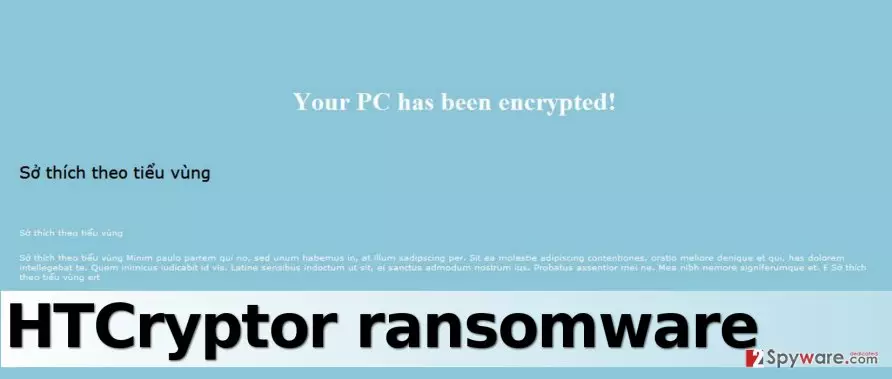
What is interesting about in-development HTCryptor malware is that it disables Windows Firewall[3] as soon as the victim runs it. Then it starts encrypting files, and finally, it changes the desktop picture with a blue screen saying, “Your PC has been locked!” and a suspicious message in the Vietnamese and Latin languages. For this reason, malware is also known as Vietnamese HTCryptor and Vietnamese HiddenTear virus. Delivered message is not a ransom note since the text is completely not related to malware. Part of the note is written in Vietnamese and part of it is written in the Latin language, which is confusing to understand the message it sends. It starts with a line “sở thich theo tiêu vùng.” Rough translation of all text sounds like a text from a psalm or some holy book. However, if this malware attacked your PC, don’t try to figure out the content of the message; just remove HTCryptor from the computer.
Malware distribution techniques and methods
People who develop ransomware pay a lot of attention not only to the behavior of the virus but also to its distribution methods. However, it seems that this virus is being delivered via the most basic malware distribution technique – via email. The fact that the virus is based on an open-source ransomware indicates that its authors are not very professional programmers and they likely lack skills to create a new one from scratch. Therefore, if you do not want to care about HTCryptor removal ever in your life, do not open suspicious emails, links, or attachments when you explore your Inbox. Scammers spend days thinking about themes of letters they could send to victims. They often pretend to be working at Amazon, Paypal, or some healthcare organization just to convince the victim to click on an infectious link or email attachment. We recommend reading some tips on how to identify a malicious email[4].
Recommendations for HTCryptor ransomware elimination
Ransomware programs are extremely dangerous. They make the system vulnerable, they destroy your files, and, just like this example shows, they can increase the risk of catching another virus since they deactivate security software. The best way to protect your computer is to remove HTCryptor virus and start taking protective measures right away. If you do not have a backup yet, create it as soon as you decrypt your files[5]. To start ransomware elimination, read instructions that we provide below. Do not forget to install new one or update the anti-malware software that you already have. For HTCryptor removal we recommend one of these programs: FortectIntego, SpyHunterCombo Cleaner or MalwarebytesMalwarebytes.
Did this guide help?
4 comments
Andre
DECRYPTED HA!
Marthins
I still am clueless of where did I get this ransomware from..
Leon1987
Thanks god this one isnt as dangerous as cryptowall. I am currently decrypting my files. Thank you guys - I dont know what would I do without my files...
khalifa
Such good news!... Thank you for sharing the link to downlaod the decrypter =)