

Is Hucky ransomware really as dangerous as Locky?
Does Hucky virus sound familiar to you? Indeed, the name of this infection was adapted from the notorious ransomware infection called Locky which has been terrorizing the web community for the past year. Numerous amateur hackers are simply fascinated by the success of Locky, so it is not surprising that new ransomware variants based on this particular virus keep emerging on the web. Hungarian Locky — or Hucky for short — is one of them. The creators of this virus do not simply take certain features of Locky and integrate them into their own software. They plain-and-straight imitate them: Hucky uses the same ransom note, extension and payment system. The major difference, though, is that the virus is Hungarian, so it is likely that it primarily targets devices located in Hungary, instead of the whole world. This theory can be justified by the ransomware victims who claim to have interacted with the criminals in Hungarian.
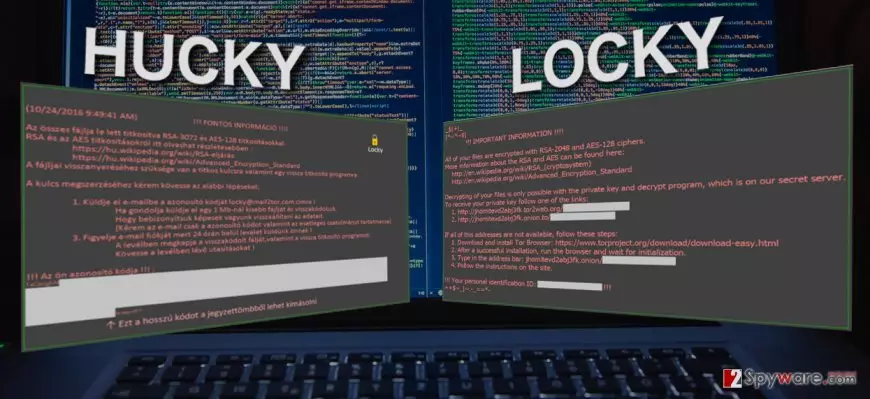
Nonetheless, looking at the rest of its working principles, the virus seems to operate identically to the initial Locky versions. First, the malicious virus script is implemented on the computer with the help of spam emails. The script is then activated by the Word Macros and, finally, the virus gets downloaded to the computer. After that follows the data encryption procedure and system reboot which results in numerous inaccessible files. Unlike Locky, Hucky only has around 200 file types on its target list, and these include video game files including Minecraft, World of Tanks, etc. If you are not a gamer, don’t get too excited just yet, because the Microsoft Office files, pictures, archives, etc. have undoubtedly also made it to the list as well. Thus, you should not expect to get away from this virus unharmed. What you can do, though, is prepare yourself for the Hucky removal. For this purpose, we recommend obtaining a licensed FortectIntego version and running a system scan with it. Another interesting feature we should note is that Hucky still uses the old .locky extensions, while they have already been changed in the latest versions of Locky. This can be a good starting point in indicating which virus has infected your PC exactly.
In this particular version, the _locky_recover_instructions.txt document which was used by the older Locky variants is changed with _Adatok_visszaallitasahoz_utasitasok.txt. Though it features the same style, the information in it is slightly altered. Nevertheless, you can still find a brief explanation about what happened to the computer and how to fix this unpleasant situation. The virus victim is given 24 hours to get in touch with the criminals via the provided email — locky@mail2tor.com. The size of the ransom and other payment details are not in the note, but we can presume that this information will be disclosed after the criminals are contacted personally. Looking at the typical tendencies, the data decryption price should range from 0,5 to 2 Bitcoin per device. If you are willing to pay — go ahead, but keep in mind that the hackers may quickly be gone your money without offering you any data decryption alternatives. Thus, to protect your finances as well as your future files, you should simply remove Hucky from your computer.
How to protect your files from this ransomware?
Since Hucky virus is still in the process of growing, system defense should become your main priority right now. You should make certain that your operating system and all of the software that you have installed on your computer is updated and running according to the latest standards. This will decrease the system’s vulnerability and protect you from accidentally downloading bogus, malware-infested software updates from the web. Of course, you should also invest in a professional and powerful antivirus utility and by no means use the pirated software. Also, don’t forget to make regular backups of your data and keep them on separate computers, external hard disks or USB drives. This might save you from unexpected data loss and help recover data easily.
Things to know about Hucky removal:
Essentially, there is only one safe way to remove Hucky virus and that is automatic removal using professional antivirus utilities. The virus may not be as complex as Locky, but it will sure fight for its place on your computer, so manually eliminating the virus may be extremely difficult. If you miss a malicious file or two — the virus will remain on your computer and continue to encrypt new files that you create on it. Hucky removal might need your interaction only if the virus tries blocking your antivirus from running a system scan. In such a case, closely follow the guidelines below the article. When the virus is removed, you can then head to the section in which we introduce data recovery options. Perhaps some of these methods help you to recover your personal files.
Did this guide help?
Be the first to comment