

INCANTO ransomware blocks access to your files and asks to pay a ransom
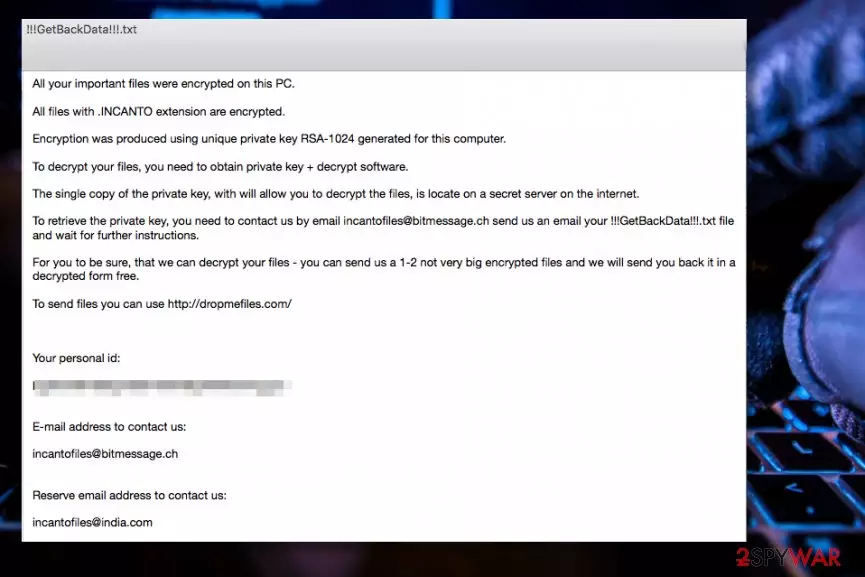
INCANTO ransomware is a new computer virus that damages victim’s files using RSA-1024[1] encryption algorithm. As a consequence, the malware leaves a ransom note called !!!GetBackData!!!.txt which contains a message from cyber criminals. They demand paying a ransom[2] to malware authors in order to get access to files again. Criminals leave incantofiles@bitmessage.ch and incantofiles@india.com email addresses as the only way of contacting them.
The first thing that ransomware does after becoming active is scan all folders and files stored in them for valuable data – pictures, documents, videos, audio files and similar. The program that is responsible for data encryption also marks every file it touches with .INCANTO file extension which it adds after the original file extension.
Following a successful data encryption, the malware outputs a message into a text file which it copies to every folder that contained at least one target file. Below you can see part of the ransom note.
All files with .INCANTO extension are encrypted.
Encryption was produced using private key RSA-1024 generated for this computer.
To decrypt your files, you need to obtain private key + decrypt software.
Losing all data you stored on your computer is not a pleasant experience. However, it does not mean that you will get access to it again if you pay the criminals (they are going to ask you to pay a certain sum of money in Bitcoins). Therefore, we recommend you to remove INCANTO virus using anti-malware program. For instance, you can use FortectIntego or SpyHunterCombo Cleaner.

The malicious virus travels via email
Before we proceed to INCANTO removal, you must learn how ransomware spreads. Malicious spam is known to be the most common malware distribution technique that is likely used for proliferation of this virus as well. We suggest you to follow these simple security tips shared by Zondervirus.nl professionals[3]:
- Be very careful when exploring messages in your email. Before opening any file or link added to the virtual message, ask yourself whether you can trust the sender of the message. Remember that scammers use spoofed emails to trick victims into thinking that the email was sent by a trustworthy person/company.
- Avoid clicking on aggressive Internet ads and never agree to install software updates suggested by shady-looking Internet sites. Remember that offering software updates is one of deceptive advertising techniques that often helps to trick users into installing unnecessary or even malicious programs.
Remove INCANTO ransomware and get access to your files
It is extremely important to remove INCANTO virus as quickly as possible. However, the malware can attempt to stop you from using your security program and block its processes. To successfully eliminate the ransomware, you should reboot your PC in a proper mode first.
INCANTO ransomware removal guidelines are provided below. They will explain to you how to restart your PC in Safe Mode with Networking and delete the malicious components automatically. We’d like to point out that you should not attempt to delete the virus manually as you can overlook some malicious files and leave your machine vulnerable to further malware attacks.
Did this guide help?
Be the first to comment