

InfoDot ransomware is a devastating crypto malware that renders personal files unrecoverable
InfoDot ransomware is a new file locking malware that showed up at the end of October 2019[1] – security researchers could not find any similarities with already existing ransomware strains. Nevertheless, the threat was created for one purpose only – to extort money from victims that are infected. This is achieved with the help of OpenSSL and powerful AES-256[2] and RSA-2048 keys. InfoDot virus targets the most commonly used files, including pictures, music, video, PDF, MS Office documents, etc., and appends them with .info@sharebyy[dot]com or .info@mymail9[dot]com marker.
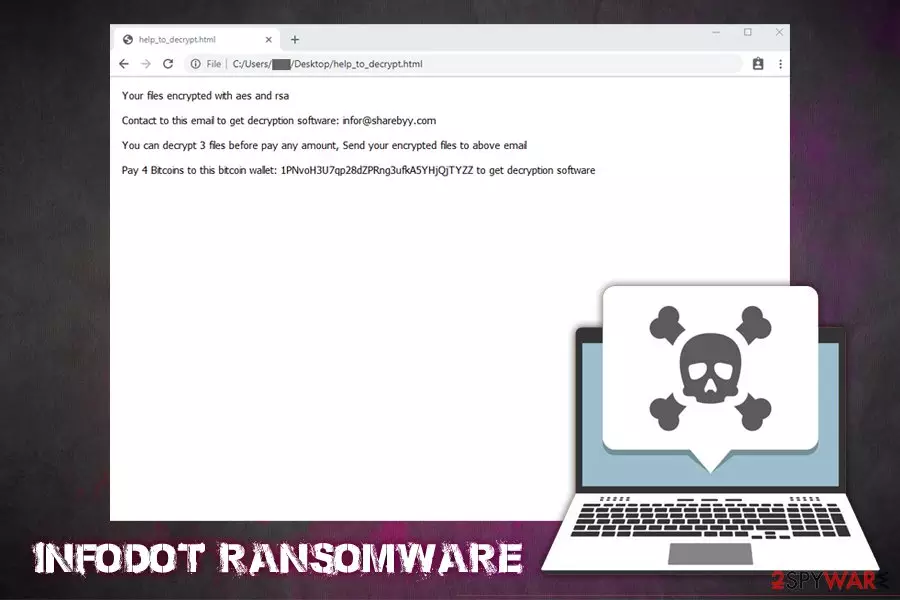
Victims are then unable to open the encrypted data – although it is not the only symptom of InfoDot ransomware infection, as they are also presented with a ransom note help_to_decrypt.html. In a brief message, hackers import the users about file encryption and order them to pay 4 Bitcoins in order to recover the key that allegedly can recover the personal data. However, cybersecurity experts discovered no evidence that the InfoDot ransomware decryptor provided by malicious actors works. For that reason, paying the ransom is most likely a waste of money, and, if you got infected with the virus, you should rather seek for alternative solutions.
| Name | InfoDot ransomware |
| Type | Cryptovirus |
| Encryption method | The virus uses OpenSSL to encrypt all personal data on the computer with secure AES-256 + RSA-2048 keys. Encrypted files are appended with .info@sharebyy[dot]com or .info@mymail9[dot]com extension |
| Dropper | bigdata.exe is placed to C:\Users\user\Desktop\ folder, which, once launched, starts various Windows changes |
| Related commands | Uses C:\Windows\System32\taskkill.exe taskkill /IM sql* /f command to terminate the relevant process |
| Ransom note | help_to_decrypt.html |
| Ransom size | Users are asked to pay 4 Bitcoins ransom that should be transferred to 1PNvoH3U7qp28dZPRng3ufkA5YHjQjTYZZ wallet |
| Contact | Hackers use info@sharebyy.com or info@mymail9.com for main communication with victims, as well as file decryption process |
| File decryption | Paying cybercriminals is useless, as the decryption method they provide does not work currently. It is advisable to create a backup of encrypted files and try recovering them using third-party software or built-in Windows tools as per instructions provided below |
| Infection removal | Before you proceed with file recovery, you need to eliminate malware from your device. For that, you should access Safe Mode with Networking (InfoDot may tamper with security software) and scan your machine fully with anti-malware. To recover from the damage done, you could employ tools like FortectIntego |
There are several methods of how users may get infected with InfoDot ransomware virus, including:
- Opening unsolicited macro-infused attachments or hyperlinks in spam emails;
- Downloading software cracks, keygens, hacktools;
- Failing to update operating system and other installed apps on time;
- Not protecting the computer with comprehensive security software;
- Carelessly using Remote Desktop connections;
- Installing fake updates or bogus programs, etc.
It is important to note that ransomware is among one of the most dangerous cyber infections, as it might result in a complete personal file loss. Speaking of which, we suggest you do not try contacting cybercriminals and rather focus on InfoDot ransomware removal as your primary goal, as malware often implements various modules that may otherwise damage your computer or steal your sensitive details (banking, login, etc.).
The main InfoDot ransomware executable researchers managed to get their hands on was called bigdata.exe – it serves as a dropper that is placed into C:\Users\user\Desktop\ path. From there, the file is launched, and all the modifications that are needed to prepare the system for file encryption to begin. Nevertheless, cybercriminals can name droppers using different names in order to avoid security software detection.

After significant changes to the Windows system, InfoDot ransomware begins a scan which marks all data that is eligible for encryption. The virus uses OpenSSL to encode data with AES, and then each of the files is encrypted with the RSA key. Examples of encrypted files: picture.jpg..info@sharebyy[dot]com, instructions.pdf.info@mymail9[dot]com. Users can then see a ransom note that states:
Your files encrypted with aes and rsa
Contact to this email to get decryption software: infor@sharebyy.com
You can decrypt 3 files before pay any amount, Send your encrypted files to above email
Pay 4 Bitcoins to this bitcoin wallet: 1PNvoH3U7qp28dZPRng3ufkA5YHjQjTYZZ to get decryption software
As previously stated, sending 4 Bitcoins (approximately $US32,000 at the time of the writing) to malicious actors will likely to result in data and money loss, as previous attempts by victims to recover data via the provided tools did not work, as the InfoDot decryptor resulted in errors in the process.
Instead, you should remove InfoDot ransomware with security software that detects the malware[3] and then use alternative methods to recover locked files. Additionally, ransomware may leave various traces in the Windows registry, and other places – FortectIntego may help you recover from virus damage completely.
Ransomware prevention tips
Ransomware is now one of the most lucrative illegal businesses around and generated approximately $25 million for hackers in the past two years alone.[4] However, these numbers are likely to be much higher due to regular users not reporting the ransom payments to the local authorities that deal with fraud. However, paying the ransom is the double-edged sword, as it drives new hacking groups and standalone actors to start their own distribution of malware in the hopes of obtaining quick profits.
Thus, malicious actors often employ multiple methods to infect as many victims worldwide as possible, as it increases the chances of more ransom payments. Most recently, more and more virus developers opt to use pirated software installers or cracks to propagate ransomware, although infections over insecure RDPs are also common.
Lesvirus.fr[5] researchers urge users to take precautionary measures to defend their systems from this devastating infection by employing sophisticated anti-malware solutions, updating software on time, never downloading pirated software, checking the unknown files with tools like Virus Total, now allowing macro-infused documents from spam emails to run and backing up their files regularly.

Remove InfoDot ransomware from your machine
It is highly likely that InfoDot ransomware mainly targets companies and small businesses, considering the high ransom demands. However, it does not mean that regular users cannot get infected as well. In case that happened to you, the bad news is that file recovery is currently highly unlikely. However, the good news is that you can make copies of encrypted files and then wait for security experts to find bugs in malware, which would help them to create a decryption tool. Nevertheless, this scenario might never happen, either. As for now, we recommend you remove InfoDot ransomware and then attempt to recover data using methods provided in our recovery section below.
If InfoDot ransomware removal proves to be difficult using security software, you should access Safe Mode with Networking and perform a full system scan from there. The mode is perfect for troubleshooting and malware removal, as it launches Windows systems with only necessary drivers and processes, temperately disabling malware functionality.
Did this guide help?
Be the first to comment