

KARLS ransomware is malware that focuses on illegal money extortion from innocent users
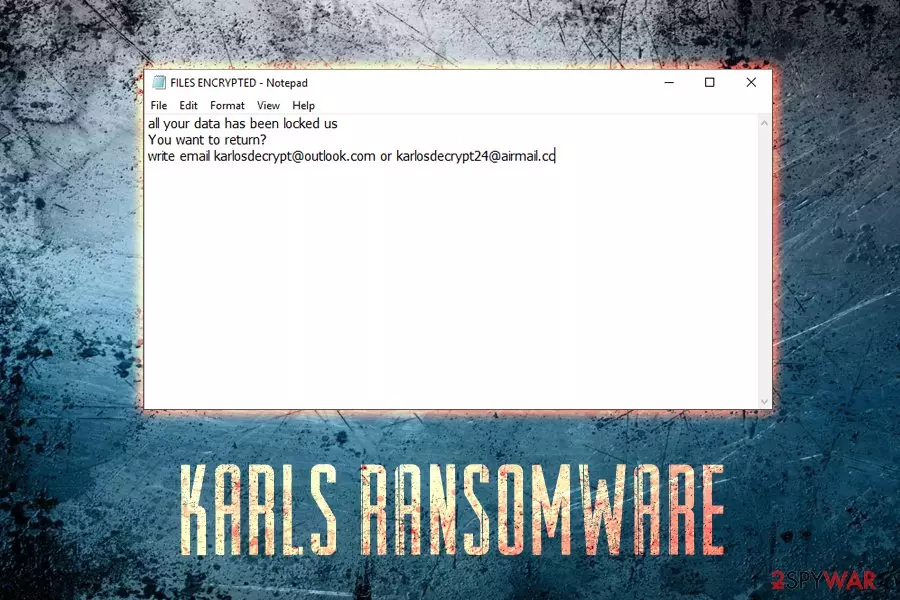
KARLS ransomware is file locking virus that was first spotted in mid-February 2019. The malware comes from one of the most prevalent families – CrySiS/Dharma, and it seems like cybercriminals are actively releasing new variants, such as .ETH, .888, .Qwex, .frend, and many others. The virus utilizes AES-256 encryption to lock up personal files like databases, documents, pictures, videos, music, etc. and appends .KARLS extension. Once the prevention of access to the data is ensured, ransomware drops two ransom notes: FILES ENCRYPTED.txt and a pop-up window – the latter including detailed instructions on what victims should do next to unlock their files. They are informed that they need to email threat actors via karlosdecrypt@outlook.com email and pay in Bitcoin in order to obtain the decryption key. While KARLS ransomware is not decryptable, users are recommended staying away from cybercriminals and never contacting them.
| Name | KARLS |
| Type | Ransomware |
| Infiltration | Hacked applications, spam emails, brute-force attacks, exploits, etc. |
| Variant of | CrySiS/Dharma |
| Encryption algorithm | AES-256 |
| File extension | .id-[random].karlosdecrypt@outlook.com.KARLS |
| Ransom note | FILES ENCRYPTED.txt |
| Contact | karlosdecrypt@outlook.com |
| Elimination | Use anti-malware software that can detect[1] the threat. We recommend FortectIntego or SpyHunterCombo Cleaner |
KARLS virus uses various infiltration techniques, including phishing emails, brute-force attacks, exploit kits, hacked or cracked installers, etc. Once inside the machine, it performs several changes to the system, such as Windows registry modification, shut down of certain processes, the launch of new operations, etc.
This is done to enable persistence and ensure malware loads with every system start, as well as complicate KARLS ransomware removal. After that, the virus starts the encryption process that usually takes only a few seconds. Note that the data does not get corrupted, but simply locked with a strong encryption cipher.
Files affected by .KARLS file virus are modified in the following way: a picture.jpg is turned into something like picture.jpg.id-8R474D32.karlosdecrypt@outlook.com.KARLS. From that point of time, users are unable to open any data. However, it can be achieved with a key that is stored on a remote server controlled by hackers.
A brief text file KARLS ransomware drops states the following:
all your data has been locked us
You want to return?
write email karlosdecrypt@outlook.com or karlosdecrypt24@airmail.cc
However, many security experts[2] advise staying away from cybercriminals, as victims can get scammed. Instead, they should remove KARLS ransomware virus and proceed with alternative file decryption methods (in case no data backups are available).
Users should use reputable security application that can recognize the threat. Several anti-malware programs detect KARLS ransomware as:[1]
- TR/Dropper.Gen
- Trojan/Win32.Crysis.R213980
- Ransom.Crysis.Generic
- Troj/Criakl-G
- GenericRXEA-WW!8B31D3BB4140
- Trojan.Ransom.Crysis.E (B)
- a variant of Win32/Filecoder.Crysis.P
- Trojan.Encoder.3953, etc.
Once the cyberthreat is eliminated, we suggest you scan your PC with FortectIntego – this software will be able to fix system files and settings corrupted by .KARLS file virus.

Cracked software is dangerous – stay away from it
Because Dharma family viruses are known to be delivered with the help of fake installers, cracked applications, and similar, we would like to explain this infiltration technique. Malicious executables can be hosted practically everywhere on the internet — for example, legitimate websites that are compromised or malicious ones hosted by criminals themselves.
Therefore, to prevent ransomware infections, you should always make sure your system and applications are up to date. This prevents malicious JavaScript[3] from abusing vulnerabilities. Additionally, downloading cracked installers, or software that is hosted on dodgy websites can lead to immediate system compromise. Before you execute any file, make sure you scan it on with Virus Total or security software.
There are also other infection methods, such as spam email attachments, brute-force attacks, and similar. Use adequate protection measures such as anti-virus software with real-time protection feature, firewall, ad-blocker, VPN, and similar. But, most importantly, be extremely cautious.
Terminate KARLS ransomware virus
Remember, before you proceed with file recovery, you need to remove KARLS virus from your computer entirely. Otherwise, all your backed data stored on an external or virtual device will be compromised repeatedly.
For safe KARLS ransomware removal, you should use anti-virus software. In case the virus is blocking the application from working correctly, you should enter a safe environment – Safe Mode with Networking. We explain how to do that below. Also, you can try System Restore option to stop the malware.
Once you are sure that .KARLS file virus is removed, proceed with file recovery. Connect your backup device and copy all your data. Alternatively, you can rely on third-party applications that might be able to help you.
Did this guide help?
Be the first to comment