

Keep Calm ransomware virus is real – unlocks your files, asks for $250
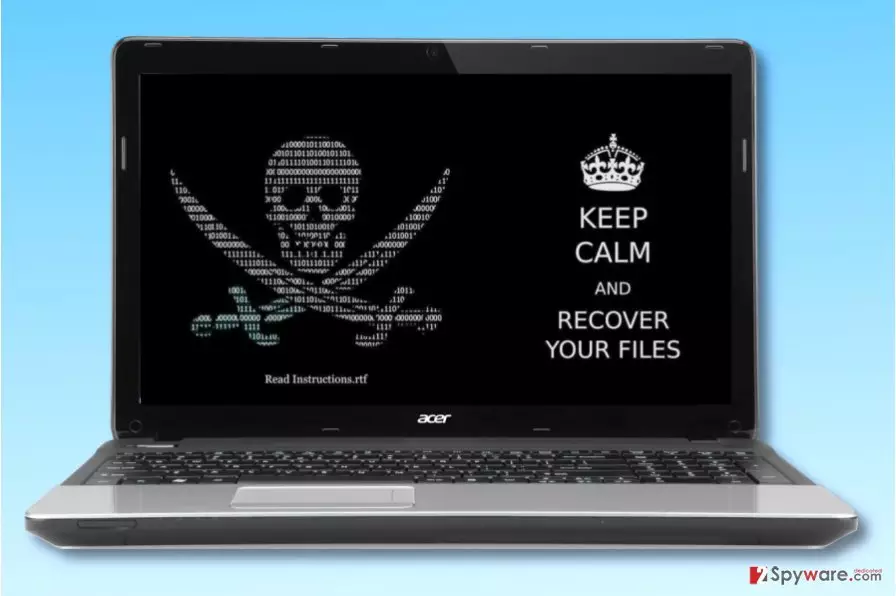
KeepCalm ransomware is a new computer virus that acts like a typical screen-locking ransomware. The virus is based on EDA2 malware[1], and during the encryption, it marks each affected file with .locked file extension. The ransomware then changes desktop wallpaper with an image called wall.jpg, which represents an ASCII image of skull and a few lines, saying:
KEEP CALM AND RECOVER YOUR FILES
Keep Calm virus then drops a ransom note called Instructions.rtf. It explains that the computer has been “hacked” and that files stored on it were encrypted. As usual, the ransom note provides the price of the decryption software needed for data recovery, or, in other words – a ransom. Cyber criminals want 0.1 BTC per one infected computer, approximately $250.
The note also contains statements urging the victim to pay the ransom within one week to “prevent them from being leaked.” The criminal also suggests writing to luisa91@you-spam.com and providing date of the transaction, PC’s name and also the email address to which the victim wants to receive the decryption key.
Surprisingly, the developers of the ransomware state that they “are business people and treat customers well” if they follow “what they ask.”
If your files were corrupted by this ransomware, we highly recommend that you do not pay the ransom. Considering that the ransomware is based on an open-source ransomware, malware analysts might find it easy to reverse the encryption process and create a free decryption tool. Therefore, to prepare your PC for further usage, we highly recommend you to remove Keep Calm virus using FortectIntego or another anti-malware software.

It is important not to mistake the described ransomware for KeepCalm virus, which is one of Globe Imposter viruses. This piece of malware adds .keepcalm file extensions and drops HOW_TO_BACK_FILES.html file (the ransom note). No matter which ransomware compromised your files, your aim is to complete Keep Calm removal as soon as possible.
Ways to get infected
Computer viruses can infect your computer in various ways. Usually, they travel via deceptive emails composed by cybercriminals. Such emails are designed to spark victim’s interest in the attached file that carries the malicious payload. It can be a ZIP, DOC, or JS file. Of course, the file format can differ.
It is highly advisable not to open email attachments or questionable links included in an email you received from a stranger. What is even more important is that you check the sender of the email – you must be sure that it is a trustworthy sender and not some fraud trying to impersonate an employee of some well-known company.
Cyber security experts believe that the virus won’t be distributed using more sophisticated malware distribution techniques used by ransomware professionals. It is highly unlikely that it will be distributed via exploit kits, malvertising[2], Trojans or other measures taken by developers of Cerber or CryptXXX ransomware.
However, if you want to protect your PC from all kinds of ransomware viruses, you should use several layers of protection such as anti-malware software, data backup and avoidance of suspicious Internet websites. For more security-related tips and tricks, visit NoVirus.uk site[3].
Remove Keep Calm ransomware without a wait
Unfortunately, you should not attempt to remove Keep Calm virus on your own. Even if you are an experienced computer user, you should rely on trustworthy anti-spyware or anti-malware tools to delete the malware properly.
Unsuccessful attempts to complete Keep Calm ransomware removal can result in various problems. For example, you might lose a chance to open your files ever again. Remember that attempts to decrypt encrypted files should be carried out only after removal of the virus, not before it.
Did this guide help?
Be the first to comment