

L33TAF Locker ransomware: another cyber infection that damages personal files
L33TAF Locker virus is a brand new ransomware virus that has been created for swindling money[1] from the computer users. This file-encrypting malware mostly spreads via malicious emails; however, the computer might get infected after clicking on the malicious ad or after installing bogus software. On the affected computer, L33TAF Locker ransomware starts data encryption process. It uses a combination of AES-256 and RSA-4096 ciphers that are known as military grade encryption. Therefore, data decryption is complicated and nearly impossible without a specific decryption key. Malware developers have this key and offer victims to purchase it. However, the payment has to be made within 48 hours; later the unique decryption key will be destroyed, and victims lose the chance to restore their files. Keep in mind that there are alternative data recovery methods, so you should not follow these instructions. Instead of that, remove L33TAF Locker from the computer with the help of FortectIntego or SpyHunterCombo Cleaner. These malware removal tools will not restore your files; however, you will have a clean and virus-free computer. Bear in mind that as long as ransomware dwells on your PC, you risk experiencing even bigger problems because your computer’s system is vulnerable and looks attractive for other malware as well.
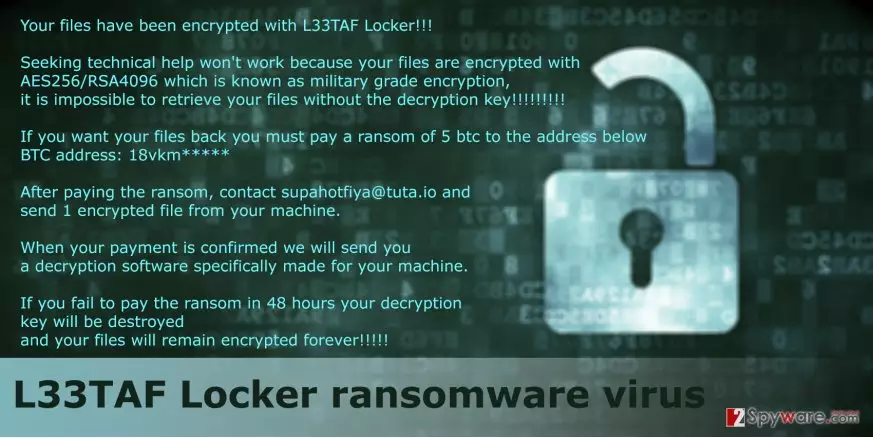
Following data encryption, L33TAF Locker malware delivers a ransom note where victims are informed about damaged files and offered the solution to get them back. The hackers provide Bitcoin address and tell users to contact them via email address supahotfiya@tuta.io and send one encrypted file. Once they receive the payment, will send back the decryption tool which is supposed to be created only for the specific device. However, this contact with the developers of the L33TAF Locker virus might end up badly[2]. You might have to wait for their response and decryption tool forever. Indeed, hackers tend to disappear after receiving the money. The purpose of ransomware projects is the same – to make as much money as possible, so every transferred Bitcoin fulfills their needs. Moreover, if you receive data recovery software, you cannot be sure that it is safe to use. It might include other computer infections or encrypt your files again. For this reason, we recommend initiating L33TAF Locker removal as soon as you notice it on your device.
Distribution methods and tips to avoid ransomware
L33TAF Locker malware is still under investigation; however, it is already known that it uses the same distribution techniques like other file-encrypting viruses. The higher chances to catch this computer infection is to open infected email attachment[3]. Therefore, you should be careful with all emails shown up in your inbox. If you don’t know the sender and not sure if you were supposed to get this email, do not open any attachments or links, no matter how important it may look. If you think about opening the document, make sure you can trust the sender by looking for information online or contacting the institution directly. Malvertising[4] is another popular ransomware distribution technique. Cyber criminals can place malicious ads not only on the potentially dangerous websites but to the reliable ones as well. For this reason, you should be careful with eye-catchy or aggressive ads, banners or pop-ups. They usually include malicious content. Furthermore, you should stay away from suspicious downloads and software updates[5]. Keep in mind that all necessary updates and safe to use programs can be found on the official developers’ websites.
Steps for L33TAF Locker virus elimination
People should terminate this computer infection just like any other ransomware virus. L33TAF Locker removal requires employing strong malware removal tool, for example, FortectIntego or SpyHunterCombo Cleaner. Of course, you can choose your preferred program, but don’t forget to update it first. Using up-to-date program, you have to scan affected computer’s system. If malware prevents you from accessing or updating software, have a look at our prepared instructions below. Following these instructions, you will remove L33TAF Locker within several minutes.
Did this guide help?
Be the first to comment