

Locdoor ransomware is a cryptovirus that demands $0.10 for encrypted files
| Name | Locdoor/ DryCry |
|---|---|
| Type | Ransomware |
| Sub-type | Cryptovirus |
| Ransom note | Notice_readme_English.txt; Help!_How |
| Contact email | sealocker@daum.net |
| Also displays | HTML window “DryCry Ransomware Decrypt Page” |
| Distribution | Spam email attachments, other malware |
| Elimination | Use FortectIntego for the Locdoor ransomware removal |
Locdoor ransomware is not encrypting your files, as typical ransomware, so there are numerous speculations claiming that the program is still in development. However, this virus replaces some of the file extensions with the appendix .door. The ransom note claims that this infection locks your data and you need to pay the ransom in cryptocurrency worth $0.10. The virus developers demand you to pay in Bitcoin at the address localbotcoins.com and send a photo to sealocker@daum.net.
However, researchers[2] do not advise victims of this cyber threat to contact its developers in any way. Besides, paying the ransom is not useful since there is no encryption procedure initiated by the virus. Developers are seeking just to lure people with the small ransom, but there is no doubt that people behind the threat are not trustworthy in any way.
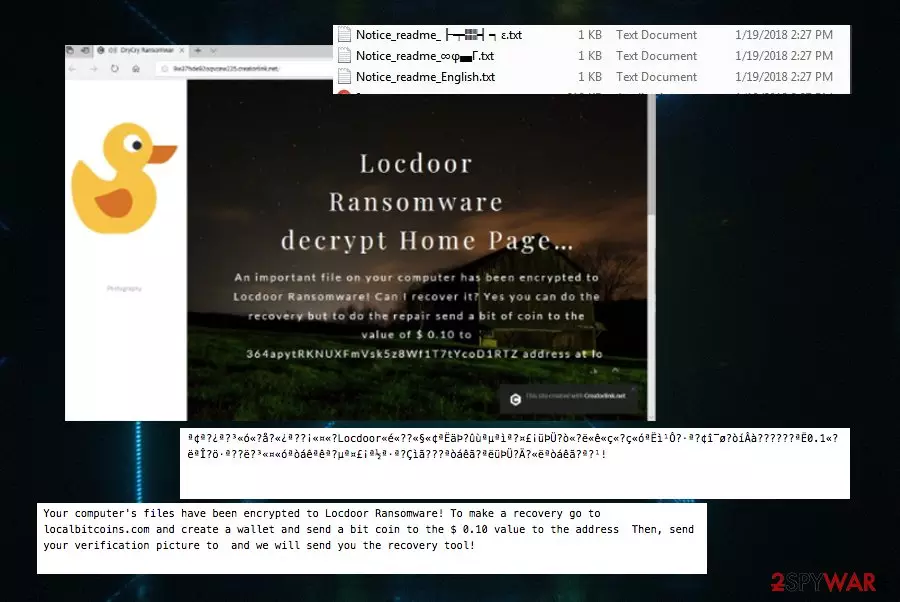
Locdoor/DryCry ransomware displays the following ransom note:
Your computer's files have been encrypted to Locdoor Ransomware! To make a recovery go to localbitcoins.com and create a wallet and send a bit coin to the $ 0.10 value to the address Then, send your verification picture to and we will send you the recovery tool!
The other version of the ransom note:
Bit coin is only allowed on localbitcoins.com! Send a bit coin of $ 0.1 value to at localbitcoins and send it to sealocker@daum.net with a certified photo! We will then email the recovery tool! Thank you! to Buy Recovery Tools.txt
You need to remove Locdoor ransomware, no matter its declared encryption is not real. keep in mind that this program was developed by crypto-extortionists, and you should get rid of this threat as soon as possible. It is important if you want to avoid any significant damage caused by this threat in the future. Keep in mind that ransomware can access important data and change system settings on your device immediately after the infiltration. Because of this fact, we do not recommend initiating Locdoor/DryCry ransomware removal manually.
You cannot be sure that this virus is not working in the background of your device. Perform Locdoor ransomware removal and then use FortectIntego to fix damage caused by this malware. This is a full procedure required for a full recovery after the infiltration of ransomware infection.

A malicious script is spread via spam emails
Silent infections can be spread in various ways. The most common for ransomware is spam email attachments. The malicious script of the ransomware can spread on your system from an insecure email that you open unknowingly. A payload dropper can be designed to install the direct malware script when you download and open a file attachment from an email. This malicious intruder can be this ransomware.
There is an opportunity to get various other malware like Trojans[3] which are designed to open backdoors or spread the ransomware directly on the device. You are downloading the file and installing malicious programs on the device at the same time. This is a silent infection you have no idea about this background process.
You can avoid these cyber infections if you pay more attention to processes happening on the device. If you are not waiting for an email, be aware that not every one of them is safe. Do not download suspicious attachments and try to scan those files before opening them on the computer.
Eliminate Locdoor ransomware from your device
To remove Locdoor ransomware once and for all, and get rid of its damage, you need to use reliable anti-malware tools like FortectIntego, SpyHunterCombo Cleaner or MalwarebytesMalwarebytes. This method ensures that all ransomware related files will be detected in no time and deleted from the system.
After a successful Locdoor ransomware removal, double-check if the system is clear. You can use the same anti-malware tools or virus termination tips provided by our experts. However, each of these methods should be implemented carefully, so make sure you follow every step in exact order.
Did this guide help?
Be the first to comment