

Locker-Pay – a lock screen malware that threatens to destroy files on the targeted computer
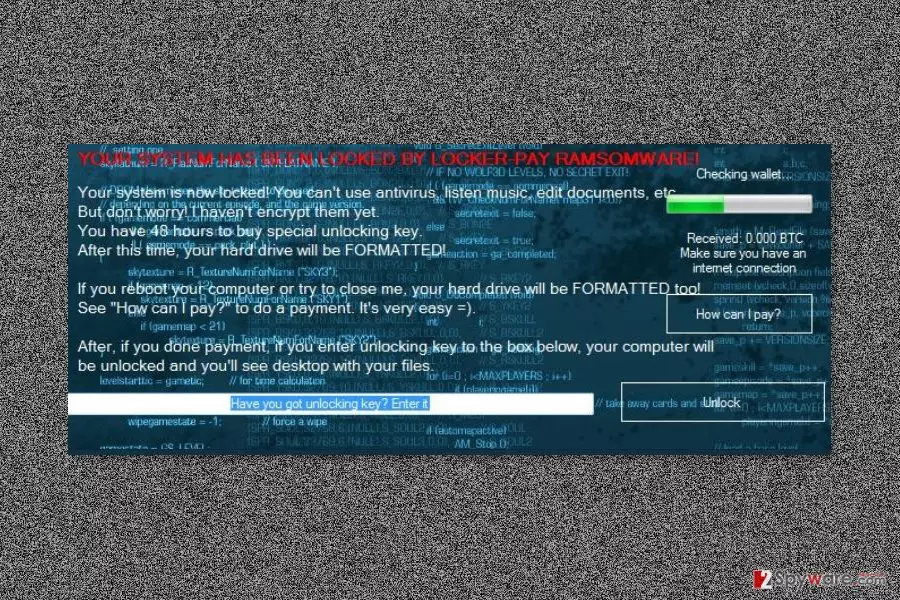
Locker-Pay is a recently discovered malware that locks affected computer’s screen. Nevertheless, it belongs to the ransomware category; it cannot encrypt files at the moment. However, after the attack users, loose access to their computers and are asked to buy a “special unlocking key” within 48 hours.
Locker-Pay virus mostly spreads via malicious spam emails and enters the system when a user opens a suspicious attachment. Malware might drop its executable and install other harmful files in one of these directories:
- %AppData%;
- %Temp%;
- %Roaming%;
- %Common%;
- %{User’s Profile}%;
- %System32%.
What is more, it makes several system modifications and alters Windows registry in order to strengthen its presence. The Locker-Pay ransomware boots with system startup and prevents victims from using their computers by delivering a lock-screen message.
The messy message tells that the ransomware has locked the system. As a result, users cannot use any of their programs, access or use files. Crooks give 48 hours to pay the ransom. Otherwise, the computer’s hard drive will be formatted. The same issue is said to happen if users try to remove Locker-Pay or shut down the lock screen.
After the attack, victims can only click “How can I pay?” button or enter the unlock code. Other tasks are blocked. However, we do not recommend learning about the shady ways how to unlock your PC.
Security experts doubt that Locker-Pay can cause such damage. These threats are mostly used for scaring victims and convincing them to pay the ransom. However, we want to point out that following these orders and transferring Bitcoins does not guarantee that this deal is over. Crooks might ask for more money or do not provide working unlock key.[1]
Therefore, you should not let crooks to blackmail you. Hence, as soon as you see the lock screen, you should reboot the computer to the Safe Mode and employ professional security software. FortectIntego or another malware elimination program will assure that Locker-Pay removal is performed smoothly and safely.

Malicious spam emails might spread malware
The primary method to spread this crypto-malware is malicious spam emails. The letter might look like sent from customer support, delivery service, bank or other reputable institution. The message usually urges to open the attached document or click a link in order to find more information about various issues.
When a user opens an infected document, enables macros or downloads other files to the computer, they install malware payload on the system. Keep in mind that malicious files always are obfuscated, so you should be careful when opening unknown documents. Always check sender’s information, look up for grammar mistakes and follow other security tips to avoid ransomware attack.[2]
Our colleagues from Germany[3] note, that ransomware can also spread via fake or illegal downloads, malicious ads or use other techniques. Thus, it’s important to act safely on the web.
A step-by-step guide on how to bypass lock screen and remove Locker-Pay virus from the PC
The main problem with Locker-Pay removal is that it locks computer’s screen. Therefore, the first task is to bypass it. In order to do it, you have to reboot your computer to the Safe Mode with Networking. You can find detailed instructions below.
Once you get access to your PC, you have to install a reputable security software, update it and run a full system scan. If you do not know what tool to choose, we recommend trying one of these: FortectIntego, SpyHunterCombo Cleaner or MalwarebytesMalwarebytes.
We want to stress out that you should not try to remove Locker-Pay manually. It’s a complicated cyber infection that affects numerous processes on the system. Thus, trying to delete suspicious components one by one might be harmful. For this reason, you have to use a professional software.
Did this guide help?
Be the first to comment