

What can we expect from the LowLevel04 revival?
LowLevel04 virus is a relatively old cyber infection which has been first spotted over a year ago — back in October 2015. According to the user reports, it then targeted computers located in Bulgaria and Greece but didn’t seem to have grown into anything bigger. However, recently, after months of silence, the virus distribution began picking up speed again, and new reports about LowLevel04 attacks are now becoming increasingly more frequent. Interestingly enough, the virus does not seem to have undergone any improvements or modifications during the silent period. It still targets Remote Desktop or Terminal Services and brute forces its way to the device by cracking their weak passwords. It has also been reported that apart from attacking individual computers, LowLevel04 also aims at servers. This makes the virus a great risk not only to the private users but to some larger companies as well. Thus, you should always let professional antivirus software like, for instance, FortectIntego keep an eye on your PC for you.
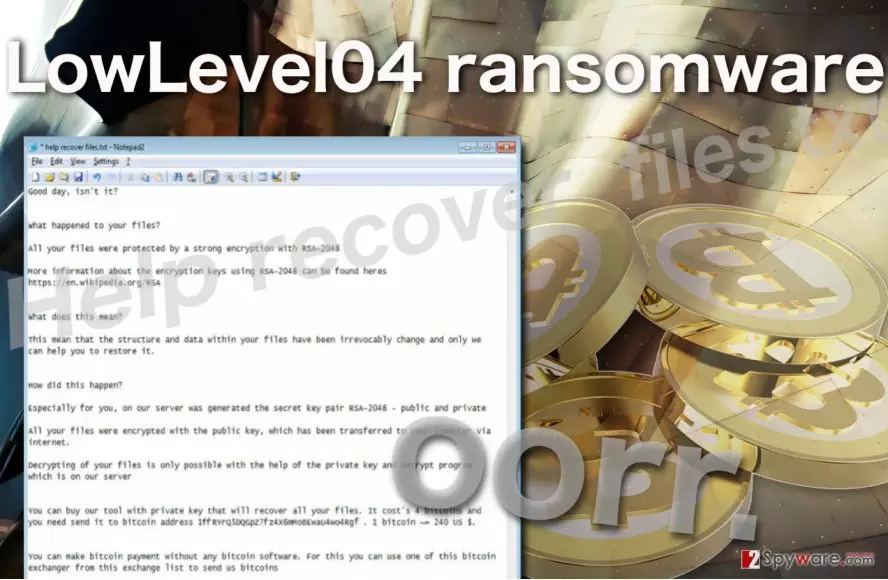
So, how does LowLevel04 actually work? Well, first of all, it is a ransomware-type virus, so its main purpose is to encrypt the files located on the infected computer and demand their owners to buy them out. The files are usually encrypted with a complex AES algorithm which is virtually impossible to decrypt, so the regular users are simply forced to follow the extortionists’ demands if they ever want to access their files again. Besides, the virus also leaves no choice of recovering these files from backup or Dropbox since it encrypts files on these platforms as well. The only way that is still valid and can be used for the data recovery is Shadow Volume Copies. The virus does not delete them. You can learn how to recover your important documents from these backup files in the tutorial just below the LowLevel04 removal instructions.
In other aspects, LowLevel04 ransomware does not seem to differ from other programs of the same category. Once it encrypts the predetermined files on the infected computer, it renames them by adding a oorr. at the beginning of every file title. The virus also drops a ransom note called Help recover files.txt in which the hackers explain what happened to victim’s computer and introduce conditions which have to be met in order to receive the file decryption key. They begin the note with the mocking “Good day, isn’t it?” and continue by demanding 4 Bitcoin for the data decryption. The note also contains two email addresses entry122717@gmail.com and entry123488@india.com for the victims to contact the criminals directly. Unfortunately, users report that this “support” email is only active until you pay the ransom. As soon as the money is transferred, the criminals simply disappear without a trace. Thus, we strongly recommend not to follow the criminals demands if you ever get infected either and hurry to remove LowLevel04 from the computer instead.
How does this virus access computers?
As we have mentioned, LowLevel04 usually gets installed on the computers directly by the criminals who exploit Remote Desktop or Terminal Services access. When they manage to crack the targeted computer’s password, the hackers can then download the malicious payload to the system undetected. To prevent such an intrusion, you should make sure your network is protected with a powerful password, and that is protection is backed-up by a reputable antivirus utility. Also, keep in mind that direct installation is the least effective and most risky way to spread ransomware around, so it is possible that LowLevel04 creators also employ other system infiltrations techniques, for instance, malicious spam campaigns or corrupt software update notifications.
LowLevel04 removal strategies:
As a disclaimer, we want to emphasize that LowLevel04 removal instructions which we provide below should only be used if the virus is blocking your antivirus from scanning the system. These steps only help decontaminate the LowLevel04 virus, but they do not eliminate the infection. To remove the virus, you should use reputable and professional antivirus tools. It is also recommended that you remove LowLevel04 using Windows Safe Mode without networking, because the virus is mostly controlled via the web, so, blocking this access you have significantly greater virus elimination chances.
Did this guide help?
Be the first to comment