

New ransomware called M0on has been released:
M0on virus is a cyber infection based on the illegal money extortion, using data encryption as a blackmailing tool. The virus acquires its leetspeak-inspired title due to the extensions it adds to the encrypted files. The filenames are appended with .m0on extension immediately after the virus is done locking them with a complex encryption algorithm. After that, the computer data becomes inaccessible. This means that trying to replace this newly-appeared extension with an original one will not help decrypt the files and may even damage them more. In general, when infected with any ransomware, it is especially important to use proper tools for the virus elimination and, if possible, file decryption. For the M0on removal, in particular, we recommend using FortectIntego or other sophisticated anti-malware tools. When it comes to the data recovery, though, we cannot recommend such a reliable solution since decryption tool for this virus has not been invented yet. Nevertheless, there are alternative data recovery approaches that might be useful in retrieving at least a fragment of the lost data. You will find them discussed below the article.
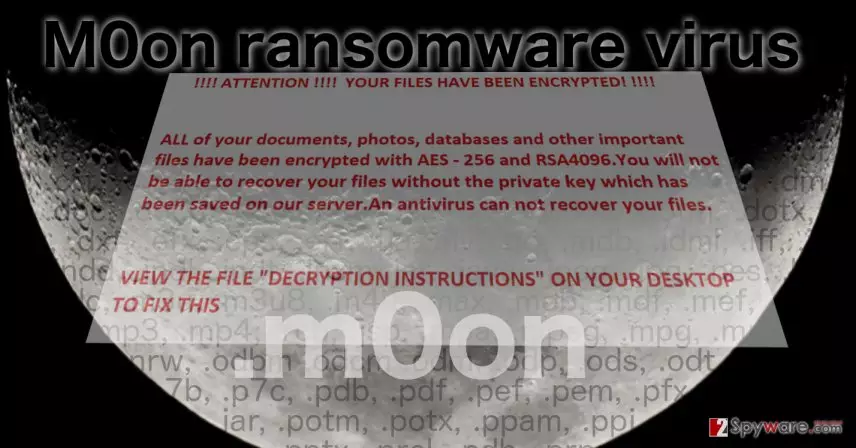
Though we do not know much about the M0on ransomware so far, we can presume that it is a late descendant of my-Little-Ransomware — an open source build-it-yourself virus that was initially released for the educational purposes. Nevertheless, M0on is not a program you can play around with anymore. It is a serious computer parasite that is distributed around the web with the help of Trojans, exploit kits and through other malicious means. Once its main executable m0on.exe is deployed on the computer, it immediately starts scanning the system for over 180 types of files including music, video, office document, images, archives, and programs. Then, the virus drops a ransom in which the hackers lay out their demands. This ransomware is relatively new and is still undergoing various modifications, so the ransom note and the amount of ransom varies. Although, we can speculate that it fluctuates somewhere between 0.5 to 1 Bitcoin. M0on developers are most likely using the good old Tor network to collect the ransom since it ensures anonymity and prevents the criminals from being tracked down and exposed to justice. This way, these fraudulent programmers become virtually unstoppable. You can simply reject the rules they want to play by and remove M0on virus from the computer without paying the ransom. The hackers will be left without the money they so desire, and all of their efforts will go to waste. This may not be a great loss for them, but it will definitely demotivate them in creating such programs in the future.
Is there a way to prevent this ransomware from infecting computers?
M0on virus is one of those viruses that work by the principle of destruction, so you should not expect any mercy from it. The way it infiltrates the computer is deceptive and stealthy as well. You may get infected by it in a place where you would the least suspect it — your email. The virus spreads with the help of exploit kits and Trojans as well, but the most commonly, it infects computers disguised as attachments sent from governmental institutions or companies that the users simply cannot ignore. To verify the legitimacy of such emails, you should always contact the sender and check all the facts. Most importantly, keep backuping the data you find important and keep these copies in places other than your computer.
What can be done about the M0on removal?
If you find the M0on virus residing on your device — do not wait and remove it without delay. Do not even think about downloading the decryption key that the hackers may suggest and focus strictly on the M0on removal. For this process to go smoothly, make sure you use sophisticated and trusted software, such as FortectIntego antivirus, for instance. Before the scan, update the software to the latest version and you are set! If after taking all these measures you still cannot remove M0on from your device, check out the guidelines below and after you complete the indicated steps try running the system scan again.
Did this guide help?
Be the first to comment