

Mystic crypto-malware links to Crypt888 ransomware?
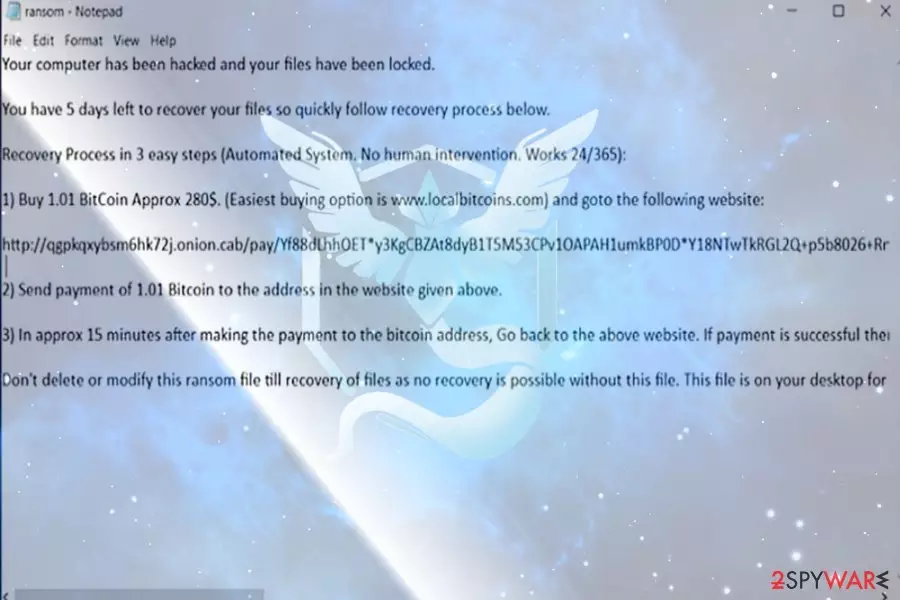
Mystic virus functions as a file-encrypting threat. It manifests unusual behavior for ransomware since it does not append any file extensions[1] nor presents its GUI. Nonetheless, it drops its ransom.txt message which contains brief information about the malware.
Besides the demands to pay 1.01 BTC ransom (approximately $3900), the message also states that the file recovery is simple if a victim follows the indicated steps. It also includes a link to the payment onion site, which, at the moment, does not work properly.
Now the malware is detectable as Gen:Variant.Kazy.21167, Backdoor.Graybird, Ransom_MYSTIC.A, W32/Trojan.BKHV-5194, etc. Regarding the detection names, there has been another ransomware which functioned as Kazy trojan – GrodexCrypt.
The latter has been coded on the pattern of Crypt888. Note that the latter is a well-known ransomware group. Though its developers release new versions, you can try decode data using Crypt888 free decryption software created by AVG experts.
Considering the fact that the link provided in the ransom.txt does not work properly and the amount of required ransom , it would be better to remove Mystic virus. You can do so with the assistance of FortectIntego or MalwarebytesMalwarebytes.
Reference to Pokemon Go?
The very name of the crypto-malware possibly pertains to the Team Mystic, one of the teams accessible for Pokemon Go level 5 players. Though it might give a slight insight to the personality of the perpetrator, their identity remains in secret.
The malware tends to encrypt files present on the desktop, even though it leaves its ransom note among system files. It also launches a series of processes. Here are some of them:
- ole32.dll
- netapi32
- rpcrt4.dll
- apphelp.dll
- clbcatq.dll
- comctl32.dll
Mystic ransomware also accesses Remote Access Connection Manager (RASMAN) which enables the connection to a remote server. Though the crypto-virus is still under development, it is not recommended to waste time on remitting the payment. There is no guarantee that you will succeed in file recovery. Therefore, Mystic removal might be a better solution.
Avoiding the encounter with ransomware
If you are interested in rasomware and cyber security, you probably already know that the most popular distribution method is malspam. Likewise, the highest probability to execute Mystic hijack is open its malicious email.
At the moment, it is not known what specific technique, i.e., whether the developers disguise the malware under fake invoice or account verification inquiries, is used. In any case, pay attention to the emails which are supposedly sent by official institutions.
Crooks disguise under the representatives of official institutions and urge potential victims to open the corrupted email as soon as possible. If you receive such message which tries requires immediate caution, act the opposite.
Evaluate the authenticity of the message and verify the sender before opening any attached files. Some malware security tools also help you battling the flow of spam emails.
Get rid of Mystic malware
Dealing with a crypto-virus is never an easy process. Regarding the features of this malware, manual Mystic removal might be futile. Update the security tool and scan the device. In case the virus prevents you from launching the security program, use the below instructions.
After you eliminate the infection from Windows, attempt data recovery. Some of the options are discussed below. Note that the virus does not only target English-speakers, but may attempt to assault Pokemon Go[2] users in Poland, France, or Denmark[3].
Did this guide help?
Be the first to comment