

Victims can choose if they want NETCrypton to encrypt their files
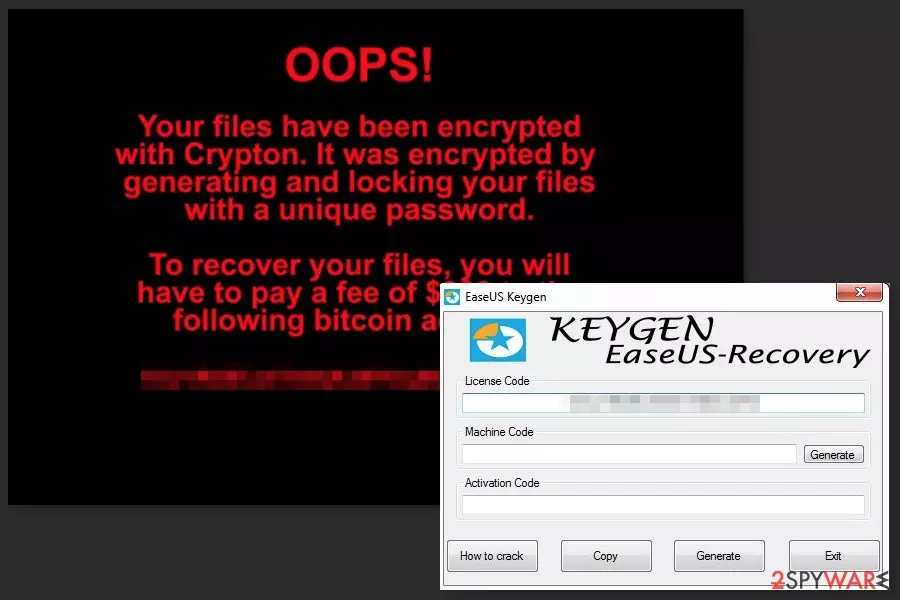
NETCrypton is a file-encrypting virus that emerged at the end of November 2017. The malicious program arrives on the system as EaseUS Data Recovery Keygen. It is executed from EaseUSDataRecovery.exe which is dropped on the affected system. During data encryption, it appends .encrptd file extension.
However, NETCrypton ransomware is a strange example of the malware. When the program is launched, it delivers a question: “ARE YOU SURE YOU WANT TO EXECUTE THIS RANSOMWARE?” and allows users to choose between “Yes” and “No” answers. If a victim clicks the latter option, the ransomware[1] is not activated.
Of course, if you choose “No” and prevent malware from encrypting your files, the “keygen” won’t work as well. However, it’s not the biggest problem considering the fact that NETCrypton is actually capable of encoding files. Keep in mind that clicking “Yes” even for fun will lead to data loss. Thus, do not cause yourself problems!
If malware gets a chance to run, it starts scanning the system looking for the popular file types and locks them with .encrptd extension. Once it’s done, NETCrypton delivers a ransom-demanding message. There’s nothing new in the criminal’s word – victims are asked to transfer Bitcoins:
OOPS!
Your files have been encrypted with Crypton. It was encrypted by
generating and locking your files
with a unique password.To recover your files, you will
have to pay a fee of $300 to the
following bitcoin address:[deleted]
Paying the ransom is never an option. Crooks may not give working decryption software and might blackmail you into paying more money. Therefore, if you let ransomware to the system, you should not follow criminals’ orders and just remove NETCrypton from the device.
NETCrypton removal has to be completed using anti-malware software. We recommend using FortectIntego or MalwarebytesMalwarebytes for ransomware elimination. However, you can use any other professional and up-to-date security software.

Attempts to get software license keys for free may lead to ransomware attack
NETCrypton spreads as a keygen for EaseUS Data Recovery. Therefore, it might be available to download on various free file-sharing sites or P2P networks. Security experts from No Virus[2] note that cracked programs usually bring malware into the computer. Therefore, you should stay away from illegal software[3] to protect the PC from cyber threats.
However, if the virus evolves, cyber criminals might try other ransomware distribution methods, such as spam email attachments, malvertising or exploit kits. Thus, you should be cautious when browsing the web.
Removal of the NETCrypton ransomware virus
NETCrypton removal should be completed just like any other file-encrypting virus. You need to reboot the computer to Safe Mode with Networking, install legit malware removal program (e.g. FortectIntego, MalwarebytesMalwarebytes, SpyHunterCombo Cleaner) and run a full system scan. More information is provided at the end of the article.
Hopefully, you have data backups, because currently, they are the only option to restore encrypted files. However, if you do not have them, you can try alternative recovery methods once you remove NETCrypton. Though, chances to restore the majority of files are not high.
Did this guide help?
Be the first to comment