

NEWRAR ransomware – a file encrypting virus which uses AES-128 and RSA-2048 ciphers to lock documents
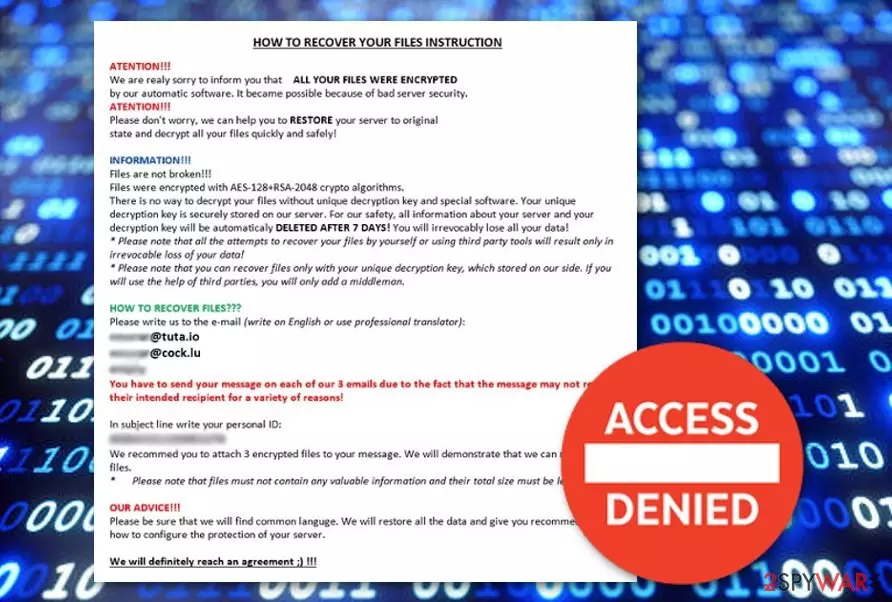
NEWRAR ransomware is a virus which is related to Matrix ransomware. It enters the system unnoticed and starts is activity by modifying the Windows Registry[1]. Moreover, this ransomware encrypts[2] files by using unique encryption ciphers and adds the .NEWRAR appendix to each locked file. After documents are blocked, NEWRAR virus displays the HOW TO RECOVER YOUR FILES INSTRUCTION ransom message and urges victims' to contact the crooks via the given email addresses and discuss the ransom price type. Moreover, the note threatens users that their files will be permanently corrupted if they do not show any signs of contact in 7 days.
| Name | NEWRAR |
|---|---|
| Type | Ransomware |
| Related to | Matrix ransomware |
| Extension | .NEWRAR |
| Ransom message | HOW TO RECOVER YOUR FILES INSTRUCTION |
| Cipher used | AES-128, RSA-2048 |
| Removal | Install FortectIntego to fix the damage |
NEWRAR ransomware does not provide any particular details about the ransom type in the displayed message. However, such viruses have a purpose to urge for Bitcoin or another type of cryptocurrency as the price type. Here is what the ransom note looks like:
HOW TO RECOVER YOUR FILES INSTRUCTION
ATENTION!!!
We are realy sorry to inform you that ALL YOUR FILES WERE ENCRYP‘I‘ED
by our automatic software. it became possible because of bad server security.
ATENTIION!!!
Please don‘t worry. we can help you to RESTORE your server to original
state and decrypt all your files quickly and safely!INFORMATION!!!
Files are not broken!!!
Files were encrypted with AES-128+RSA-2048 crypto algorithms.
There is no way to decrypt your files without unique decryption key and special software. Your unique
decryption key is securely stored on our server. For our safety, all information about your server and your
decryption key will be automaticaly DELETED AFTER 7 DAYS! You will irrevocably lose all your data!
Please note that all the attempts to recover your files by yourself or using third party tools will result only in
irrevocable loss of your data!
Please note that you can recover files only with your unique decryption key, which stored on our side. If you
will use the help of third parties, you will only add a middleman.HOW TO RECOVER FILES???
Please write us to the e-mail (write on English or use professional translator):
[Redacted]You have to send your message on each of our 3 emails due to the fact that the message may not reach
their intended recipient for a variety of reasons!In subject line write your personal ID:
[Redacted]We recommed you to attach 3 encrypted files to your message. We will demonstrate that we can recover your
files.
Please note that files must not contain any valuable information and their total size must be less than 5Mb.OUR ADVICE!!!
Please be sure that we will find common languge. We will restore all the data and give you recommedations
how to configure the protection of your server.We will definitely reach an agreement !!!
NEWRAR ransomware can be spotted from such symptoms:
- Dubious registry entries in the WIndows Registry section have been created without your permission;
- Files have the .NEWRAR extension added;
- You have seen the NEWRAR ransomware ransom message.
However, no matter how the cybercriminals try to convince you to pay the demanded price, you need to overthink everything at least two times. We recommend staying away from contacting the crooks and ignoring the NEWRAR ransomware ransom message. Users often get scammed when tricked by false promises to receive a decryption tool.
You need to remove NEWRAR virus from your computer system as soon as you spot the beforementioned signs. You can use professional anti-malware tools such as FortectIntego and other similar ones to take care of the damage that was done by the ransomware virus. Make sure you get rid of all hazardous components.
After you perform the NEWRAR ransomware removal, you can start thinking about data recovery techniques. We have provided some methods below this text which might be helpful to you. Moreover, take care of important files and keep them safe from similar attacks by purchasing an USB drive. Documents, that are saved on that device will be out of reach of everyone except you.

Avoid ransomware infections by reading these steps
According to malware researchers from Virusai.lt[3], ransomware viruses are often spread via phishing email messages. Such hazardous content comes attached to the dubious email and is launched once such attachment is opened. So, if you ever receive a questionable-looking email, make sure you eliminate it permanently and DO NOT open any components that are clipped to it.
Moreover, it is strongly recommendable that all users invest in a reliable computer security tool. Such software will protect the system automatically from various infections which might occur in your way while performing computing work. Additionally, ensure that the program is always kept up-to-date. It is a necessary condition which will allow the tool to operate correctly and successfully.
Terminate NEWRAR ransomware virus
If your computer got infected with the ransomware infection, you need to remove NEWRAR virus as soon as you spot the first signs. For such purpose, use professional and reliable anti-malware tools only. Remember that manual elimination is not possible for this case as the ransomware virus might leave numerous hazardous components in the system which can be to hard to detect on your own.
After you perform the NEWRAR ransomware removal, you can try fixing the damage by downloading and installing professional computer tools such as FortectIntego, SpyHunterCombo Cleaner, or MalwarebytesMalwarebytes. Make sure you carry out some system backups after the process is finished. This needs to be done to ensure that no virus-related content is left.
Did this guide help?
Be the first to comment