

A ransomware dubbed NTK is not as dangerous as it seems to be
NTK virus is a screen-locking Trojan horse[1], which earns the name of ransomware[2] due to its ability to block access to the computer and demand a ransom from the computer owner or user. Just like any other ransomware virus, it is a vicious software that functions as an extortion[3] tool. NTK Screenlocker virus displays a full-screen message for the victim, and at the moment NTK ransomware supports French language only. Upon installation, it runs itself as a Winban.exe file, also adds shady entries into Windows Registry[4] and ensures that it stays on the computer system for a long time. However, despite efforts that the developer of NTK malware put into it, the ransomware can be removed with anti-malware tools like FortectIntego or MalwarebytesMalwarebytes easily. The screen-locking window contains a message, which says:
You got pOwned by NTK
Ton PC est bloque 🙂 Si tu veux pouvoir le reutiliser, suis les instructions ci-dessous.
- Appuyez sur Afficher coordonnees
- Envoyez un mail et mettre en objet : Code UTK
- le vous enverrai code contre une rancon
Afficher coordonnees
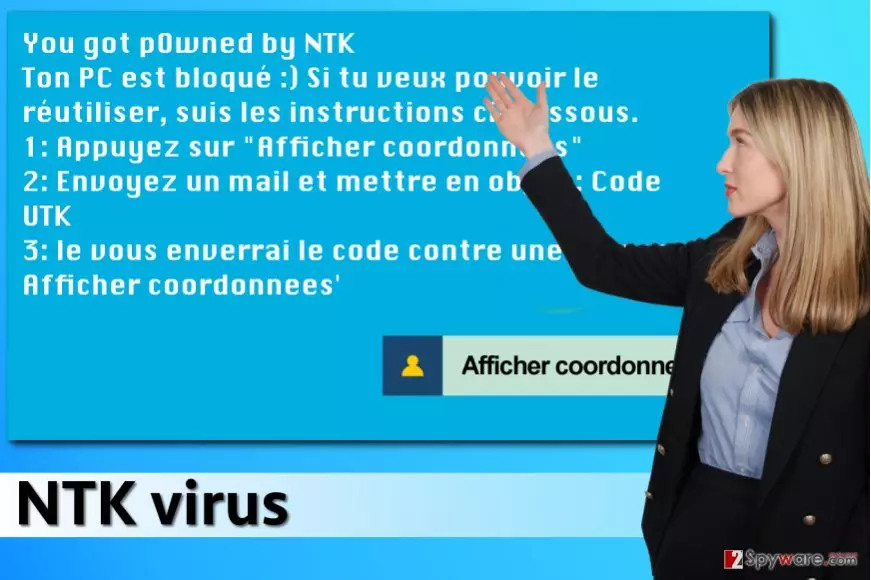
In short, virus’ author who names itself as NTK, says that the victim has to click on “Afficher coordonnees” button (display coordinates), which reveals cyber criminals’ email address. They will then ask you to pay a ransom to get access to your own PC, but obviously, you shouldn’t pay it. If you enter this code – 15s4e56dsjdhfy87 into the provided field, you would be redirected to another panel that explains how to remove the virus and unlock access to the computer. However, since we are going to provide you these instructions for free, you do not need to waste your time contacting cyber criminals, or, even worse, spending your hard-earned money by paying ransoms[5]. You can find the guide on how to remove NTK malware below this article. Do not forget to use professional anti-malware tools after NTK removal to scan your system and find any additional threats that you may have installed in the past.
How does this ransomware disseminate?
You do not want to be deceived by cyber criminals again, don’t you? If so, please read this paragraph attentively. Please try to avoid opening emails that come from unsolicited and unknown individuals or companies. Here are some tips how you can identify malicious emails:
- Look at sender’s email address. Check it on Google if you doubt that it comes from a trustworthy person/company.
- If you have any doubts about an individual email message, do not open files attached to it, nor links included in the letter.
- Check what kind of link appears in your browser’s bottom left corner as you hover over the message or underlined text including hyperlinks. If these URLs appear to be very long and suspicious, do not click on anything!
- Ransomware can also be delivered to you via exploit kits or compromised websites, so to prevent such attacks, we suggest keeping your programs up-to-date and installing an anti-malware program on the system.
Remove NTK virus by yourself
Ransomware is a complicated program, and NTK removal needs to be completed with extreme caution. You do not want to leave those ransomware files on your system, especially because most of them are assigned as default startup programs, which means they are going to be run immediately after booting the computer system. To remove NTK virus, follow instructions provided below.
Did this guide help?
3 comments
Danielle Saldwin
I recovered my files!! Thanks!!
zenday
I cannot thank you enough, I was going crazy, i thought that my files were encrypted! Thank you, thank you so so much!
Matt
Honestly, a very useful post! I managed to remove the virus and restore access to the computer (my mother installed this ransomware yesterday)