

One System Care is the fake PC optimization tool that reports nonexistent system issues just to trick its victim that it is infected
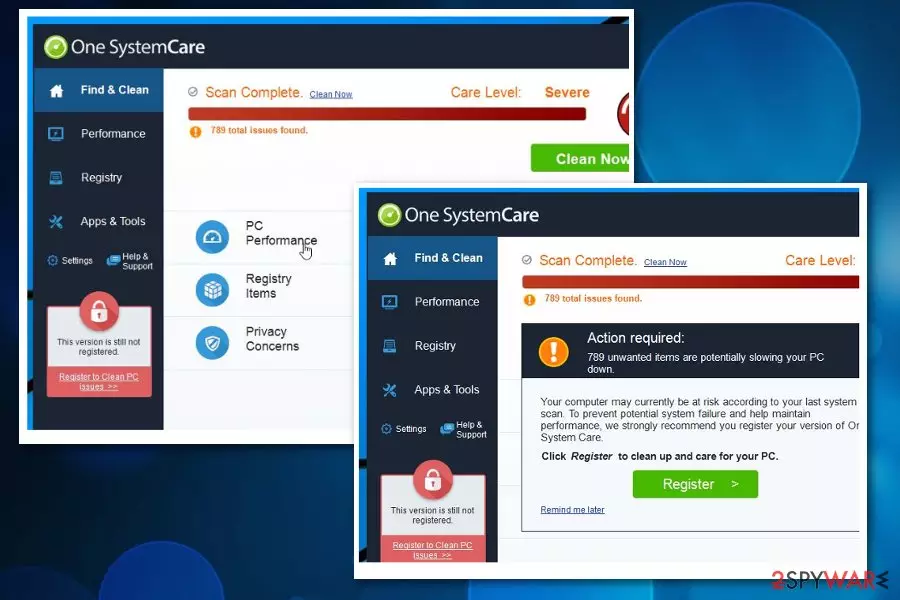
One System Care is a potentially unwanted program classified as a rogue tool because it claims to offer various useful features. Unfortunately, this program does nothing good for improving PC's functionality. Even the junk files that this application claims to delete can be essential processes and their removal can cause more issues than improvements. Numerous users have reported that this app appeared on their systems out of nowhere and showed up with the “Launch One System Care” or similar alert. Ignore it and run a full system scan to make sure that your computer is completely fine.
| Name | One SystemCare |
|---|---|
| Type | Rogue tool |
| Category | Potentially unwanted application |
| Symptoms | Delivers fake scan results and advertisements, causes redirects and suggests purchasing rogue software |
| Distribution | Software bundling, deceptive ads |
| Purpose | Make revenue from advertising content, redirects, and direct sales |
| Elimination | Use FortectIntego for general system cleaning and One SystemCare removal |
One System Care is considered to be a system optimization tool which supposedly should protect users and retain healthy PC performance. In reality, this so-called all-in-one computer aid is classified as a potentially unwanted program (PUP)[1] by IT experts due to promotional content and redirects to shady pages it causes.
This alleged PC tool can be called One SystemCare virus because AV engines detect the application as malicious or dangerous.[2] Even the paid version does nothing improving for the machine or its speed and performance. Such registry cleaners are suggested to be dangerous because deleting certain entries can cause crashes and disabled programs.
Even though it is not malicious, it uses less than fair techniques to gain revenue. The primary purpose of the One SystemCare is tricking users into purchasing more useless software and obtaining revenue from commercial content delivered directly to your screen.
This system tool does nothing valuable for the device and can be uninstalled alongside other additional content added without your permission which affects the speed of the system and loads background processes. System issues that fake system tool indicates about are false, and there is no need to purchase any licensed version of the program to remove possible threats.

When inside the system, the One System Care may start showing you continuous warning messages about hundreds of errors and unused files that you should remove from your computer. Of course, some of these files should be eliminated from the system, but we cannot guarantee that by removing one hundred of such data you will be able to see a clear difference in your PC's performance.
Often such tools that claim to improve the performance of the machine involve registry cleaning and other activities that may seem harmless. However, when One System Care deletes allegedly useless files or registry entries it can affect the performance in a negative way or even damage the machine.
Also, One SystemCare virus can try to convince you that you need to install additional programs on your computer or download their latest updates, purchase licensed version. As you may have already understood, most of such pop-up ads are misleading, and you should never click on them since you can be tricked into downloading more PUPs on your system.
Even the full tool with a purchased One System Care license key cannot perform the alleged cleaning process. It only cleans the fake list and claims to have removed all the threats. You pay for the useless application and the system remains infected with the PUP.
Additionally, the rogue tool can initiate silent installations of:
- browser extensions;
- toolbars;
- bookmarks;
- in-browser tools.
After checking One SystemCare user reviews, it becomes clear that there are hundreds of people who are trying to find the license key. That's because the trial version of this program can only be used for checking the computer's state and finding the issues.

However, as we have already mentioned, it shows you exaggerated scan reports that are supposed to lead people into believing that they must purchase the licensed version of this program. Unfortunately, relation to adware and other potentially unwanted programs cause intrusive commercial content delivered to your screen.
Additionally, Internet forums are full of reports that One System Care virus won't uninstall from the PC. This is because potentially unwanted programs are designed to protect themselves against easy elimination. For this reason, you should follow detailed instructions on how to get rid of it at the end of this article.
We should also note that since ad-supported programs can be associated with One System Care PUP, every redirect site and the program itself collects, tracks and even shares details about your online activities with third-party advertisers. All this data tracking is useful for later malvertising purposes.[3]
All this One System Care data tracking is disclosed briefly in the Privacy Policy section of the official site:
We may collect some information relating to you including among others your IP Address, browser type, operating system version, GUID, customer configuration, the identification number of the hardware used by you, whether you are Administrator or not, version of the operating system and service pack and whether your Windows operating system is 32 or 64 bit, internal tracking identifiers that we use to track downloads, installs, sales, and uninstalls, your using behavior of our Software, and the type and number of files located by our Software in your computer.
Once again, please, do NOT purchase the licensed version of this less than reliable system optimization tool. Instead, try searching for a reliable program which is offered for free and remove One System Care without hesitation. Remember, you can do it both, manually and automatically.
In case you still believe that this program is useful, we suggest you downloading another professional antivirus, like FortectIntego and running a full system scan. We promise the results will differ. Additionally, new and reliable security software will serve for One System Care removal as well as a general system cleaning.

Software-bundles distribute rogue programs during freeware installations
While there are numerous similar programs to this PUP and all of them are distributed in the same way — bundling[4]. Usually, unreliable system optimizers are bundled together with free applications and stealthily installed on the computer during the procedure.
In general, we suggest you avoid downloading applications from third-party websites and unauthorized developers. Although, Avirus.hu[5] team says that it is wise to take precautions if you want to keep your computer away from this tool:
- Always select Advanced/Custom installation;
- NEVER click the Next button before reading the terms;
- Follow everything carefully and opt out of additional tools (unmark ticks that are already marked for you).
This way, you should prevent the additional installation of malware and other suspicious apps. Keeping the antivirus program on the machine ensures that the tool blocks PUP-filled websites and avoids cyber infections.
Ways to uninstall One System Care
Even though this fraudulent program is not a dangerous computer threat, it is vital to remove One System Care from the computer carefully. As we have already mentioned, you have two options — manual and automatic elimination. Those who are up for a challenge can follow the instructions at the end of this article.
Others, who are willing to save their time and patience should download professional antivirus software for One System Care removal. We strongly recommend picking one from the list below since they tested by our experts and easy to use. Although, it is possible to run a full system scan with another reputable malware removal tool. Also, if there is some additional content on your browser reset it to Default and remove suspicious extensions this way.
Uninstall from Windows
Uninstall from Windows 10/8:
- Type Control Panel into the Windows search box and open the result.
- Under Programs, select Uninstall a program.


Uninstall from Windows 7/XP:
- Click on Windows Start > Control Panel (Windows XP users should click on Add/Remove Programs).
- In Control Panel, select Programs > Uninstall a program.


Remove the unwanted program:
- In the Programs and Features window, look for any recently installed suspicious entries, select them, and click Uninstall.
- If User Account Control appears, click Yes to confirm, then complete the removal.


Did this guide help?
2 comments
QueueNiau
Annoying application. Took me hours to understand how to eliminate it from my computer.
123jjDex
One problem with this software, is that it is a problem.