

PaySafeCard gives away files for 20 dollars. It is still not worth paying
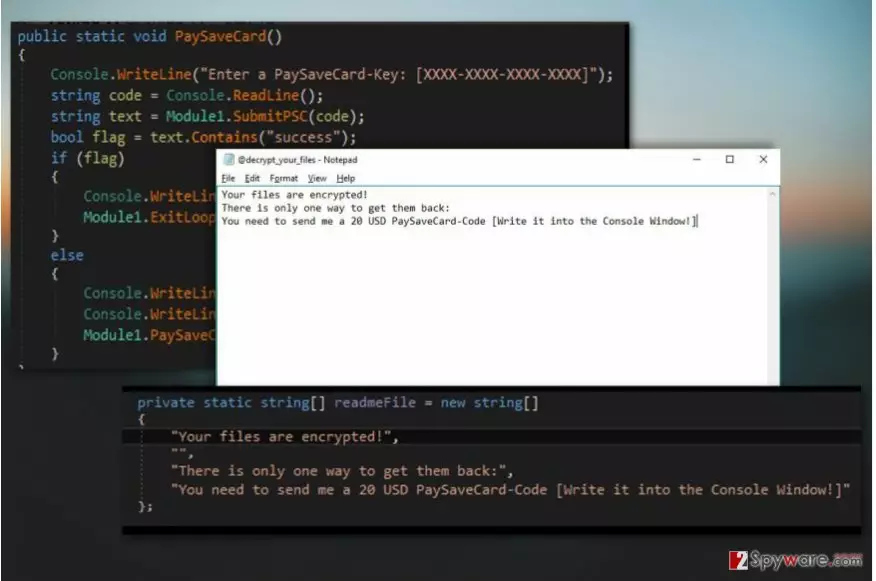
PaySafeCard virus is yet another file-encrypting virus [1] which encrypts documents using AES encryption algorithm, marks them with .rnsmwre extensions and offers victims to buy out their data using PaySafeCard codes.
The extortionists demand merely 20 USD for the data recovery key and promise that after the payment is made, all files that have been affected will be recovered. According to the instructions on the @ decrypt_your_files.txt ransom note, all the victim has to do is purchase some PaySafeCard codes and pay the criminals. Here is the full transcript of this document:
Your files are encrypted!
There is only one way to get them back: You need to send me a 20 USD PaySaveCard-Code
[Write it into the Console Window!]
You can’t help but notice that the note has probably been compiled quickly, without caring too much about whether the victims know how to perform the payment procedure or not. This might signal that the perpetrators behind this cyber threat are either beginners or simply don’t expect much profit from the virus. It only leaves us some hope that perhaps the virus has flaws in its coding and security experts will come up with a workaround for data recovery. As for now, we can only encourage you to remove PaySafeCard and protect your future data from damage.

PaySafeCard codes is not a particularly novel way for the cyber criminals to collect the ransom from their victims. Ransomware developers have been implementing particular payment method alongside Bitcoins [2] and Ukash Vouchers for quite some time now.
Well-known names such as PadCrypt, CainXPii or Razy emerge among the extortionware that uses it. So, although this ransom payment technique does not come close to the extent in which extortionists use Bitcoins, it is sure getting more popular and brings significant amounts of money. However, you can make the life of the cyber criminals a little less sweet by performing PaySafeCard removal. Although $ 20 is not a particularly large sum to pay for data recovery, it adds to the perpetrators’ budget and only motivates them to continue their malicious activities in the future.
3 main ways ransomware infiltrate PCs
When it comes to PaySafeCard distribution, the criminals most likely stick to the three techniques that ensure the effectiveness of the attacks:
- Spam emails and their malicious attachments;
- Malvertising and malicious downloads;
- Fake software or system updates.
Of course, these are only a few ways extortionists may deploy the malicious executable rnsmwre.exe on the victim’s computer. In fact, you can never be sure when the virus is going to strike. Thus, it would be a smart move to create and keep several backups of your files stored on different devices, external storage drives, USBs, etc.
PaySafeCard removal: things you should know
Before you start PaySafeCard removal process, check whether you have all the right equipment for that. You should install some reputable antivirus tool and make sure it runs the latest version. When you make sure everything is in place, you may then launch the full system scan. If you encounter obstacles and can’t remove PaySafeCard virus, it might be that your security utility is being blocked by the malicious ransomware scripts. You will have to restart your PC in Safe Mode and start over.
Did this guide help?
Be the first to comment