

The peculiar behavior of PC Locker virus
PC Locker virus is another threat from lock screen ransomware series. Though it is less destructive than the viruses, which employ AES and RSA algorithms for data encryption, it is still considered to be a serious infection. Despite that, even if this cyber misfortune has befallen you, you can still remove PC Locker without any problems. For that, you may require FortectIntego. This utility completes the elimination quickly and effectively. More about the removal instructions can be found below. The threat also threatens to lock your data within 72 hours and urge you to make the money. However, we do not recommend doing it.
It seems that lock screen viruses are gaining popularity among hackers. While there are tons of ordinary ransomware employing asymmetric encryption techniques, lock screen viruses are easier to program. Usually, they do not encode personal files which might be regarded as a big advantage. On the other hand, locked screen is a problematic phenomenon as well as you cannot cancel the window and perform any other functions. Therefore, when PC Locker infection infiltration gets into the device, a ransom note pops declaring of the threat‘s misdeeds. You may opt from administrator, log off, restart, and shutdown options. The virus researchers have identified that pchip2012 stands for the user and s2m2sug1 is used as a password. Such information was embedded in the source code of the ransomware. As it is common for lock screen viruses, this current infection also asks you to complete the survey in exchange for the password.
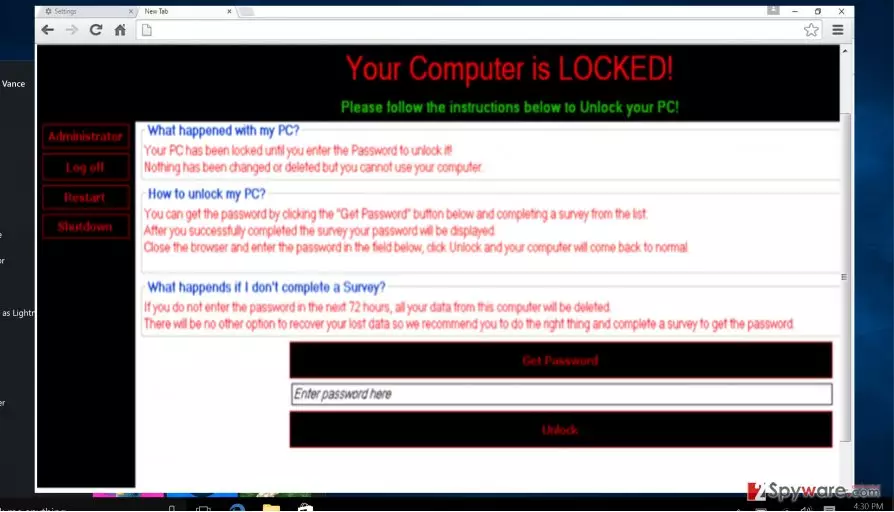
After completing the survey, a certain amount of money is transferred for their developers. Crooks might not be used relying on more trusted domains such as secret servers or bitcoin web pages. Hackers also encourage victims to fill them by setting a 72-hour time period. According to the ransom note, if a victim fails to complete the form within the specified time, all important documents and data might be locked. However, such scenario is unlikely as most of the lock screen viruses only manage to lock the screen. PC Locker malware seems to be the result of beginners as IT specialists have found a code how to unlock the screen without completing tiresome surveys.
The hackers messed up as they also included the unlock key in the cyber code. london1969paris is the key to unlocking the affected computer. The password might be associated with famous Grand Theft Auto game where an action takes place in this specific location and year. Therefore, there are more speculations that teenagers and more hacker-wannabes joining in the ransomware business. Furthermore, the virus is able to inject its specific [HKEY_LOCAL_MACHINE\SOFTWARE\Microsoft\Windows NT\CurrentVersion\Winlogon] registry entry. Though the virus may seem less destructive in comparison with Cerber or Locky, it is necessary to perform proper PC Locker removal.
When does PC Locker ransomware infect computers?
It still uses the usual channels for distribution: spam, exploit kits, outdated tools, and file-sharing domains. Therefore, hardcore gamers might be the primary target of these hackers. Speaking of spam messages, be careful even if you receive the message from tax institution or even a local police office. Crooks have mastered ways how to forge credentials of official companies to make the hoax messages more realistic. Additionally, if you can reduce the risk of encountering the virus via spam messages, then exploit kits are another matter. They might lurk in any website. The only probable way to block them is to launch a security tool.
Eliminate PC Locker effectively
When it comes to ransomware termination, the very process does not take long if you employ an anti-spyware program (FortectIntego or MalwarebytesMalwarebytes). Launch it and update it before scanning. Therefore, the tool will be able to detect and remove PC Locker virus completely. Manual elimination might not be as effective as the virus inserts not only the mentioned registry entry but other smaller elements as well. When PC Locker removal is finished, you may read about data recovery possibilities. In the end, keep in mind that personal caution may also highly reduce the risk of PC Locker hijack or other cyber threat.
Did this guide help?
3 comments
monyD
The hackers are still enjoying themselves...
Donalddonaldio
At leats, we have the key.
socialStatus
It would be interesting to see the source code of the virus...